
Managing one project is straightforward. Managing five simultaneously — each with different tasks, owners, deadlines, and budgets — requires a consolidated view that makes every project’s status visible at once.
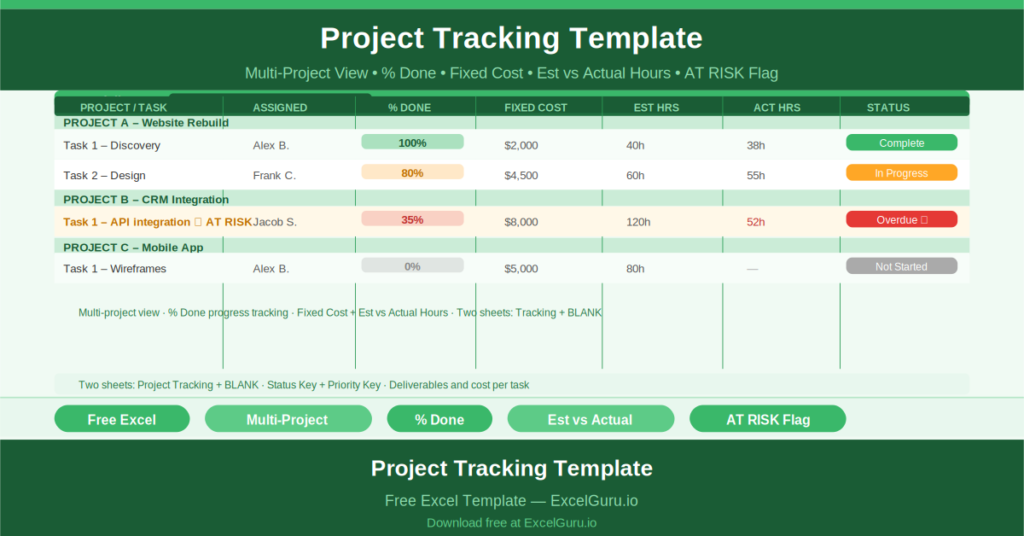
This free Excel Project Tracking Template gives you a multi-project tracker that captures tasks, percentage completion, fixed costs, estimated versus actual hours, status, and priority across all your active projects in a single sheet.
What Is the Project Tracking Template?
The Project Tracking Template is a free Microsoft Excel workbook with two sheets: a fully populated tracking template with sample data and a blank version for immediate use.
The template is designed to track multiple projects simultaneously. Each row represents one task, linked to a named project. A project summary area at the top provides deliverable, cost, and hours totals across all tasks in the portfolio.
The Twelve-Column Task Structure
Each task row captures twelve fields:
- Project Name: which project this task belongs to
- Task: the specific work item
- Description: additional detail on the task scope
- Assigned To: the team member responsible
- Deliverable: the expected output
- % Done: completion percentage (e.g., 0.8 = 80%)
- Fixed Cost: any fixed expenditure for the task
- Estimated Hours: the planned effort
- Actual Hours: hours logged to date
- Status: Not Started, In Progress, Complete, Overdue, On Hold
- Priority: High, Medium, or Low
The sample data shows Task 1 at 100% done (Fixed Cost: Complete, High Priority) and Task 2 at 80% done (In Progress, High Priority) — illustrating how tasks at different completion stages appear side by side.
Projects, Deliverables, and Cost Summary
Above the task table, the template displays project-level summaries: total deliverables, total cost, and total hours across all tasks in the portfolio. These summary figures give project managers and PMO leads a portfolio-level view without opening individual project files.
AT RISK Flag and Colour Coding
An AT RISK banner at the top of the template flags the portfolio’s overall risk position. Status and Priority keys in the right margin provide colour-coding reference for consistent data entry across the team.
Who Should Use This Template?
Project managers running multiple concurrent projects will use the template as a single-file portfolio tracker that surfaces all task statuses, costs, and hours in one view.
PMO teams monitoring project delivery across a portfolio will use the project name column to filter by project and review each project’s tasks independently within the same tracker.
Operations managers overseeing improvement projects across different business units will use the template to maintain a consolidated task register that they review in weekly governance meetings.
How to Use the Template
Open the BLANK sheet. For each active project, enter the project name, tasks, assignees, deliverables, fixed costs, and estimated hours. Update % Done and Actual Hours as work progresses. Set Status and Priority for each task. Review the AT RISK flag and address overdue items in your weekly review.
Download the free Project Tracking Template and manage every project, every task, and every cost in one consolidated view.