
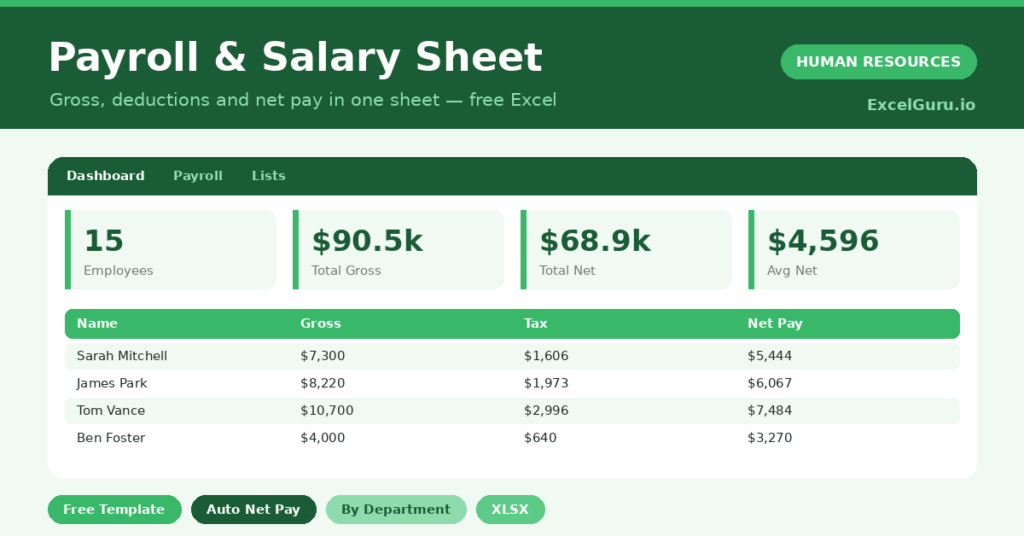
Payroll is the one number employees check most closely, so accuracy is non-negotiable. A single slip can break trust or trigger a compliance problem. This free payroll sheet calculates every pay packet for you. You enter the inputs, and the sheet works out gross pay, deductions and net pay. You will also find realistic sample data already inside the file. Therefore, you can explore every formula, dropdown and chart first, and then replace the samples with your own records in minutes.
Below, we explain the formulas, the workflow, and how to adapt the sheet to your own payroll rules.
What Is a Payroll Sheet?
A payroll sheet calculates what each employee is paid for a period. It builds gross pay, applies tax and deductions, and arrives at net pay.
It then totals those figures across the team. As a result, you have both a per-employee payslip basis and a clear payroll summary.
Why Does Accurate Payroll Matter?
Payroll touches trust, morale and the law all at once. Underpaying angers staff, while overpaying and tax errors create real liabilities. It is one of many things which has to be accurate for balance in the business world. Business has to keep its salary tracking, computing and disbursement intact. Employee will need pay slip and break down for their records and clarity in life.
A structured sheet reduces those risks. Therefore, every pay run follows the same logic and is easy to check. Clear totals also help you forecast cost and brief your accountant.
Why Use This Template?
A solid payroll sheet makes pay runs calm and accurate. In particular, this one helps you:
- Build gross pay from salary, allowances and overtime.
- Apply tax and deductions consistently.
- Calculate net pay for every employee.
- Total payroll and see the breakdown.
- Compare net pay across departments.

What’s Inside the Template?
The workbook has four tabs:
- How to Use — a built-in guide.
- Dashboard — gross, tax, net and breakdown KPIs.
- Payroll — one row per employee.
- Lists — the department dropdown.

What Formulas Does the Template Use?
The sheet uses dependable Excel formulas:
| Formula | What it does |
| =Basic + Allowances + Overtime | Calculates gross pay. |
| =Gross Pay * Tax % | Calculates the tax due. |
| =Tax + Insurance + Other | Calculates total deductions. |
| =Gross Pay – Total Deductions | Calculates net pay. |
| =SUMIF(Department, d, Net Pay) | Totals net pay per department. |
How Do You Use the Template?
The sheet is quick to run. Just follow these steps:
- Open the Payroll tab and list your employees.
- Enter basic salary, allowances and overtime.
- Add the tax rate for each person.
- Enter insurance and any other deductions.
- Let gross pay, tax and net pay calculate.
- Review totals and the breakdown on the Dashboard.
What Are the Best Use Cases?
The sheet fits many teams, such as:
- Small businesses running monthly payroll.
- Managers checking pay before a run.
- Finance teams summarizing labor cost.
- Owners briefing an accountant.
- Anyone replacing a manual pay calculation.
How Can You Modify the Template?
You can tailor it freely. To add deductions, insert a column and include it in the total-deductions formula.
You can also replace the flat tax rate with a banded calculation if your rules require it.
Moreover, the sheet covers 40 employees by default, and you can copy the formula row downward for more.
What Mistakes Should You Avoid?
A few habits weaken the sheet. Therefore, avoid these common mistakes:
- Using a tax rate that does not match local rules.
- Forgetting allowances or overtime in gross pay.
- Overwriting a formula cell by accident.
- Skipping a saved copy of each pay run.
Tips to Get the Most From It
- Confirm tax rates against current local rules.
- Double-check overtime before each run.
- Save a dated copy of every pay run.
- Reconcile net pay totals with your bank transfers.
Frequently Asked Questions
Is this a substitute for payroll software?
For a small team it can handle the core calculation. As you grow, or where tax rules are complex, dedicated payroll software adds compliance and filing features.
How is net pay calculated?
Net pay is gross pay minus tax, insurance and any other deductions. The sheet calculates each step so you can check the working.
Can I handle different tax rates?
Yes. Each employee has their own tax rate column, and you can replace it with a banded formula if needed.
Does it calculate employer contributions?
It focuses on employee pay. You can add columns for employer contributions if you want a fuller cost picture.
Does it work in Google Sheets?
It does, with minor adjustments to formatting after importing.
Download the Template and Get Started
Accurate pay is the foundation of trust at work. This sheet helps you get every pay packet right, every time. Download the Payroll & Salary Sheet Template and simplify your next pay run today.