
Goals that live in a slide deck rarely get done. Without a way to measure progress, ambition quietly becomes a wish list.
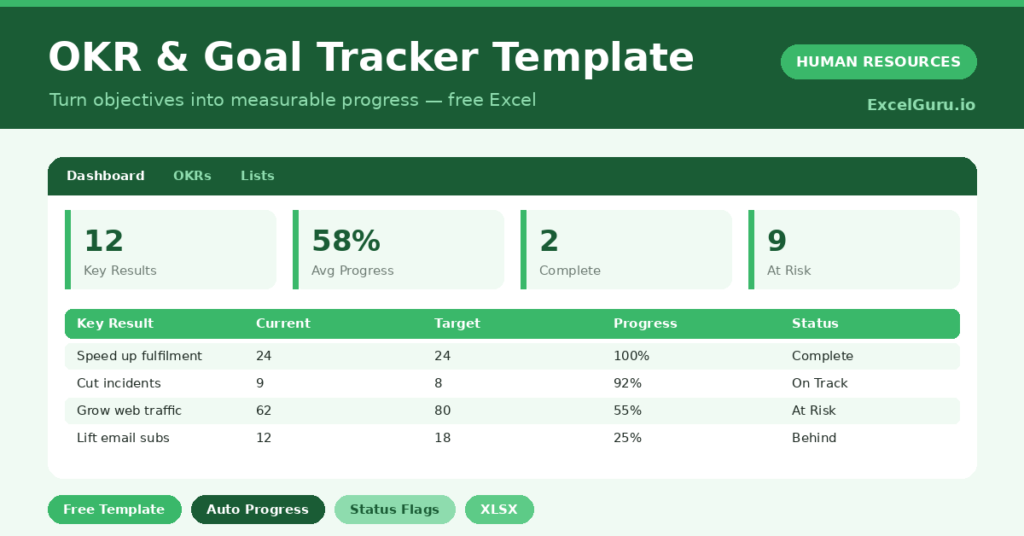
This free OKR tracker keeps every goal measurable. You set a start, current and target value, and the sheet calculates progress and status. You will also find realistic sample data already inside the file. Therefore, you can explore every formula, dropdown and chart first, and then replace the samples with your own records in minutes.
Below, we explain the formulas, the workflow, and how to adapt the tracker to your own goals.
What Is an OKR Tracker?
An OKR tracker records your objectives and the key results that measure them. Each key result has a number to move from a start to a target.
From those numbers, it calculates progress and a status. As a result, ambition turns into something you can actually track.
Why Do OKRs Matter?
Goals without measurement drift. People stay busy, but it is hard to tell whether the work is moving the needle.
Measurable key results fix that. Therefore, everyone can see real progress and focus on what is falling behind. Clear status flags also make check-ins faster and more honest.
Why Use This Template?
A clear tracker turns goals into progress. In particular, this one helps you:
- Set objectives with measurable key results.
- Track progress from start to target.
- See status flagged automatically.
- Focus on the results that are behind.
- Review progress in one simple view.
What’s Inside the Template?
The workbook has four tabs:
- How to Use — a built-in guide.
- Dashboard — progress, status and objective KPIs.
- OKRs — one row per key result.
- Lists — quarter and confidence dropdowns.
What Formulas Does the Template Use?
The tracker uses dependable Excel formulas:
| Formula | What it does |
| =(Current – Start) / (Target – Start) | Calculates progress toward the target. |
| =IF(Progress>=1,”Complete”,…) | Sets the status of each key result. |
| =COUNTIF(Status,”Complete”) | Counts completed key results. |
| =AVERAGE(Progress) | Calculates average progress across all results. |
| =COUNTIF(Status,”At Risk”) | Counts results that are at risk or behind. |
How Do You Use the Template?
The tracker is quick to run. Just follow these steps:
- Open the OKRs tab and list your objectives.
- Add the key results that measure each one.
- Enter the start, current and target value.
- Let progress and status calculate.
- Update current values regularly.
- Review progress and status on the Dashboard.
What Are the Best Use Cases?
The tracker fits many teams, such as:
- Startups running quarterly OKRs.
- Managers tracking team goals.
- Leadership reviewing company objectives.
- Individuals managing personal goals.
- Anyone replacing a static goal list.
How Can You Modify the Template?
You can tailor it freely. To add structure, include a department or team column and filter by it.
You can also change the status thresholds to set a tougher or gentler bar.
Moreover, the sheet covers 40 key results by default, and you can copy the formula row downward for more.
What Mistakes Should You Avoid?
A few habits weaken the tracker. Therefore, avoid these common mistakes:
- Writing key results without a clear number.
- Setting too many objectives to focus on.
- Updating values only at the end of the quarter.
- Treating a red status as failure rather than a signal.
Tips to Get the Most From It
- Make every key result measurable with a number.
- Keep to a few objectives so focus stays sharp.
- Update current values weekly for an honest view.
- Use the status flags to drive your check-ins.
Frequently Asked Questions
What is the difference between an objective and a key result?
An objective is the goal you want to achieve. A key result is a measurable outcome that shows whether you are getting there.
How is progress calculated?
It measures how far the current value has moved from the start toward the target. This works whether the number should rise or fall.
What do the status labels mean?
Complete means the target is met, On Track means most of the way there, At Risk means partway, and Behind means progress is low.
How often should I update it?
Weekly is ideal. Frequent updates keep the status honest and make check-ins quick and focused.
Does it work in Google Sheets?
It does, with minor adjustments to formatting after importing.
Download the Template and Get Started
Goals only matter if you can measure them. This tracker turns your objectives into visible, honest progress.
Download the OKR & Goal Tracker Template and start moving your goals today.