
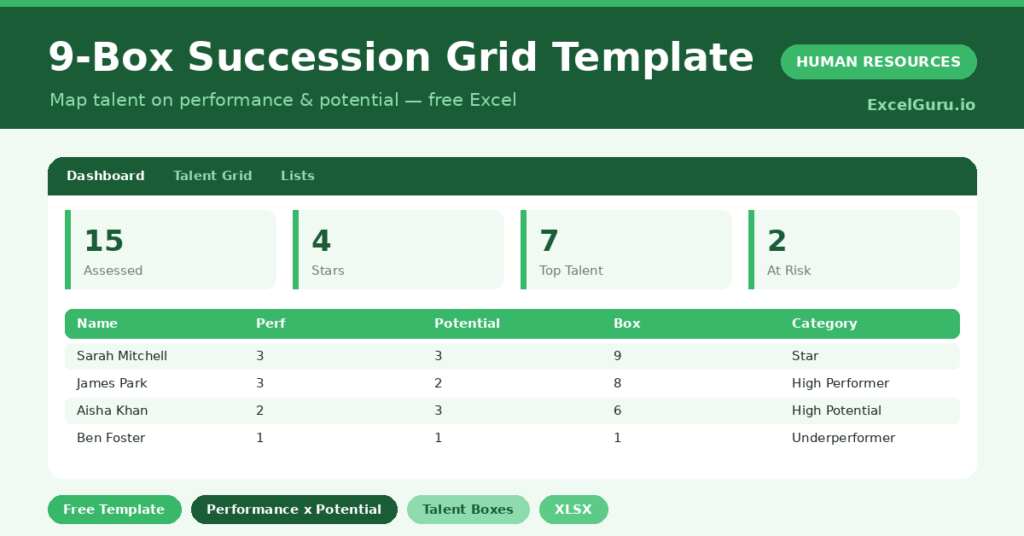
Most teams know who their stars are, but few can show it on paper. Talent decisions get made on memory, and quiet high-potentials get missed.
This free 9-box grid puts talent on a clear map. You rate performance and potential, and the sheet places each person in a box with a category. You will also find realistic sample data already inside the file. Therefore, you can explore every formula, dropdown and chart first, and then replace the samples with your own records in minutes.
Below, we explain the grid, the formulas, and how to adapt it to your own talent review.
What Is a 9-Box Grid?
A 9-box grid plots every employee on two axes: current performance and future potential. Each axis runs low, medium and high, creating nine boxes.
Each box carries a meaning, from star to underperformer. As a result, you get a shared, visual language for talent and succession.
Why Does the 9-Box Matter?
Talent decisions are too important to leave to memory. Without a framework, reviews favor the visible and overlook quiet potential.
The grid forces a fairer, fuller view. Therefore, you can spot future leaders, plan development and identify successors for key roles. It also gives leadership one clear picture of the talent bench.
Why Use This Template?
A clear grid sharpens every talent conversation. In particular, this one helps you:
- Rate performance and potential simply.
- Place each person in a talent box automatically.
- Assign a clear category and action.
- See your stars and your risks at a glance.
- Plan succession with a shared view.
What’s Inside the Template?
The workbook has four tabs:
- How to Use — a built-in guide.
- Dashboard — the talent distribution and box chart.
- Talent Grid — one row per employee.
- Lists — the rating scale and action list.
What Formulas Does the Template Use?
The grid uses dependable Excel formulas:
| Formula | What it does |
| =(Performance – 1) * 3 + Potential | Calculates the box number from 1 to 9. |
| =IF(Perf=3, IF(Pot=3,”Star”,…)) | Assigns the talent category. |
| =COUNTIFS(Perf, 3, Pot, 3) | Counts your stars. |
| =COUNTIF(Box, “>=8”) | Counts your top talent. |
| =AVERAGEIF(Box, “>0”) | Calculates the average box score. |
How Do You Use the Template?
The grid is quick to complete. Just follow these steps:
- Open the Talent Grid tab and list your team.
- Rate each person’s performance from 1 to 3.
- Rate their potential from 1 to 3.
- Let the box and category calculate.
- Add a suggested action for each person.
- Review the distribution on the Dashboard.
What Are the Best Use Cases?
The grid fits many teams, such as:
- Leadership running a talent review.
- HR teams planning succession.
- Managers calibrating their team’s talent.
- Founders identifying future leaders.
- Anyone planning development investment.
How Can You Modify the Template?
You can tailor it freely. To change the labels, edit the category names to match your own talent language.
You can also add a notes column to capture the reasoning behind each rating.
Moreover, the sheet covers 40 employees by default, and you can copy the formula row downward for more.
What Mistakes Should You Avoid?
A few habits weaken the grid. Therefore, avoid these common mistakes:
- Confusing current performance with potential.
- Rating without calibrating across managers.
- Treating the grid as a label rather than a conversation.
- Filing the grid and never acting on it.
Tips to Get the Most From It
- Keep performance and potential as separate judgements.
- Calibrate ratings across managers for fairness.
- Use the grid to drive development, not just labels.
- Revisit it each cycle as people grow.
Frequently Asked Questions
What is the difference between performance and potential?
Performance is how someone is doing in their current role. Potential is their capacity to grow into bigger or different roles in future.
How is the box number worked out?
The template combines the performance and potential ratings into a box from 1 to 9, where 9 is high on both and 1 is low on both.
Should employees see their box?
The grid is usually a management tool. The development conversations that follow are what employees benefit from most, rather than the label itself.
Can I change the categories?
Yes. Edit the category names to match your own talent language, and the grid logic still works.
Does it work in Google Sheets?
It does, with minor adjustments to formatting after importing.
Download the Template and Get Started
Great succession planning starts with seeing your talent clearly. This grid gives you that map in minutes.
Download the 9-Box Succession Grid Template and review your talent today.