
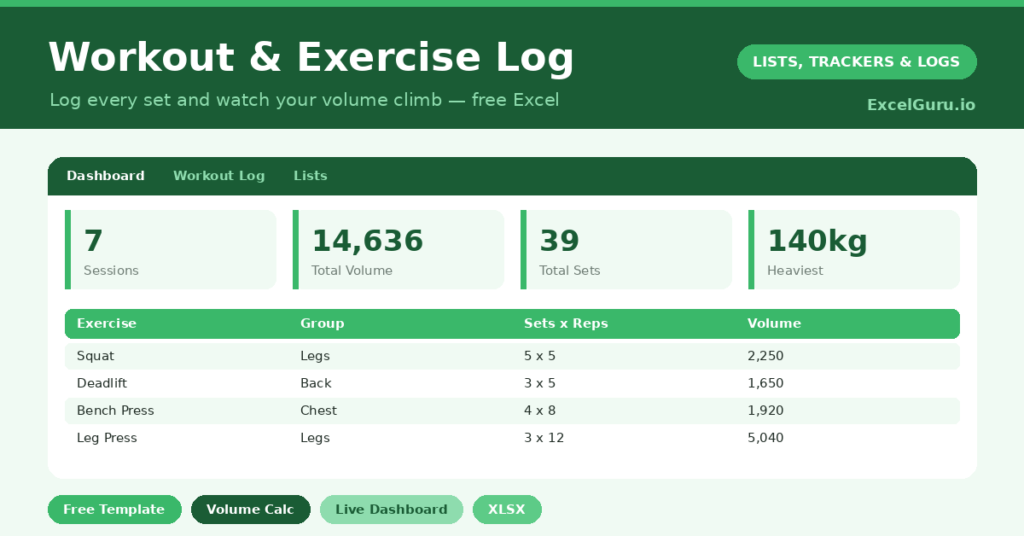
A workout tracker exists because memory lies in the gym. Ask yourself what you benched three weeks ago, and you will guess high every time. The barbell, however, only cares about what is written down.
This free template keeps logging brutally simple. So you record one row per exercise: date, movement, muscle group, sets, reps and weight. Ten seconds between sets, and you are done. Then the spreadsheet turns those numbers into something you can train against.
What does the workout tracker include?
The template is a single fast-entry log feeding a progress dashboard. Everything is designed so you can fill it in mid-workout on your phone. In short, you get the following:
- An exercise log with date, exercise, muscle group, type, sets, reps, weight and an auto-calculated volume.
- Drop-down lists for muscle group and workout type, so entries stay consistent.
- A dashboard showing session count, total volume, sets, sessions this week and your heaviest lift.
- A volume-by-muscle-group chart, so you can see which areas get the most work.
Because the data is structured, you can filter to a single lift and watch it climb over months. So progress stops being a feeling and becomes a number.
How does the workout tracker calculate volume?
Reps alone do not tell the story, and neither does weight on its own. Training volume, which is sets times reps times load, is the figure that tracks real work over time. So the log computes it for every entry with =Sets*Reps*MAX(Weight,1).
That little MAX is deliberate. It means bodyweight moves like pull-ups and planks still score a volume, rather than collapsing to zero. On the dashboard, your session count uses a SUMPRODUCT trick to count distinct training days. Meanwhile, =SUMIF(Group, …, Volume) breaks your work down by muscle group. As a result, you can see whether legs get the love they deserve, or quietly get skipped.
Why track workouts in Excel?
Fitness apps are slick, yet they lock your history inside a subscription and a fixed layout. A spreadsheet gives you the raw numbers instead. So you can chart a single lift over a year, compare two training blocks, or export it for a coach.
The act of writing down each set keeps you honest and present between efforts too. Furthermore, it works for any style of training. Whether you follow a push-pull-legs split, full-body sessions or a couch-to-5K plan, the log bends to fit.
What does the dashboard reveal?
The dashboard turns scattered sets into a clear training picture. The total-volume figure is your headline measure of work, and it should trend upward over a training block. So a rising number is hard proof that you are progressing.
The volume-by-muscle-group chart is just as useful. It exposes the imbalances we all drift into, such as endless chest work and neglected legs. Because the gap is visible, you can correct it before it becomes an injury or a weak point. In short, the dashboard helps you train smarter, not just harder.
How do you customize the log?
Train in pounds? Change the header, because the formula does not care about units. Want to track effort? Drop in an RPE column. Following a specific split? Filter by muscle group to review one body part at a time. The muscle-group and workout-type options live on the Lists tab, ready to match your program.
What mistakes should you avoid?
The classic error is logging inconsistently, with three detailed sessions and then a fortnight of nothing. Volume only tells a story if the story is complete, so log every session, even the short ones. The second mistake is chasing volume for its own sake by adding junk sets.
The number is a guide, not a god. So train sensibly, log honestly, and let the trend do the talking. A steady, well-earned climb beats a spiky line built on ego lifting every time.
How do you stay consistent with it?
Consistency beats intensity, and a tracker quietly rewards it. So the first trick is to make logging effortless. Keep the file on your phone, and enter each set the moment you finish it, while you rest.
The second trick is to glance at the dashboard each week. A rising volume line is genuinely motivating, and it pulls you back to the gym on the wavering days. Because the proof of progress is right there, the habit reinforces itself. In short, the log does not just record your training; it actively encourages the next session.
Frequently asked questions
Does the workout tracker work for bodyweight exercises?
Yes. The volume formula uses MAX(Weight,1), so press-ups, pull-ups and planks still record a volume based on your sets and reps, even with no added weight.
Can I switch from kilograms to pounds?
Easily. Rename the weight column header to Lb and enter your numbers as usual. The volume calculation works the same regardless of the unit you train in.
How does it count my sessions?
A SUMPRODUCT formula counts the number of distinct dates in the log. So several exercises logged on the same day count as one session, not many, which keeps your session total accurate.
Here is the promise. Log honestly for eight weeks, and the dashboard will show a volume line trending up and to the right. That line is progress made visible. So on the days when motivation runs thin, it becomes the best argument there is for putting your shoes on.