
A vehicle maintenance log does two valuable things at once. It keeps your car running safely, and it pays you back at resale, when a complete history can add real money to the price. Yet most of us keep that history as a drawer of faded receipts.
So this free template captures every service, repair and replacement, along with the cost and the mileage. Crucially, it also tracks what is due next. As a result, routine jobs happen on schedule, rather than after something starts making a worrying noise.
What does the vehicle maintenance log include?
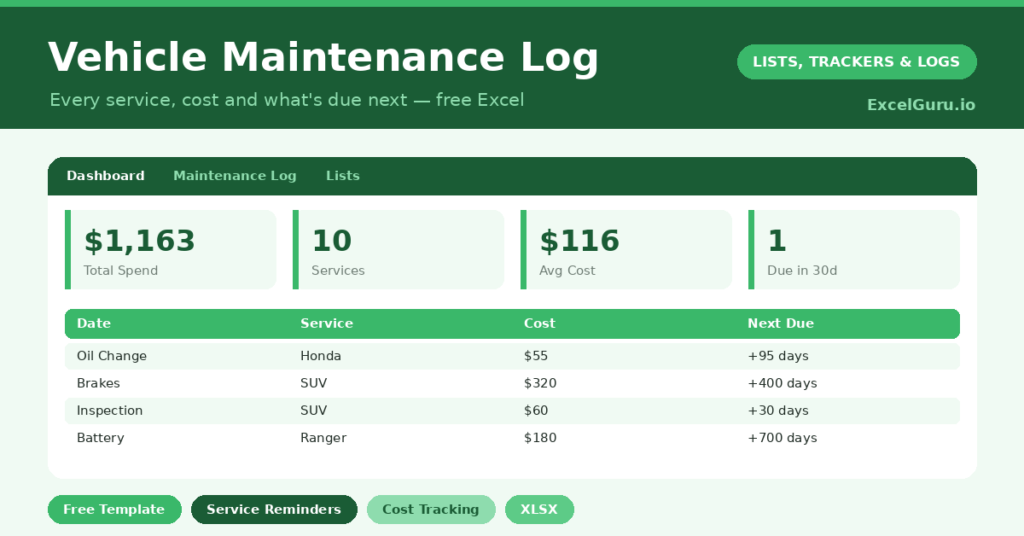
The template pairs a detailed service log with a dashboard that surfaces the numbers and dates you care about. In short, you get the following:
- A service log with the date, the mileage, the service type, a short description, the cost, and the next-due date.
- Drop-down lists for service type, so the log stays consistent and easy to filter.
- A dashboard showing total spend, service count, spend by type, and the soonest job due.
- Conditional formatting that flags anything overdue in red, so a forgotten service never slips quietly past you.
How does the vehicle maintenance log track the next service?
Each record can carry a next-due date, and the log counts down to it with =Next Due – TODAY(). So you always know how long you have. The clever part sits on the dashboard.
A helper column lists only the future due dates, and a plain MIN over that column surfaces the single soonest job. This helper-and-MIN approach exists for a good reason. Running MIN directly over a column with blank rows misbehaves, so filtering to valid dates first makes the answer reliable. Elsewhere, =SUMIF(Type, …, Cost) breaks your spending down by category.
Why keep a service history?
Safety comes first. Brakes, tyres and oil changes are not optional, and a log makes sure none slips. So the routine work that protects you actually gets done on time.
The resale argument is just as concrete. A buyer faced with two similar cars will pay more for the one with a full, documented history. So your spreadsheet becomes money in your pocket later. It also helps you budget, because a year of running costs in one place is no longer a mystery.
What does the dashboard reveal?
The dashboard turns a list of garage visits into useful insight. The total-spend figure shows what your car really costs to keep on the road, which is often more than owners expect. The spend-by-type breakdown then shows where the money goes.
You might see, for instance, that tyres have quietly cost you a small fortune. The soonest-service figure is the practical star, since it names the very next job due. So a single glance tells you what to budget for and when. In short, the dashboard replaces a vague worry with clear numbers.
How do you customise it?
Edit the service types on the Lists tab to match your vehicle, adding things like *Cambelt*, *MOT* or *Tyre rotation*. Additionally, owners of more than one car can add a *Vehicle* column and filter by name. You can also record the garage and the invoice number against each job, which makes warranty and recall conversations far easier.
What mistakes should you avoid?
The main mistake is logging only the big repairs and skipping routine work. It is the routine servicing that protects the car and impresses a future buyer, so record it all. Another mistake is leaving the next-due date blank.
Without it, the countdown and the soonest-service figure have nothing to work with. Finally, record the mileage at each service, because service intervals are usually mileage-based as much as time-based. That small detail keeps your scheduling accurate.
Who should keep a maintenance log?
Anyone who owns a vehicle benefits, yet some benefit more than others. Owners of older cars, for instance, gain the most, because ageing vehicles need closer attention and prove harder to sell without a history.
People who plan to sell on should also start one early. A full record built over years is impossible to fake at the last minute. Equally, anyone running a small fleet of vans or company cars needs this discipline to control costs. So the log earns its place in almost any glovebox.
Frequently asked questions
Can I track more than one vehicle?
Yes. Add a Vehicle column to the log and filter by name, or copy the sheet so each car has its own tab. The dashboard formulas work either way, so a household or a small fleet is no problem.
How does the vehicle maintenance log know what is due next?
You enter a next-due date for each service. The log counts down to it, and the dashboard uses a helper column with MIN to surface the soonest job across everything you track.
Does it total my spending?
It does. The dashboard sums your total maintenance cost and uses SUMIF to break it down by service type, so you can see exactly where the money goes over the life of the car.
Spend a minute logging each garage visit, and you build something genuinely useful. You get a safer car, a clear picture of running costs, and a documented history that quietly pays you back the day you sell. For the price of a minute here and there, that is a remarkable return.