
A mileage log turns the miles you drive for work into money you can actually claim. If you drive for business, those miles are valuable. However, they only count if you can prove them.
Tax authorities do not accept a vague guess of “roughly two thousand miles.” They want a proper record of dates, destinations, odometer readings and purpose. So this free template captures each trip and does the arithmetic for you. It works out the miles driven and the reimbursement owed.
What does the mileage log include?
The template is built to satisfy a tax inspector and stay quick to fill in. Each trip is one row, and the calculated columns do the heavy lifting. In short, you get the following:
- A trip log with the date, the start and end location, the purpose of the trip, and the start and end odometer readings.
- An auto-calculated Miles column for every single journey.
- A Reimbursement column that applies your rate to business trips only.
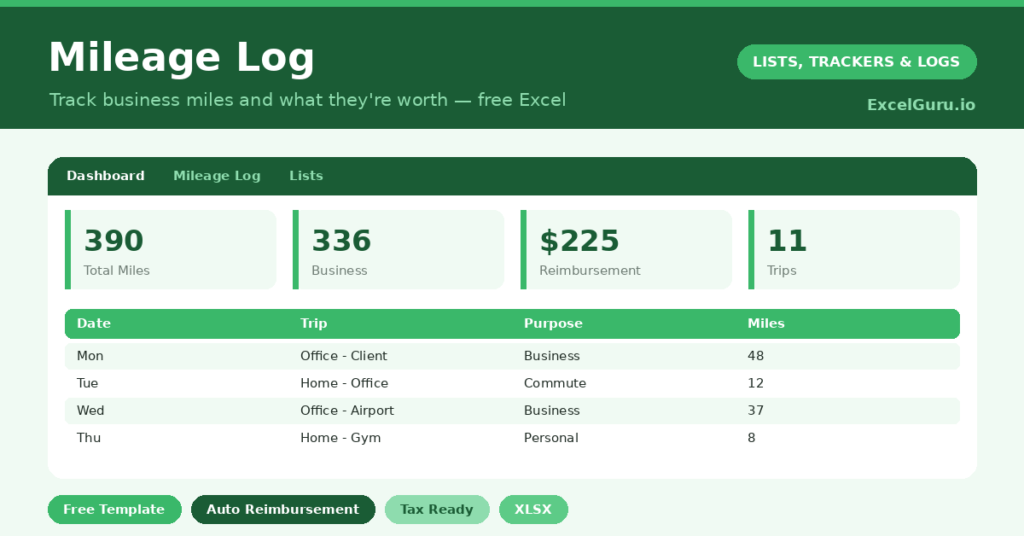
- A dashboard totaling business miles, personal miles, the total reimbursement owed, and your overall trip count.
Which formulas power the mileage log?
The calculations are simple but exactly what you need. Miles is just =End Odometer – Start Odometer for each trip. So the distance fills itself in the moment you enter the readings.
Reimbursement uses =IF(Purpose=”Business”, Miles*Rate, 0). So only business journeys generate a claim, while personal trips are logged for completeness. On the dashboard, SUMIF splits your mileage by purpose and totals the reimbursement owed. Because everything updates as you type, your claimable figure is always current.
Why keep a mileage log?
Two reasons stand out: compliance and cash. On compliance, most tax systems require a detailed, timely log to support any mileage deduction. A spreadsheet filled in as you go is precisely what they ask for, with every trip dated and detailed.
On cash, those miles add up fast. At common reimbursement rates, a few thousand business miles a year is a meaningful sum. So you simply lose that money if you cannot document it. The log suits the self-employed, gig drivers, field reps and anyone who claims mileage from an employer. Whatever your situation, the rule is the same: record the trip when it happens, not from memory months later.
What does the dashboard total for you?
The dashboard answers the questions a tax return asks. It totals your business miles, which is the figure your deduction is built on. It also totals the reimbursement owed, so you know the cash value at a glance.
Splitting business from personal mileage matters too. The ratio between them proves your business-use percentage, which makes the whole record more credible. So when the dashboard shows the split clearly, your claim is far easier to defend. In short, it turns a pile of trips into a single, defensible number.
How do you customize it?
Set your reimbursement rate once, and every business trip uses it. You can change the rate mid-year if the official figure updates, while keeping older trips on the old rate. Additionally, you can add a column for the client or project if you bill mileage onward. A notes field works well for tolls and parking you also intend to claim.
What mistakes should you avoid?
The single biggest mistake is filling the log in from memory at month’s end. Tax authorities value a contemporaneous record, so log each trip the day it happens. The second mistake is recording only business trips.
Logging personal miles too proves your business percentage and makes the record more credible. Finally, double-check your odometer readings. A transposed digit can throw a trip wildly off, so a quick glance saves trouble later.
How do you make logging a habit?
The whole system rests on one habit: log the trip before you forget it. So keep the file on your phone, and enter the odometer reading the moment you park. It takes ten seconds.
A simple cue helps it stick. For example, log the trip while the engine is still ticking, before you climb out. Because the record is built in real time, it is both accurate and defensible. In short, a tiny habit at the end of each journey protects a real sum of money at the end of the year.
Frequently asked questions
Is this mileage log accepted for taxes?
It records everything tax authorities typically require, including date, purpose, locations and odometer readings. However, rules vary by country, so confirm the specifics with your accountant or tax authority before you file.
Can I set my own reimbursement rate?
Yes. Enter your rate once, and every business trip calculates its reimbursement automatically. You can update the rate at any time for future trips, which is handy when the official figure changes.
Does it separate business and personal trips?
It does. Tag each trip’s purpose, and the dashboard uses SUMIF to total business and personal mileage separately, along with the reimbursement owed. So the split that proves your business use is always right there.
Keep it in the glovebox or on your phone, and log each trip as you finish it. Come tax time, you will have a clean, defensible record. Quite possibly, you will also have a larger deduction than you expected. And if the tax office ever asks questions, you will have the answers ready, line by line.