
A cleaning schedule replaces household chaos with a calm rhythm. Without a plan, you tend to clean the same visible surfaces over and over. Meanwhile, the truly grimy jobs hide in plain sight until guests are due.
This free template lists each household task, how often it needs doing, and who is responsible. So it works out the next due date and flags anything that has slipped. As a result, the cleaning runs on a system, not on nagging, and the whole home stays on top of itself.
What does the cleaning schedule include?
The template is designed to share the load and surface what genuinely needs doing today. In short, you get the following:
- A task schedulewith the task, the room, the frequency, the assigned person and the last-done date.
- An auto-calculated Next Duedate and a colour-coded status for every task.
- Drop-down lists for rooms, frequencies and the people in your household.
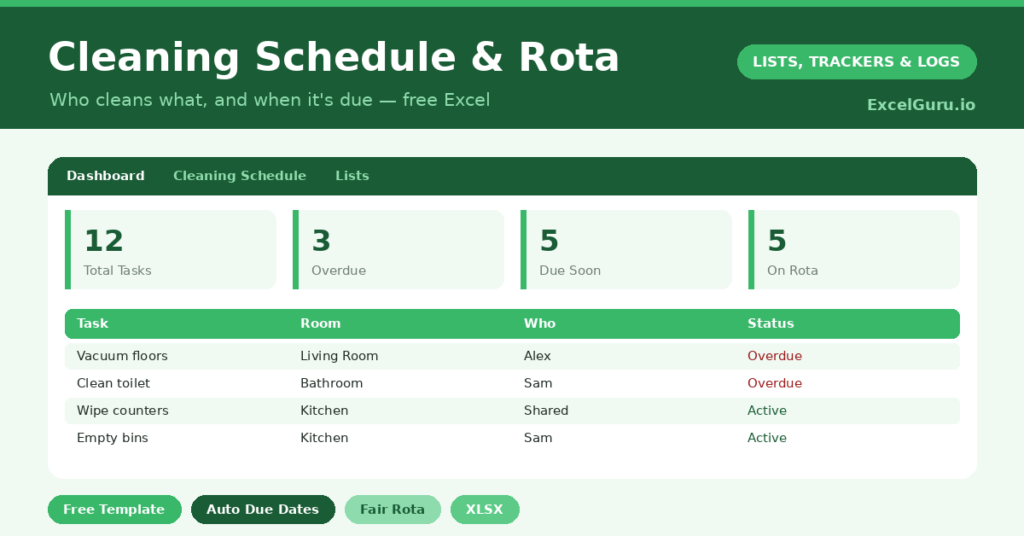
- A dashboard showing what is due now, what is overdue, and the split of tasks per person across the household.
How does the cleaning schedule calculate due dates?
Each frequency maps to a number of days on a small lookup table. So daily, weekly, fortnightly and monthly each carry their own value. The Next Due date is then =Last Done + VLOOKUP(Frequency, table, 2, FALSE).
A weekly task therefore falls due seven days after you last did it, and a monthly one thirty. A nested IF labels each task *Overdue*, *Due Soon* or *On Track*, and colours it accordingly. Meanwhile, COUNTIF counts each person’s tasks on the dashboard. So a glance settles any “I do everything” debate with actual data.
Why use a cleaning rota?
Two reasons stand out. First, nothing gets forgotten. The deep-clean jobs with no obvious visual trigger finally happen, such as descaling the kettle or wiping the skirting boards.
Second, the work gets shared fairly. Assigning tasks turns a vague sense of unfairness into a transparent rota everyone can see. So it suits shared houses, couples and families especially well. When the rota is on the fridge, the question shifts from “why am I the only one cleaning?” to “whose turn is the bathroom this week?”
What does the dashboard show you?
The dashboard turns the schedule into a simple to-do list for today. The overdue count is the figure to watch, since it tells you what genuinely needs attention now. The due-soon count then warns you what is coming.
The per-person breakdown is quietly powerful too. It shows, in black and white, how the workload is actually split. So if one person is carrying far more, you can rebalance the rota rather than argue about it. In short, the dashboard keeps both the home and the household running smoothly.
How do you customise it?
Edit the rooms, frequencies and household members on the Lists tab. So you can add tasks specific to your home, whether that is a garden, a pet or a wood-burning stove. Additionally, you can rotate who does what each week by reassigning the person column. That keeps any single chore from always landing on the same unlucky soul.
What mistakes should you avoid?
The biggest mistake is building an unrealistic schedule. A plan that demands daily deep-cleaning collapses by week two. So be honest about frequencies, because a bathroom cleaned well once a week beats a guilt-ridden plan you ignore.
Another mistake is forgetting to update the last-done dates. That leaves the whole schedule frozen and the flags meaningless. So tick each job as you finish it, and the schedule keeps itself current. A quick update is all it takes.
Will it work for a shared house?
It works particularly well there. Shared houses live or die by fairness, and a visible rota removes the resentment that builds when chores are invisible. So add every housemate to the Lists tab, and assign tasks around the group.
Then print the rota or keep it on a shared screen, so everyone can see who is responsible for what. Because the dashboard counts tasks per person, the split stays demonstrably fair. In short, the schedule does the awkward job of keeping everyone accountable, so you do not have to.
Frequently asked questions
Can I assign tasks to different people?
Yes. Each task has an assigned-person column drawn from your household list, and the dashboard counts tasks per person. So the workload stays visibly and demonstrably fair, and nobody can reasonably claim that they do absolutely everything.
How does the cleaning schedule know when a task is due?
Each frequency maps to a number of days. Next Due adds that to the last-done date with a VLOOKUP, and the status flags whether a task is on track, due soon or overdue, all colour-coded for a fast glance.
Will it work for a shared house?
Very well. Add every housemate to the Lists tab, assign tasks around, and print or share the rota so everyone can see exactly who is responsible for what, with the counts proving the split is even.
Set it up once, keep the dates current, and your home settles into a steady rhythm. It becomes cleaner overall, fairer to everyone, and free of that last-minute panic before the doorbell rings. Best of all, the cleaning simply happens, quietly and on time, without anyone having to be the designated household nag any more.