
A water tracker turns a good intention into a habit you can actually see. Most of us mean to drink more water. However, without any record, a busy day slips by and the glass sits forgotten on the desk.
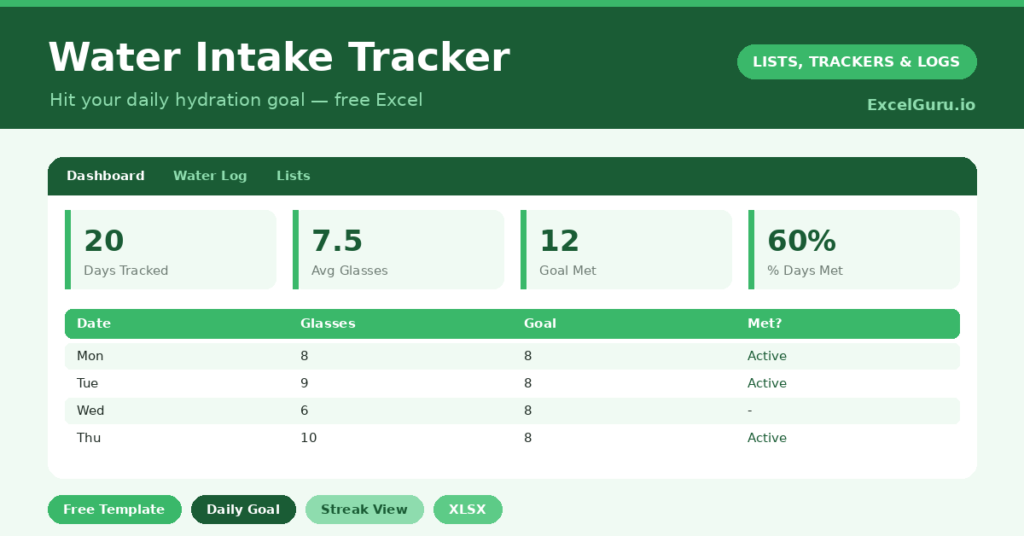
This free template makes hydration visible. So you log your glasses each day, set a daily goal, and the sheet shows your percentage of that goal. It then counts the days you hit it, which builds a satisfying streak.
What does the water tracker include?
The template is deliberately simple, because the easier it is, the more likely you are to keep it up. In short, you get the following:
- A water log with the date, glasses drunk, your goal, the percentage met and a goal-met flag.
- A single editable daily goal, so the whole sheet adjusts to your target.
- A note column for context, such as a hot day or a long workout.
- A dashboard showing days logged, your average glasses, the days you met your goal, your overall success rate and your best day.
Which formulas power the water tracker?
The calcualtion is light but effective. Your percentage of goal is simply =Glasses / Goal, pulled from a single goal cell on the Lists tab. So changing one number updates the whole sheet.
The goal-met flag uses =IF(Glasses >= Goal, “Yes”, “No”), which turns a number into a clear yes or no. On the dashboard, AVERAGE gives your typical intake, and a COUNTIF counts the days you hit your target. Your success rate then divides those wins by the days logged. Because it all updates live, the streak stays motivating.
Why track your water intake?
Hydration affects energy, focus and headaches more than most people realize. Yet it is the easiest healthy habit to forget. A tracker fixes that by making the gap visible. So a run of half-met days stops hiding and becomes a number you can act on.
The motivation is real, too. Ticking off a goal-met day feels good, and nobody likes breaking a streak. Furthermore, the success-rate figure gives you an honest score for the week. In short, the tracker nudges you toward a habit that quietly improves how you feel every day.
What does the dashboard show you?
The dashboard keeps your hydration honest and encouraging. The average-glasses figure shows your true daily intake, which is often lower than you would guess. The days-met count then celebrates the days you succeeded.
The success-rate percentage is the figure to watch over time. Because it sums up the whole week in one number, you can see real improvement as it climbs. Your best day adds a little friendly target to beat. So the dashboard turns a simple habit into a small, winnable game you actually want to play.
How do you customize it?
Set your daily goal on the Lists tab, and the whole sheet follows. So you can switch from eight glasses to ten, or to a number of milliliters, in one edit. Additionally, you can rename the unit if you prefer bottles or liters. The note column is handy for spotting why some days run high or low, such as exercise or hot weather.
What mistakes should you avoid?
The first mistake is setting an unrealistic goal you never meet, which is simply discouraging. So start with an achievable target, and raise it once it sticks. The second mistake is logging sporadically.
The streak and the average only mean something if the record is complete, so log every day, even the poor ones. Finally, remember that individual needs vary with size, activity and climate. The right goal is a personal one, so treat the number as your own target rather than a fixed rule that applies to everyone.
How do you build the hydration habit?
Small cues make the habit stick. So try linking a glass to things you already do, such as a glass with each meal and one on waking. The log then catches what those cues miss.
Keeping a bottle on your desk helps too, because visible water gets drunk. Glance at the dashboard each evening, and a half-met day nudges you to top up before bed. Because the streak is right there, you are far more likely to protect it. In short, the tracker turns a vague intention into a daily, winnable target.
Frequently asked questions
How does the water tracker calculate my percentage?
It divides your glasses for the day by your goal, which is set in a single cell on the Lists tab. So if you change the goal, every day’s percentage updates automatically.
Can I track milliliters instead of glasses?
Yes. Set your goal as a number of milliliters or liters, and log your intake in the same unit. The percentage, average and success-rate calculations all work the same way.
How much water should I drink?
That varies with your size, activity and climate, so there is no single right answer. Set a goal that suits you, and treat the tracker as a personal nudge rather than a strict medical rule that applies to everyone.
Set a sensible goal, log your glasses each day, and watch your success rate climb. The streak does the motivating for you. A water tracker is about the simplest healthy habit there is, yet seeing it on a dashboard is exactly what turns the intention into a routine.