
A sleep tracker answers a question most of us only guess at: am I actually getting enough rest? We tend to overestimate our sleep and underestimate how much a few bad nights add up. So writing it down replaces the guess with a number.
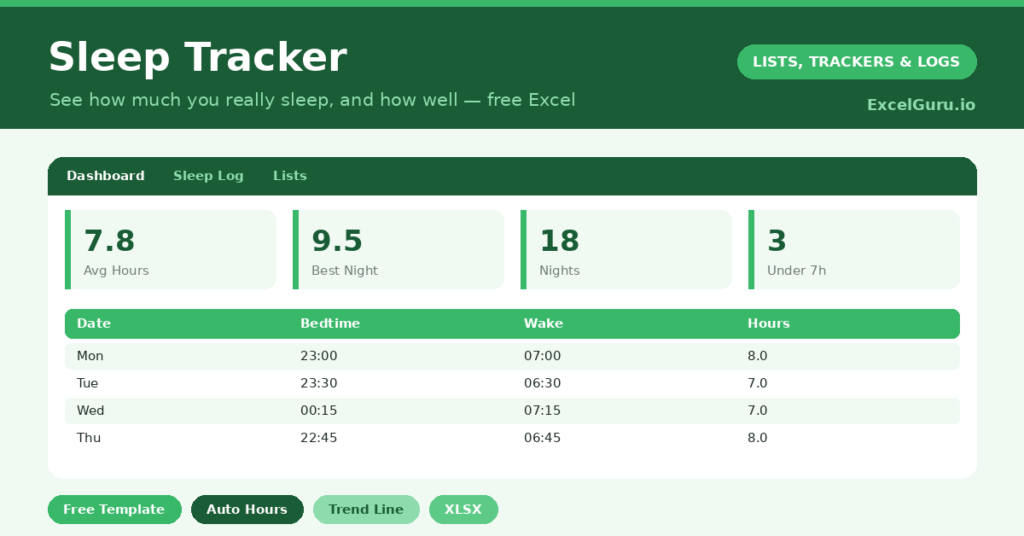
This free template logs your bedtime and wake time, then works out the hours slept for you. It also tracks sleep quality and shows your seven-day average. As a result, you can finally see your real sleep patterns rather than imagining them.
What does the sleep tracker include?
The template is a simple log feeding a clear dashboard. You record two times, and the sheet does the calculation. In short, you get the following:
- A sleep log with the date, bedtime, wake time, auto-calculated hours, quality and notes.
- A quality dropdown, so you can rate each night from poor to excellent.
- A notes column for what affected your sleep, such as caffeine, screens or stress.
- A dashboard showing nights logged, average hours, your best night, short nights, good nights and your 7-day average.
Which formula powers the sleep tracker?
Calculating sleep across midnight is surprisingly fiddly, yet one formula handles it neatly. The hours-slept column reads =MOD(Wake – Bedtime, 1) * 24. So a bedtime of 11 p.m. and a wake time of 7 a.m. correctly returns eight hours.
The MOD function is the trick. It wraps the calculation around midnight, so the times never produce a negative result. On the dashboard, AVERAGE gives your typical night, while a COUNTIF flags nights under seven hours. A clever AVERAGEIFS then works out your rolling seven-day average. So recent trends are easy to see.
Why track your sleep?
Sleep shapes almost everything else, including mood, focus, appetite and health. Yet it is easy to let it slip without noticing. A tracker makes the cost visible. So a run of six-hour nights stops being invisible and becomes a number you can see.
The notes column is where the insight lives. Over time, you might link late screens or evening coffee to poorer nights. Because the pattern is written down, you can test small changes and see if they help. In short, the tracker turns sleep from a vague complaint into something you can actually improve.
What does the dashboard reveal?
The dashboard gives you an honest weekly report card for your rest. The average-hours figure is the headline, and it is often lower than people expect. The short-nights count then shows how often you fall below seven hours.
The seven-day average is the most useful number of all. Because it smooths out one good or bad night, it reflects your true recent pattern. So you can see whether this week was genuinely better than last, rather than relying on how tired you happen to feel today. That trend is what guides real change.
How do you customize it?
Enter your times in a 24-hour or a.m./p.m. format, whichever you prefer, and the formula copes with both. Additionally, you can edit the quality ratings on the Lists tab. You might also add columns for caffeine, exercise or screen time, so you can test exactly what helps you sleep and what hurts.
What mistakes should you avoid?
The first mistake is judging a single night. Sleep naturally varies, so focus on the weekly average instead. The second is logging only the bad nights, because a complete record is what makes the average meaningful.
Finally, do not turn tracking into a source of stress, since anxiety about sleep is its own enemy. Log your times calmly each morning, glance at the trend now and then, and use the notes to guide gentle experiments. The goal is better rest, not a perfect spreadsheet.
How do you build better sleep habits?
The tracker is most useful when it guides small experiments. So pick one change at a time, and watch the average respond. For example, you might set a consistent bedtime for a week.
Common levers are worth testing one by one. Cutting late caffeine, dimming screens before bed, and keeping a steady wake time all tend to help. Because the notes column records what you tried, you can link each change to the numbers that followed. In short, the tracker lets you find the handful of habits that actually move your sleep, rather than guessing.
Frequently asked questions
How does the sleep tracker handle going past midnight?
A MOD formula wraps the calculation around midnight, so a bedtime of 11 p.m. and a wake time of 7 a.m. correctly shows eight hours rather than a negative number.
What is the 7-day average for?
It smooths out single good or bad nights to show your true recent pattern. Because one rough night barely moves it, the figure reflects how you have really been sleeping this week.
Can I track sleep quality as well as hours?
Yes. Each night has a quality rating from poor to excellent, and a notes column for what affected your sleep. The dashboard counts your good and excellent nights right alongside the hours you slept.
Log your bedtime and wake time each morning, add a note when something affects your rest, and watch the seven-day average. Over a few weeks, the patterns become clear. And once you can see them, better sleep stops being a mystery and becomes something you can steadily build.