
A meal planner ends the daily 5 p.m. question that haunts so many kitchens: what is for dinner tonight? Deciding on the spot, while tired and hungry, leads to takeaways and waste. So planning the week ahead saves money, time and stress all at once.
This free template lays your whole week on a simple grid. So you slot a meal into each day, build a shopping list alongside it, and shop once with a clear plan. As a result, the week runs on purpose rather than panic.
Also, check out sleep tracker excel template by Excel Guru.
What does the meal planner include?
The template pairs a weekly grid with a linked shopping list. Together they take you from plan to plate. In short, you get the following:
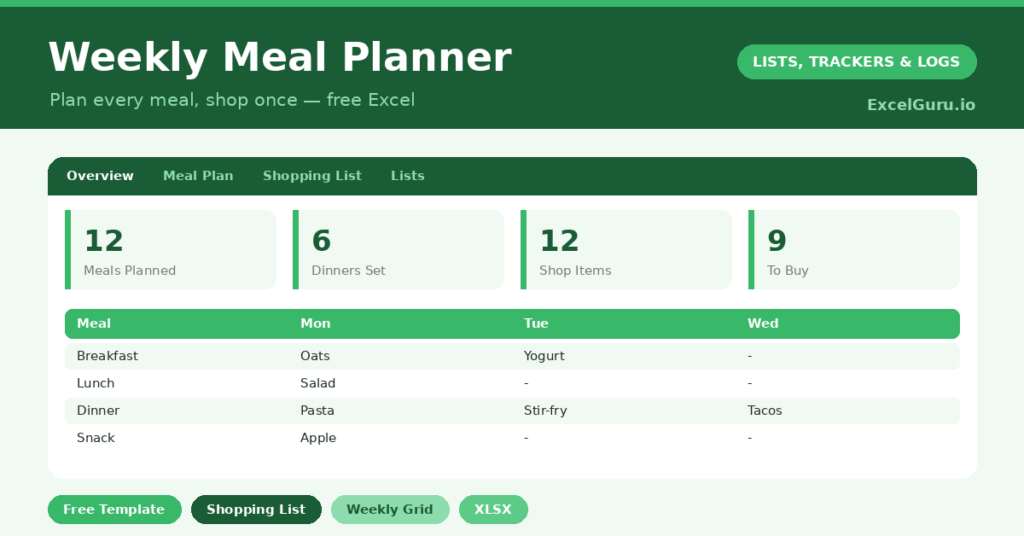
- A weekly grid with the days across the top and meal slots, such as breakfast, lunch and dinner, down the side.
- A shopping list sheet for the ingredients each plan requires, with an in-cart checkbox.
- Drop-down lists to keep your shopping categories tidy and easy to sort.
- A dashboard showing meals planned, empty slots, dinners planned, shopping items and what is still to buy.
Which formulas power the meal planner?
The dashboard keeps a quiet eye on your week. Meals planned uses =COUNTA() across the grid, which simply counts the slots you have filled. Empty slots then comes from =28 – meals planned, so you can see the gaps at a glance.
On the shopping side, COUNTIF counts the items already in your cart and those still to buy. So you always know how far through the shop you are. Because the grid and the list sit in one file, your plan and your groceries stay in step. In short, the maths is simple, yet it keeps the whole week organised.
Why plan your meals?
The benefits stack up fast. First, planning cuts waste, because you buy only what your meals need. Second, it saves money, since a single planned shop beats daily top-up trips and impulse buys.
Third, it removes the daily decision fatigue that leads to takeaways. So you eat better and spend less, almost by accident. The format suits families, busy couples and anyone trying to eat more healthily. Furthermore, a visible plan makes it easy to balance the week, rather than realising on Friday that every dinner was beige.
What does the dashboard reveal?
The dashboard shows whether your week is genuinely planned or full of gaps. The meals-planned and empty-slots figures give you that picture instantly. So you can fill the holes before they become last-minute takeaways.
The shopping side is just as useful. The items-to-buy count tells you what is left, and the in-cart count tracks your progress around the store. Because both halves update together, the planner stays a single source of truth for the week’s food. In short, it connects the plan to the plate without any extra effort.
How do you customise it?
Rename the meal slots to match how you eat, whether that is three meals or five small ones. Additionally, you can edit the shopping categories on the Lists tab to mirror your supermarket’s layout, which makes the actual shop faster. Many people keep a tab of favourite meals to drop in, so planning becomes a quick assembly rather than a blank page.
What mistakes should you avoid?
The first mistake is over-planning every single meal, which feels rigid and rarely survives a busy week. So leave room for leftovers and the odd spontaneous night. The second mistake is forgetting to build the shopping list from the plan.
The two halves only work together, so add ingredients as you plan each meal. Finally, do not ignore what you already have. A quick check of the cupboards before you shop prevents buying a third jar of the same spice and keeps the plan grounded in reality.
How do you start meal planning?
The first week is the hardest, so keep it simple. Begin by planning only dinners, and leave the other meals loose. That alone removes most of the daily stress.
Next, lean on a short list of meals you already cook well, rather than chasing new recipes every night. Then build the shopping list straight from the plan, so nothing is forgotten. Because the grid and the list live together, the whole process takes minutes. In short, start small, repeat it weekly, and let the habit grow from there.
Frequently asked questions
Does the meal planner build a shopping list?
Yes. It has a dedicated shopping list sheet alongside the weekly grid. As you plan meals, you add the ingredients, and the dashboard tracks how many items are still to buy versus already in your cart.
Can I change the meal slots?
Absolutely. Rename the rows to match how you eat, whether that is breakfast, lunch and dinner or a different set of meals. The dashboard counts whatever slots you set up.
Will it work for a whole family?
Very well. Plan the family’s meals on the grid, build one shared shopping list, and shop once for the week. It is one of the simplest ways to cut both food waste and the cost of daily top-up trips.
Spend ten minutes planning on a Sunday, build the shopping list as you go, and shop once with a clear plan. The week then runs itself. A meal planner is a small habit, yet it quietly saves money, cuts waste, and silences that daily what’s-for-dinner question for good.