
A content calendar is what separates a consistent online presence from a sporadic, last-minute scramble. Posting well means planning ahead across several platforms, yet without a plan it collapses into a panicked “what shall I post today?” So a calendar turns scattered effort into a steady pipeline.
This free template lets you plan posts across every platform, each with a topic, an owner and a status. It then tracks each post from idea to published. As a result, you always know what is going out, where and when, and nothing is left to the last minute.
What does the content calendar include?
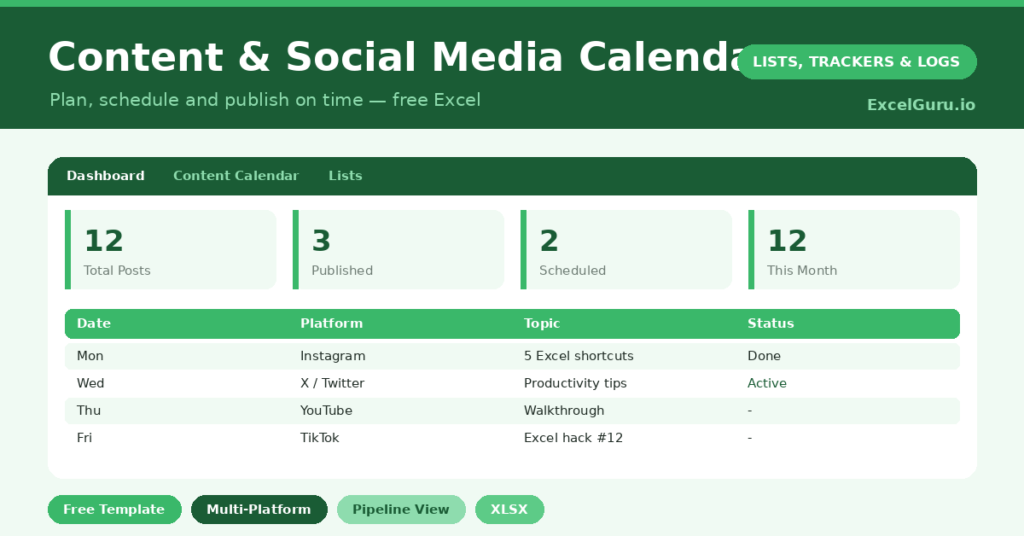
The template is one planning sheet feeding a pipeline dashboard. Dropdowns keep platforms, types and statuses tidy. In short, you get the following:
- A content calendar with the date, platform, content type, title or topic, status, owner and a link or notes.
- Drop-down lists for platform, content type and status, so entries stay consistent.
- Color-coded statuses, so ideas, drafts, scheduled and published posts are clear at a glance.
- A dashboard showing total posts, published, scheduled, draft and idea counts, plus this year’s posts.
Which formulas power the content calendar?
The dashboard tracks your pipeline from idea to published. A series of COUNTIF formulas counts the posts at each stage, so you can see how many are published, scheduled, in draft or still just an idea. That gives you an instant health check on your content flow.
A SUMPRODUCT then counts the posts dated within the current year, which keeps the view relevant. Because the statuses feed the dashboard directly, you can spot a pipeline running dry before it becomes a quiet week. So the maths is simple, yet it keeps your whole content operation visible.
Why use a content calendar?
Consistency is the secret to growing an audience, and consistency requires planning. A calendar makes that planning easy. So you can batch your ideas, schedule ahead, and avoid the daily panic of starting from a blank page.
It also improves the content itself. Seeing your posts laid out lets you balance topics and platforms, rather than posting the same thing everywhere. The status pipeline keeps work moving from idea to published, so good ideas do not stall in drafts. Furthermore, a shared calendar lets a team collaborate without stepping on each other. In short, it makes a sustainable posting habit genuinely achievable.
What does the dashboard reveal?
The dashboard shows the health of your content pipeline at a glance. The published count records what you have shipped, while the scheduled count shows what is ready to go. So you can see how far ahead you are working.
The draft and idea counts reveal the depth of your pipeline. A healthy stack of ideas means you will never be stuck, while an empty one is an early warning to brainstorm. Because the stages are all visible, you can keep the flow balanced. So the dashboard helps you stay ahead rather than constantly catching up.
How do you plan content with it?
Start by brainstorming a batch of ideas straight into the calendar, marking each as an idea. So you build a backlog to draw from. Then schedule the best ones onto specific dates and platforms, moving them to scheduled as you go.
As you create each post, update its status from draft to scheduled to published. Working a week or two ahead removes almost all the stress, since there is always something ready. Because the dashboard shows your pipeline, you know exactly when to top up the ideas. In short, the calendar turns posting from a daily chore into a planned, repeatable rhythm.
How do you customize it?
Edit the platforms, content types and statuses on the Lists tab to match your channels and workflow. Additionally, you can add columns for hashtags, a call to action, or performance notes once a post goes live. A campaign column is useful for grouping posts around a launch or a theme. The template adapts to a solo creator or a full marketing team.
What mistakes should you avoid?
The first mistake is planning only a day ahead, which keeps you in permanent scramble mode. So build a backlog of ideas and work at least a week out. The second mistake is letting statuses drift, so the dashboard no longer reflects reality.
Update each post as it moves through the pipeline, and the counts stay honest. Finally, do not plan so rigidly that you cannot react to a trend or a timely moment. Leave a little space for the spontaneous post. A good calendar gives you structure without locking you out of the conversation.
Frequently asked questions
How does the content calendar track my pipeline?
COUNTIF formulas count your posts at each stage, from idea to draft to scheduled to published. The dashboard shows these counts, so you can see the health of your content flow at a glance.
Can I plan for multiple platforms?
Yes. Each post has a platform, so you can plan across all your channels in one place. Sorting by platform lets you see and balance what is going out on each one.
Can a team use it together?
Absolutely. Keep the file in a shared location and assign each post an owner. Everyone then works from the same calendar, which prevents duplication and keeps the pipeline moving smoothly.
Brainstorm a backlog, schedule ahead, and move each post from idea to published. The dashboard then keeps your pipeline healthy and visible. A content calendar will not write your posts, yet it turns a stressful, sporadic effort into the steady, consistent presence that actually grows an audience.