
A customer contact log is the cure for one of service’s most common irritations: making someone explain their issue for the third time, to the third person. Behind that frustration sits a missing record. Nobody wrote down the last conversation.
This free template fixes that with one shared place for every interaction. So each call, email and meeting gets logged, along with what was discussed and what happens next. In short, it becomes the institutional memory your customer relationships quietly depend on.
What does the customer contact log include?
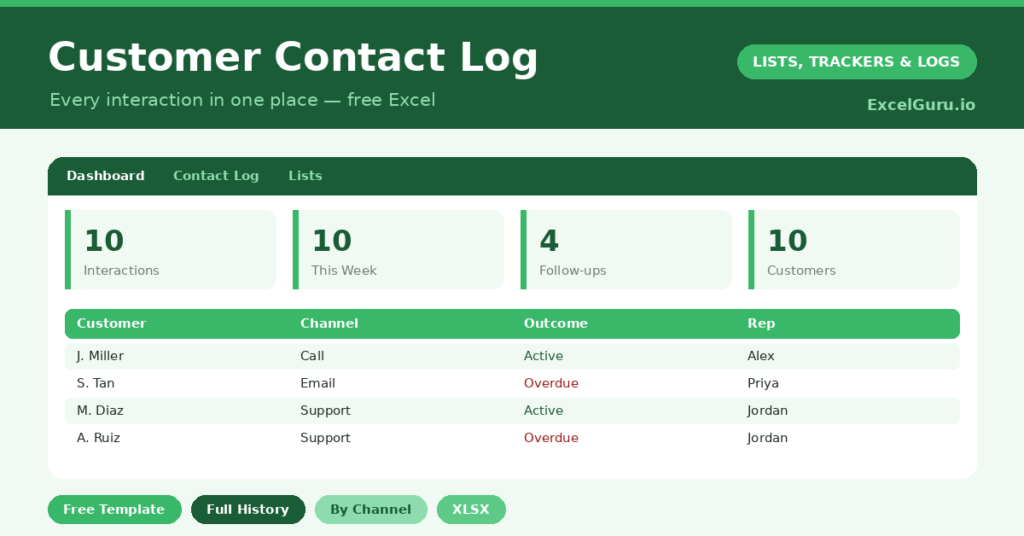
The template is a single, fast log feeding a dashboard. Dropdowns keep your channels and outcomes tidy, which also makes them easy to filter later. Here is what you get:
- A contact log with date, customer, company, channel, subject, rep and outcome.
- A follow-up date with an automatic day countdown beside it.
- Color-coded outcomes, so resolved items and open actions are obvious at a glance.
- A dashboard showing total interactions, contacts this week, follow-ups due, distinct customers and the clear split by channel, all updating automatically as you type.
Every interaction is one row, so the log stays quick to fill in. You can also filter it instantly by customer, by channel, or by the outcomes that still need work.
Which formulas does the customer contact log use?
The dashboard does some quietly clever counting. For instance, distinct customers are tallied with =SUMPRODUCT((range<>””)/COUNTIF(range, range&””)). That counts unique names even when someone appears in several rows.
Interactions this week use a SUMPRODUCT that checks each date against TODAY()-6. Meanwhile, follow-ups due are a simple COUNTIF on the outcome column. The day countdown beside each follow-up date then keeps the timing honest. Because everything updates live, the dashboard always reflects reality rather than last month’s picture.
What does logging contacts reveal over time?
A single entry is just a note. Hundreds of them become genuine insight. Over time, the channel split shows how your customers actually prefer to reach you, which may surprise you.
The outcome breakdown matters even more. A rising count of *Follow-up needed* against *Resolved*, for example, hints that issues are not being closed first time. So the log becomes an early-warning system for service problems. It also protects you: when a dispute arises, a dated, factual history is far stronger than anyone’s memory.
Why log every customer contact?
Two reasons stand out. First comes continuity. A shared history means a customer never has to repeat themselves, and that is the foundation of service that feels effortless. Second comes accountability.
When a follow-up is logged with a date, it actually happens. Otherwise it gets half-remembered and quietly dropped. So the log suits small support teams, account managers and freelancers especially well. Indeed, the more people who might touch a customer, the more valuable a shared record becomes.
How do you customize it?
Edit the channels, outcomes and reps on the Lists tab to match how you work. For example, you might add *Video call* or *Social DM* as a channel. Additionally, you can add a priority column for urgent issues, or a satisfaction rating to see how interactions land. Then filter by customer to pull up their entire history, which is gold before a renewal call.
What mistakes should you avoid?
The biggest mistake is logging selectively, capturing only the difficult conversations. A log with gaps cannot be trusted, so record every meaningful contact. The second mistake is vague subject lines.
“Called customer” helps nobody. “Called re: late delivery, promised update Friday” tells the whole story. Finally, do not let follow-ups marked *needed* pile up unactioned. Otherwise the log slowly becomes a record of broken promises instead of kept ones.
How do you start using the contact log?
Getting going takes only a few minutes. First, save the file somewhere your whole team can reach, such as a shared drive. Next, agree one simple rule together: every meaningful customer contact gets a row, the same day it happens.
Then add your team to the Lists tab and start logging. Within a week, the dashboard already tells a story. Within a month, you have a history no single person could hold in their head. So the habit pays off quickly, and it keeps paying off for as long as you keep it.
Frequently asked questions
Can my whole team use one contact log?
Yes. Keep the file in a shared location such as OneDrive or Google Drive, assign a rep to each entry, and everyone works from the same single history rather than a dozen private notebooks.
Does the customer contact log track follow-ups?
It does. Add a follow-up date to any interaction and the log counts down to it. The dashboard also tallies how many follow-ups are currently due, so nothing important slips your mind.
How does it count unique customers?
A SUMPRODUCT and COUNTIF formula counts distinct customer names. So even if someone appears in ten rows, they still count once toward your customer total, which keeps the figure meaningful. It is a small touch, but it stops a handful of chatty customers from inflating your numbers.
Keep it current, and the payoff is a customer experience that feels joined-up and personal. That is the kind of service which quietly turns one-off buyers into loyal, long-term relationships. And it all starts with a single, faithfully kept row for every conversation you have.