
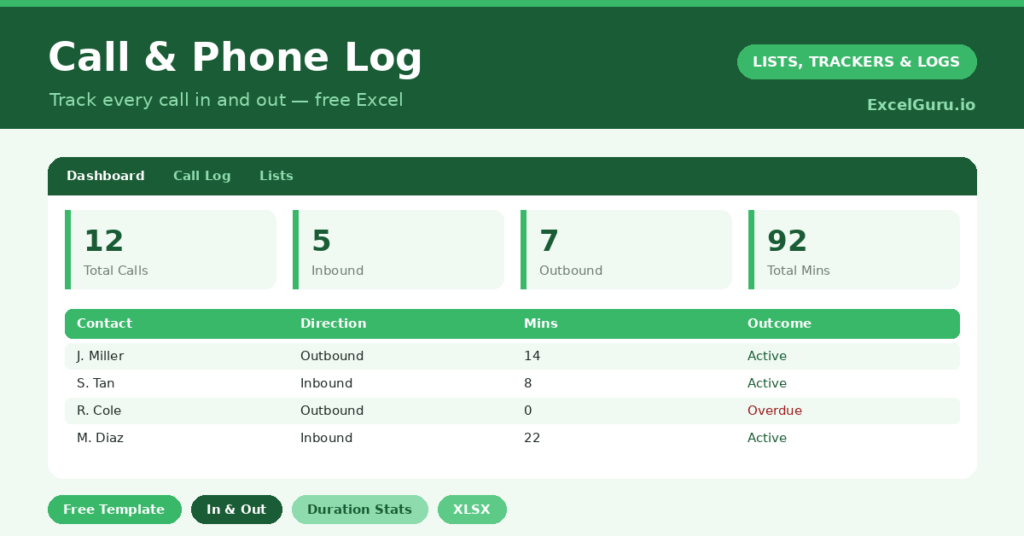
A call log turns your most fleeting business records into something you can rely on. A phone call happens, decisions get made, promises get given, and then it all evaporates. Later you are left guessing whether you really agreed something about Friday.
This free phone log template captures every call, inbound and outbound, with its duration, purpose and outcome. So whether you work in sales, in support, or simply field a lot of calls, you build a searchable history of who you spoke to and what was said.
What does the call log include?
The template is built for speed, because you should be able to log a call in seconds, even mid-conversation. Each call is one tidy row. In practice, you get the following:
- A call log with date, time, contact, company, direction, duration, purpose and outcome.
- Drop-down lists for direction, purpose and outcome, so entries stay consistent.
- A notes column for the substance of each conversation.
- A dashboard showing total calls, the inbound and outbound split, total and average minutes, plus breakdowns by purpose and outcome.
Since the data is structured, you can filter the log by contact, by direction, or by the calls that still need a callback. So the record works as hard as you do.
Which formulas power the call log?
The dashboard keeps the calculation simple but useful. Total talk time is a plain =SUM() over the duration column. The average, however, uses =AVERAGEIF(Duration, “>0”), so unanswered calls do not drag the figure down.
The inbound and outbound counts, along with the purpose and outcome breakdowns, all run on COUNTIF. Because the average ignores zero-minute calls, it reflects your real conversation length. Therefore it is a far more honest measure than a blunt average of everything you dialled.
What can the call stats tell you?
Patterns emerge surprisingly fast. The inbound-versus-outbound split, for example, shows whether you are driving conversations or mostly reacting to them. Both have their place, yet the balance is worth knowing.
The outcome breakdown is the real prize. If voicemails and no-answers dominate your outbound calls, your timing is probably off. So you might shift your calling to mid-morning or late afternoon and watch the connection rate climb. In other words, the log does not just record effort; it helps you spend that effort better.
Why keep a phone log?
For salespeople, a log is the backbone of follow-up. You know exactly when you last spoke to a prospect, and what they said. For support teams, it becomes a record of issues and resolutions.
For anyone else, it settles the “what did we agree?” question with a written note rather than a hopeful guess. That single habit prevents misunderstandings, missed callbacks and the quiet erosion of trust that follows them. So a minute of logging protects hours of goodwill.
How do you customize it?
Edit the directions, purposes and outcomes on the Lists tab to match your world. Additionally, you can add a follow-up column when calls often need a callback. A column linking each call to a deal or ticket number works well too. Then filter by contact to see the full call history with one person, which is invaluable before you dial them again.
What mistakes should you avoid?
The main mistake is logging the call but skipping the notes. The duration tells you a call happened, yet the notes tell you what mattered. So jot a line while it is fresh.
Another mistake is inconsistent purposes. If you freestyle the labels, the breakdown becomes noise, so stick to the dropdown. Lastly, log the no-answers too. They are part of the effort, and they shape your connection rate honestly.
How do you get the most from the log?
A few small habits make a big difference. First, log each call the moment it ends, while the detail is fresh. Second, keep the notes specific, naming the next step rather than just the topic. Third, review the log briefly at the start of each day.
That morning glance is the secret. You spot the callbacks promised for today, the prospects gone quiet, and the threads worth picking up again. So the log stops being a passive record and becomes a daily action list. In short, a minute of review turns yesterday’s calls into today’s priorities.
Frequently asked questions
Can I track both inbound and outbound calls?
Yes. Tag each call’s direction from the dropdown. The dashboard then counts inbound and outbound separately, alongside your total call volume, so you see the balance at a glance.
How is average call duration calculated?
An AVERAGEIF formula averages only calls longer than zero minutes. So voicemails and no-answers do not distort your true average conversation length, which keeps the figure meaningful.
Is the call log useful for sales follow-up?
Very. Filter by contact to see every call you have had with them, note the outcome and next step, and you will always know exactly where a conversation left off the next time you ring. That continuity is what makes follow-up calls feel personal rather than cold.
Keep it open beside the phone and log each call as you hang up. Over time it becomes a genuinely useful record, for following up, for accountability, and for settling those “I’m sure we agreed something” moments with certainty. In a job built on conversations, that certainty is worth a great deal.