
A work order template makes sure the things that break also get fixed. In any building or workshop, requests arrive constantly. The ones written down get done. The ones shouted across the floor get forgotten.
This free template logs every maintenance request with a priority and an owner. So it numbers each job automatically and tracks how long it stays open. From a leaking tap to a failed server-room aircon, nothing slips through the cracks. Therefore your maintenance stops being a scramble and starts being a process.
What does the work order template include?
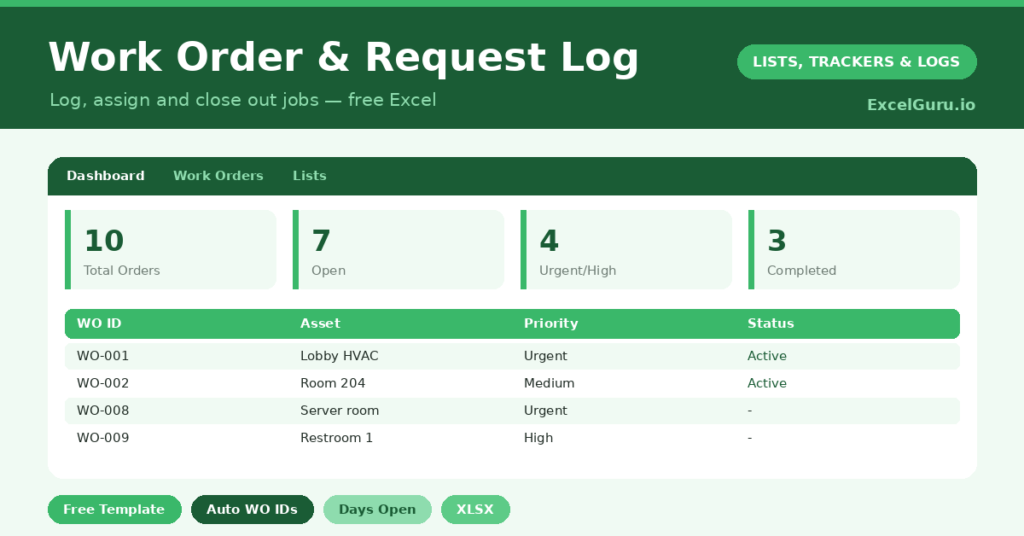
The template pairs a detailed log with a dashboard that surfaces what needs attention. Each request is one row, and dropdowns keep priorities, statuses and assignees consistent. In short, you get the following:
- A work order log with an auto-generated ID, request date, requester, location, description, priority and assignee.
- A status column and a completed date, with an automatic days-open count that ages every job.
- Color-coded priorities and statuses, so urgent jobs still open leap straight off the screen.
- A dashboard showing open versus completed orders, urgent jobs outstanding, average turnaround, and the split by status and priority.
Which formulas power the work order template?
Two formulas do the heavy lifting. Every order numbers itself with =“WO-“&TEXT(ROW()-3,”000”). So you get tidy references like WO-001 and WO-002 without typing a thing.
The days-open metric is smarter still. It reads =IF(Status=”Completed”, Completed-Requested, TODAY()-Requested). While a job is live, it counts up from the request date. Once completed, however, it freezes at the time the job actually took. As a result, the dashboard can report your true average turnaround, which is a number every facilities manager should know.
What does the dashboard tell you?
The dashboard turns a list of jobs into a management view. First, it shows how many orders are genuinely open, not merely how many exist. Second, it counts the urgent and high-priority jobs still waiting, which is where your attention belongs.
The average days-open figure is the quiet star. A creeping average is an early warning that the backlog is winning. Meanwhile, the priority breakdown reveals whether you are firefighting emergencies or steadily clearing routine work. So you manage by data, not by whoever shouts loudest.
Why log work orders?
A log brings order to reactive work. It ensures nothing is forgotten, and it makes ownership explicit, so jobs do not fall between people. Furthermore, it gives you data on which assets break most and how long repairs really take.
For a landlord, a facilities team or a small workshop, that visibility changes everything. You can spot the machine that keeps failing, justify a replacement with evidence, and show tenants or managers that requests are handled. In short, the log earns its keep many times over.
How do you customize it?
Edit the priorities, statuses and assignees on the Lists tab to match your team. Additionally, you can add a cost column to track repair spend, or a category column if you manage a mixed estate. Then sort by priority and by days open together, so the most urgent, longest-waiting job is always first in line.
What mistakes should you avoid?
The first mistake is leaving requests unassigned, because an order with no owner is an order nobody does. So assign every job, even to a holding name. The second mistake is forgetting the completed date, which leaves the days-open count running forever and skews your averages.
Finally, do not let priorities drift upward. If everything becomes *Urgent*, then nothing truly is. Reserve the top priority for genuine emergencies, and the dashboard stays meaningful.
Who should use a work order log?
The template fits anyone who fields repair and maintenance requests. Landlords and property managers, for instance, can track jobs across several units without losing one. Facilities teams use it to coordinate a building’s constant small failures.
Small workshops and manufacturers benefit too, since equipment downtime costs money directly. Even a busy household can use it for ongoing home repairs. In short, wherever requests arrive faster than memory can hold them, a written log pays for itself. So the question is rarely whether you need one, but how soon you start.
Frequently asked questions
Do work order numbers generate automatically?
Yes. As soon as you enter a request, the ID column creates a sequential number like WO-001 using a TEXT and ROW formula. So every order is uniquely tagged without any manual effort.
How is days-open calculated?
While a job is open, it counts from the request date to today. Once you mark it completed and add a completed date, it freezes at the actual number of days the job took, which keeps your turnaround stats accurate.
Can several people be assigned work?
Yes. Add your team to the Lists tab and assign each order to the right person. Then filter by assignee to see anyone’s current workload at a glance.
Set it up once, log every request as it arrives, and your maintenance becomes a managed, measurable process. Best of all, you will always have a clear answer to the only question that really matters: what is outstanding right now? Then, when a manager or a tenant asks how a job is progressing, you answer in seconds rather than excuses. That credibility, built one logged request at a time, is worth as much as the time the template saves.