
An IT asset register ends the awkward pause that follows a simple question: how many laptops do we own, who has them, and which are still under warranty. Hardware scatters over time. It gets assigned, reassigned, taken home and quietly retired, until nobody really knows.
This free template restores order with one authoritative list. So every device is tracked with its owner, cost, warranty and status. Whether you are facing an audit, planning a refresh, or just hunting a spare monitor, the answer is one glance away. Therefore the guesswork simply stops, and the awkward pause disappears for good.
What does the IT asset register include?
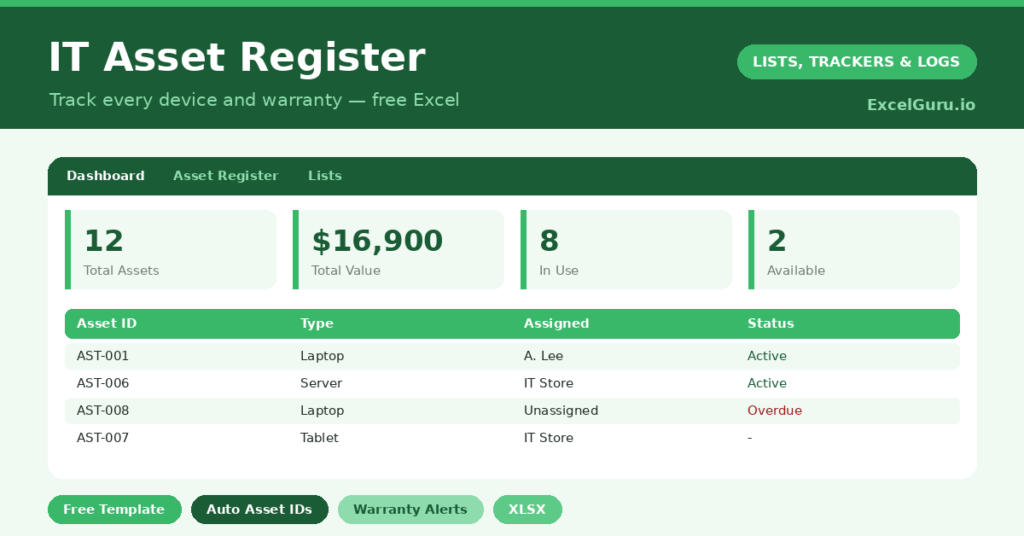
The template is a clean register feeding a dashboard built for audits and budgeting. Each device is one row, and dropdowns keep types, statuses and owners consistent. In practice, you get the following:
- An asset register with an auto-generated ID, type, make and model, serial number and assignee.
- Purchase date, cost, warranty expiry and status recorded for every single item.
- Color-coded statuses, so devices in use, available, in repair or retired are obvious instantly.
- A dashboard showing total assets and value, devices in use versus available, warranties expiring soon, and the fleet by type.
How does the IT asset register tag and track devices?
Each asset numbers itself with =”AST-“&TEXT(ROW()-3,”000”). So every device gets a unique tag like AST-001 automatically, with no risk of duplicates.
The dashboard then counts warranties expiring within 90 days. It uses a SUMPRODUCT that checks each expiry date against today, flagging the window where you can still claim or plan a replacement. Total value, meanwhile, is a simple =SUM() of the cost column, and the status counts run on COUNTIF. Together, these answer exactly what auditors and budget-holders ask.
Why keep an asset register?
Three reasons stand out. For support, it tells you instantly what a user has and whether it is covered. For audits and insurance, it is the documented proof you will be asked for.
For budgeting, it shows the age and value of your fleet, so a hardware refresh becomes a plan rather than a panic. Even a ten-person company benefits enormously from this clarity. Indeed, the smaller the IT team, the more a register does the remembering they have no time to do themselves.
What does the dashboard reveal?
The dashboard is built for the conversations IT actually has. The in-use versus available split, for instance, tells you whether you have spare kit for a new starter or need to order more. The warranty-expiring count gives you a running to-do list of claims and replacements.
The value total and the type breakdown then support budgeting. You can see, at a glance, that your laptops are ageing and a refresh is due. So a request for budget arrives backed by evidence, not a hunch. That tends to make finance say yes.
How do you customize it?
Edit the asset types, statuses and people on the Lists tab to match your environment. Additionally, you can add columns for purchase order numbers, physical location, or operating system. Then, during onboarding and offboarding, filter by assignee for an instant checklist of what to hand out or collect back.
What mistakes should you avoid?
The biggest mistake is letting the register go stale. An asset list six months out of date is worse than none, because people still trust it. So update it whenever a device is bought, assigned or retired.
Another mistake is skipping serial numbers, which are essential for warranty claims and theft reports. Finally, mark retired assets as *Retired* rather than deleting them, so your history and audit trail stay intact for years to come.
How do you keep the register accurate?
A register only helps if it reflects reality, so a light routine matters. The simplest rule is to update it at three moments: when a device is bought, when it changes hands, and when it is retired. Each takes under a minute.
Onboarding and offboarding are the natural checkpoints. When someone joins, you assign their kit and log it. When they leave, you filter by their name and collect everything back. So the register stays current as a by-product of normal work, rather than needing a dreaded annual clean-up. That habit is what keeps the data trustworthy.
Frequently asked questions
Do asset IDs generate automatically?
Yes. Each row creates a sequential ID like AST-001 using a TEXT and ROW formula. So every device is uniquely and consistently tagged the moment you add it.
Can the IT asset register flag expiring warranties?
It can. The dashboard counts assets whose warranty expires within the next 90 days. That gives you time to plan replacements or claim repairs before cover quietly lapses.
Is it suitable for a small business?
Very. Even with a handful of devices, a register answers who has what, what it cost and whether it is under warranty. That is invaluable for support, audits and budgeting alike.
Build it once, keep it current, and you turn a scattered pile of hardware into a managed asset base. So you are ready for the next audit, the next support call, and the next budget conversation, all from one tidy sheet. A register also quietly protects you when something goes missing, since you can prove exactly what existed and who held it. For a few minutes of upkeep, that is a remarkable amount of cover.