
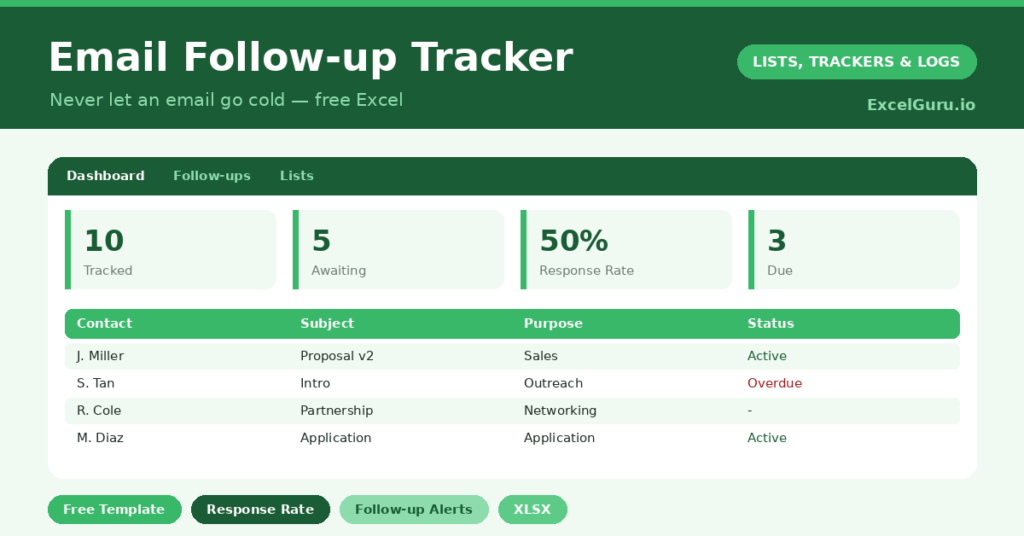
An email follow-up tracker captures the simple truth that the fortune is in the follow-up. Most emails that go unanswered are not rejected. They are forgotten, by both sides, somewhere between a busy inbox and good intentions.
This free template logs the emails that need a reply and tells you when to chase them. So a sales pitch, a job application or a networking note never quietly dies in your sent folder. Instead, you follow up at the right moment, which is exactly when most results are won. A timely, friendly nudge often does the work that the first email could not.
What does the email follow-up tracker include?
The template is a focused log feeding a simple dashboard. Each email is one row, and dropdowns keep purposes and statuses tidy. In short, you get the following:
- A follow-up log with the date sent, contact, company, subject, purpose and owner.
- A status column running from awaiting reply to replied, no response or closed.
- A follow-up date and a days-since-sent counter, so timing is never a guess.
- A dashboard showing emails awaiting a reply, your response rate, follow-ups due, and the split by status and purpose, all refreshing automatically as you update each row.
Which formulas power the email follow-up tracker?
The dashboard does the thinking so you do not have to. The days-since counter is a simple =TODAY()-Date Sent, so you always know how long a thread has been silent.
Response rate is the more revealing figure. It divides replies by replies plus non-responses, using COUNTIF. So you get an honest sense of how often your emails actually land. Follow-ups due, meanwhile, are counted against today’s date. Because the numbers update live, a glance tells you who needs chasing right now.
What does the response rate tell you?
Response rate is quietly one of the most useful numbers you can track. A healthy rate means your subject lines and opening lines are working. A poor one, by contrast, is a signal to change something.
For instance, you might shorten your emails, sharpen the subject, or send at a different time. Then you watch the rate respond over the following weeks. So the tracker does more than remind you to follow up. It turns your outreach into something you can measure and steadily improve.
Why track email follow-ups?
Persistence wins deals, interviews and introductions, yet persistence is hard to sustain from memory alone. A tracker carries that load for you. It remembers every open thread, and it tells you when a polite nudge is due.
It suits salespeople, job seekers, founders and freelancers especially well. Indeed, anyone who sends important emails and waits on replies will recognise the cost of a forgotten follow-up. So the tracker pays for itself the first time it saves a lead you would otherwise have lost.
How do you customize it?
Edit the purposes, statuses and owners on the Lists tab to match your work. Additionally, you can add a column for the follow-up number, since a third nudge reads differently from a first. Then sort by days-since-sent, and the threads gone quietest rise to the top, ready for a gentle, well-timed chase.
What mistakes should you avoid?
The first mistake is following up too soon or too aggressively, which costs goodwill. Give a reasonable gap, and keep each nudge friendly. The second mistake is the opposite: letting a thread sit for weeks until the moment has passed.
The tracker exists to find the middle ground. Finally, remember to close out threads that are clearly dead. A clean log is a useful log, and a cluttered one is quietly ignored.
When is the best time to follow up?
Timing makes or breaks a follow-up. Too soon feels pushy, while too late lets the thread go cold. As a general guide, a gap of three to five working days suits most first nudges.
The days-since counter takes the guesswork out of it. You simply glance at the column and chase the threads that have crossed your chosen threshold. For warmer leads, you might follow up sooner; for cooler ones, you can wait a little longer. So the tracker lets you apply judgement consistently, rather than chasing on a whim or forgetting entirely.
Frequently asked questions
How is the response rate calculated?
The dashboard divides your replied emails by the total of replied plus no-response emails. So awaiting and closed threads do not distort the figure, and you see your real reply rate clearly.
Does the email follow-up tracker remind me when to chase?
It does. Add a follow-up date to each email, and the dashboard counts how many are due. A days-since-sent counter also shows which silent threads are overdue a nudge.
Can I use it for job applications?
Absolutely. Set the purpose to Application, log each role you apply for, and follow up after a sensible gap. Tracking applications this way keeps a busy search organised and persistent.
Keep it open as you send, log anything that needs a reply, and check it briefly each morning. Over time, that small habit turns scattered good intentions into steady, well-timed follow-up, which is where so many results quietly hide. Most people give up after a single unanswered email, yet the reply often comes on the second or third try. So the tracker is really a tool for out-persisting your competition, politely and on schedule.