
A gift tracker solves two problems at once: the blank-minded panic of not knowing what to buy, and the quiet budget creep of buying it anyway. Good gift ideas tend to strike at random moments, then vanish by the time the occasion arrives.
This free template catches those ideas the moment they appear. So you keep a running list by person and occasion, set a budget, and follow each gift from idea to given. As a result, gift-giving becomes thoughtful and planned, rather than rushed and expensive. You buy the right thing for the right person, and you do it without a frantic dash to the shops. Over a full year, that small change saves both money and stress.
What does the gift tracker include?
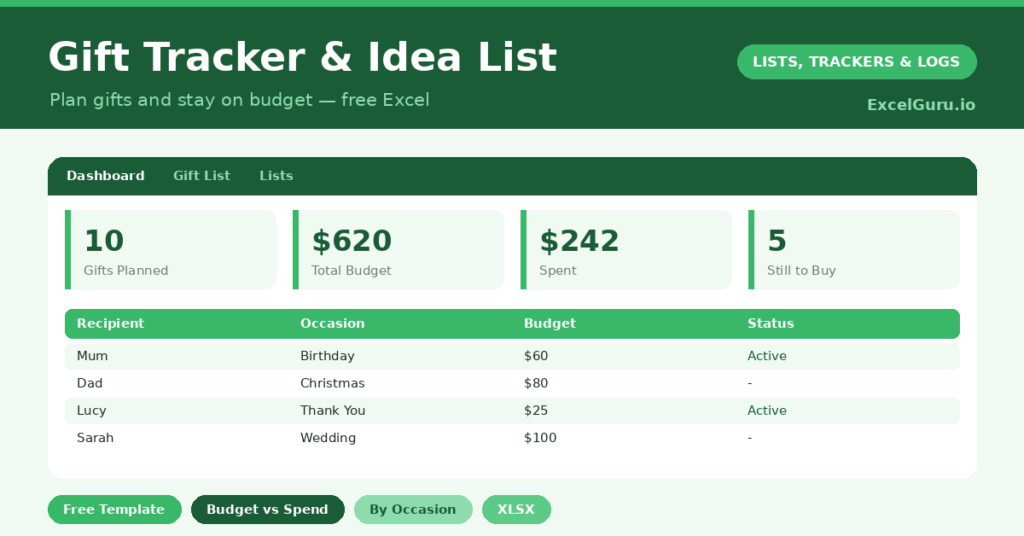
The template is a simple list feeding a budget dashboard. Each gift is one row, and dropdowns keep occasions and statuses tidy. In short, you get the following:
- A gift list with the recipient, occasion, gift idea, budget and the actual cost once you buy.
- A status column following each gift from idea to bought, wrapped and given.
- A date column, plus a red flag whenever the actual cost runs over the budget.
- A dashboard showing gifts sorted versus still ideas, total budget and spend, what is left, and spending broken down by occasion so each event stays on track.
Which formulas power the gift tracker?
The dashboard keeps your spending honest. Total budget and total spend are simple =SUM() figures, and the difference shows your remaining budget at a glance.
Spending by occasion uses =SUMIF(Occasion, …, Actual Cost), so you can see exactly where the money goes. Christmas, for instance, often turns out larger than expected. A conditional-formatting rule then flags any gift where the actual cost exceeds the budget. So overspending shows up in red, the moment it happens.
Why plan gifts ahead?
Two payoffs make this worthwhile. First comes calm. Jotting ideas down through the year means no frantic, blank-minded shopping in late December. You simply review your list and buy.
Second comes control. Tracking a budget against actual spend keeps the festive season from blowing a hole in your finances. The total spend figure tends to be sobering in a useful way. So you give generously where it matters and trim where it does not, all on purpose rather than by accident.
Who is the gift tracker for?
It suits anyone who buys for more than a handful of people. Large families, in particular, benefit, since Christmas alone can mean a dozen presents to plan and fund.
It also helps the chronically last-minute, by giving ideas a home long before the deadline. And it quietly prevents the awkward duplicate, because you can see at a glance what you already bought. In short, if gift-giving ever stresses you, the tracker takes the weight off.
How do you customize it?
Edit the occasions on the Lists tab to match your year, adding things like *Graduation* or *New Baby*. Additionally, you can add a column for where you spotted an idea, or a gift-wrap checkbox for December. Best of all, reuse the same sheet each year, so you start every season with a head start of ideas.
What mistakes should you avoid?
The first mistake is setting budgets you ignore. A budget only helps if you check the actual cost against it, which the red flag makes easy. The second is leaving everything at the *Idea* stage until the last week.
So update the status as you buy and wrap, and let the dashboard show your progress. Finally, do not delete gifts once given. Keeping the record helps you avoid repeating yourself next year and reminds you what landed well.
How do you build the gift-giving habit?
The real magic happens when you capture ideas year-round, not just at the deadline. So the trick is to add a row the instant inspiration strikes. Someone mentions they love a particular author, and you note it on the spot.
Keep the file somewhere easy to reach, such as a phone or a shared drive. Then a few seconds of typing today becomes a thoughtful gift in three months. Over a year, you build a quiet bank of ideas for everyone who matters. In short, the habit turns gift-giving from a scramble into something genuinely considered.
Frequently asked questions
Does the gift tracker warn me if I overspend?
Yes. A conditional-formatting rule turns the actual cost red whenever it exceeds the budget you set. So overspending is impossible to miss as you shop.
Can I plan for the whole year?
Absolutely. Log ideas for birthdays, Christmas, anniversaries and more as they occur to you. The dashboard then breaks spending down by occasion, so each event stays on budget.
Will it stop me buying duplicate gifts?
It helps a great deal. Because every idea and purchase is recorded against a person, a quick glance shows what you have already chosen, which prevents the accidental repeat.
Keep it open through the year and add ideas the moment they strike. Come the occasion, you will have thoughtful gifts already chosen and a budget under control, with not a hint of last-minute panic. Better still, your spending stays where you meant it to, rather than ballooning under deadline pressure. So you give more thoughtfully and spend more wisely, which is the best of both worlds.