
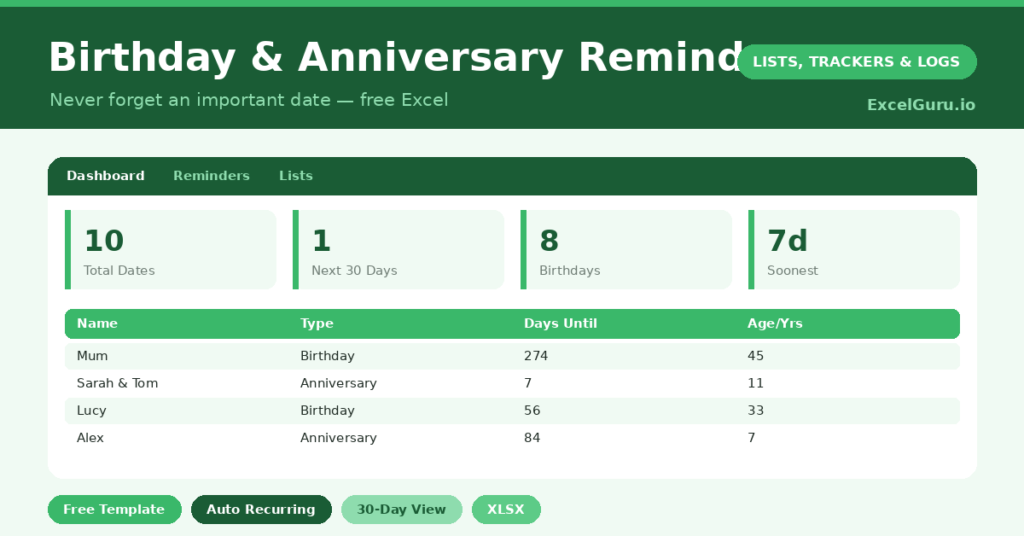
A birthday reminder you can trust is worth more than the best intentions, because intentions forget and spreadsheets do not. We have all felt that small guilt of remembering a birthday a day too late, when the card can no longer arrive in time.
This free template stores every birthday and anniversary once. So it then works out how many days until each one comes around again, entirely on its own. As a result, you always know what is coming, and a card or gift always has time to arrive. No more guilty, day-late messages to the people you care about most.
What does the birthday reminder template include?
The template is one simple list feeding a friendly dashboard. Each person is a row, and dropdowns keep the type and relationship tidy. In short, you get the following:
- A reminder list with each person’s name, relationship, the type of date, and the original full date including the year.
- An automatic days-until countdown that recurs every year without any maintenance.
- An upcoming age or anniversary-years column, worked out for you from the original date.
- A dashboard showing dates this month, the next 30 days, birthdays versus anniversaries, and the very soonest date due, all worked out automatically for you.
Which formula powers the birthday reminder?
One clever formula does all the work. It rebuilds this year’s version of each date, and then checks whether that day has already passed.
In full, it reads =DATE(YEAR(TODAY())+IF(DATE(YEAR(TODAY()),MONTH(D),DAY(D))<TODAY(),1,0),MONTH(D),DAY(D))-TODAY(). If the date has gone for this year, it rolls forward to next year. So the days-until figure always points to the next celebration, never a date in the past. The upcoming-age column uses the same idea to count the years being marked.
What does the dashboard show you?
The dashboard turns a list of dates into a gentle monthly routine. At the start of each month, you glance at it and see who is celebrating soon. The this-month and next-30-days figures are the ones you will check most.
The soonest-date figure is reassuring too, since it names the very next occasion at a glance. Meanwhile, the split of birthdays and anniversaries gives a quick sense of the month ahead. So a single look replaces a nagging worry about who you might be forgetting.
Why keep a reminder list?
Remembering the people who matter is a small kindness with a large effect. A timely card or message says you were thinking of someone, and that lands far more warmly than a late one.
Phone calendars help, of course, yet they bury the year ahead behind a daily alert. This list shows the whole picture at once, and it lets you plan rather than merely react. So you can order a gift in good time, not the night before. In short, it turns thoughtfulness into something reliable.
How do you customise it?
Edit the relationships on the Lists tab to suit your circles. Additionally, you can add a gift-idea column against each person, so inspiration is captured the moment it strikes. A budget column works well too. Then check the dashboard monthly, and a card always goes out with time to spare.
What mistakes should you avoid?
The first mistake is entering only the day and month, with no year. The age and anniversary-years columns need the full original date to work. So include the year wherever you can.
The second mistake is setting it up and never looking again. A reminder list only helps if you glance at it, so make the monthly check a small habit. Finally, keep it backed up, since it is exactly the sort of file you would hate to lose and slowly rebuild.
How do you turn it into a habit?
A reminder list works best with one small monthly ritual. So, on the first of each month, open the file and glance at the dashboard. It shows you who is celebrating in the next few weeks.
From there, the rest is easy. You buy a card, order a gift, or simply set a note to call on the day. Because you are looking a month ahead, nothing ever feels rushed. That gentle routine, repeated, means you become the person who always remembers, which is a quietly lovely reputation to have.
Frequently asked questions
Does the birthday reminder recur every year?
Yes. The days-until formula rebuilds each date for the current year and rolls forward once it has passed. So you enter a date once, and it counts down correctly every year thereafter.
Can it track anniversaries too?
It can. Each entry has a type, so you can log birthdays, wedding anniversaries and other yearly dates side by side. The dashboard then counts each type separately.
How far ahead can I see?
The dashboard highlights dates this month and within the next 30 days, and names the soonest date overall. Sorting the list by days-until shows the entire year ahead in order.
Set it up once with everyone who matters, add the years and a gift idea where you can, and glance at it monthly. From then on, the right card goes out at the right time, and that quiet reliability is a genuinely lovely thing to give. In a world of automated alerts, a remembered birthday still stands out. So this small spreadsheet helps you show people, again and again, that they were worth remembering.