
A contact list in Excel does something your phone quietly resists: it hands you full ownership of your own people. Numbers, emails and addresses tend to scatter across apps, SIM cards and accounts, until finding one becomes a small hunt.
This free template gathers them into a single, searchable file. So every contact sits in one place, neatly categorised, and entirely under your control. As a result, you can search, sort, back up and reshape your address book however you like, with no service holding your data hostage. The whole address book lives in a single file that opens anywhere.
What does the contact list include?
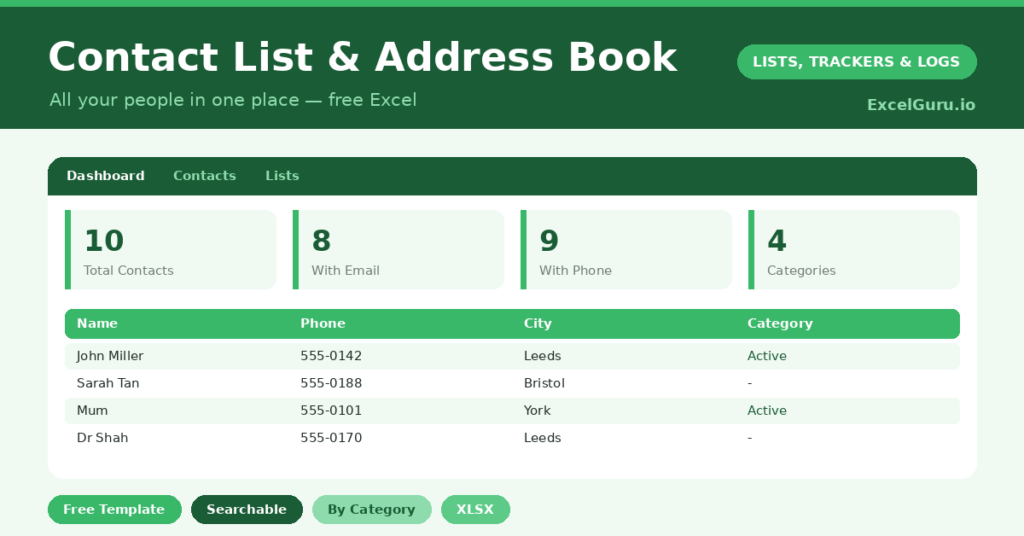
The template is a clean, sortable list feeding a simple dashboard. Each contact is one row, and a dropdown keeps the categories tidy. In short, you get the following:
- A contacts table with name, phone, email, address, city, category and notes.
- A category dropdown that colour-codes family, work and service contacts at a glance.
- A notes column for the small details that make a contact useful later.
- A dashboard showing your total contacts, how many have an email or phone on file, and the split by category.
Which formulas power the contact list?
The dashboard counts the things worth knowing. To see how complete your records are, it uses =COUNTIF(range,”?*”). That neat pattern counts cells that actually contain text, so it tells you how many contacts have an email or a phone number on file.
The category breakdown runs on COUNTIF, and the count of distinct categories uses a SUMPRODUCT trick. Because these update live, the dashboard always reflects your current address book. So you can spot, for example, that several contacts are missing an email and fill the gaps.
Why keep a contact list in Excel?
Three reasons make the case. First, ownership: a spreadsheet never locks your data inside a service you might one day leave. Second, flexibility: you can add any column you like and sort or filter freely.
Third, simplicity: it opens anywhere, searches instantly, and backs up with a single copy. Phone contacts are fine for calling, yet they are awkward for a proper overview or a mail-merge. So a spreadsheet address book complements your phone rather than competing with it. For a small business, it doubles as a simple customer directory.
What can you do with it?
A structured list is more useful than it first appears. You can sort by city to plan visits, or filter by category to email just your work contacts. You can also use it as the source for a mail-merge, whether for cards, invitations or a newsletter.
The completeness counts help too. If half your contacts lack an email, a quick effort to fill those gaps makes the whole list far more powerful. So the address book becomes a working tool, not just a store of numbers gathering digital dust.
How do you customize it?
Edit the categories on the Lists tab to match your circles, adding things like *Club* or *Supplier*. Additionally, you can add columns for a birthday, a second phone number, or a website. Then sort by category or by city to group your contacts in whatever way suits the task in front of you.
What mistakes should you avoid?
The first mistake is letting the list drift out of date. A contact list is only as good as its newest entry, so update details as they change. The second is inconsistent categories, which make filtering unreliable, so stick to the dropdown.
Finally, keep a backup, ideally in the cloud. Your address book represents years of accumulated connections, and it is exactly the sort of thing you would hate to rebuild from scratch.
How do you keep the contact list tidy?
A little upkeep keeps the address book genuinely useful. The simplest habit is to update a contact’s details the moment they change, rather than promising to do it later. A new number takes seconds to correct.
It also helps to review the list occasionally. You can merge any duplicates, fill in missing emails, and archive contacts you no longer need. The completeness counts on the dashboard guide this nicely. So a five-minute tidy every few months keeps the list accurate, and an accurate list is one you will actually reach for.
Frequently asked questions
Does the contact list show which records are incomplete?
Yes. The dashboard counts how many contacts have an email and a phone number on file, using a COUNTIF formula. So you can quickly spot and fill the gaps in your records.
Can I use it for a mail-merge?
Absolutely. Because the data is neatly structured in columns, it works perfectly as the source for a mail-merge in Word, whether for letters, cards or invitations.
Will it work in Google Sheets?
Yes. Upload the file to Google Drive and open it in Sheets. The categories, colour-coding and dashboard formulas all carry across without any fuss.
Build it once, keep it current, and you will have an address book that is searchable, sortable and entirely yours. That is a quietly satisfying thing to own in a world where most of our data lives on someone else’s server. Whenever you switch phones or change providers, your contacts stay exactly where you left them. So you never again face the slow, irritating job of rebuilding an address book from scratch.