
A garden planner brings a little order to the happy chaos of growing your own. It is genuinely hard to remember when you sowed the carrots, when the tomatoes should ripen, or what is due to crop next. So a record of what went in, and when to expect it out, turns guesswork into a plan you can actually follow.
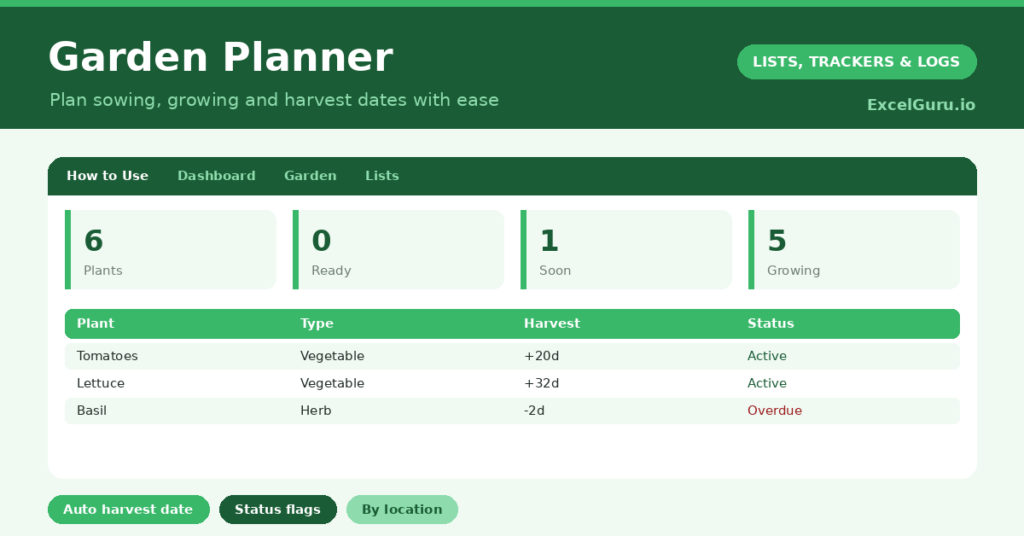
This free template tracks each plant with its sow date and the weeks it needs to mature. So it works out the expected harvest date and flags what is ready, coming soon or still growing. As a result, you tend the right plants at the right time and catch your crops at their peak.
What does the garden planner include?
The template is one planting list feeding a clear dashboard. Dropdowns keep types and locations tidy. In short, you get the following:
- A garden list with the plant, type, location, sow date, weeks to harvest, an auto-calculated expected date, days to date and status.
- An automatic expected harvest date and a Growing, Soon or Ready status for every plant.
- Drop-down lists for type and location, so entries stay consistent.
- Color-coded statuses, so plants nearing harvest stand out.
- A dashboard showing total plants, those ready and due soon, those still growing, your distinct plant types and the soonest harvest.
Which formulas power the garden planner?
Three formulas turn a sow date into a plan. The expected date is =Sow Date + Weeks to Harvest * 7, which simply adds the growing weeks, converted to days, onto the day you planted.
The days to date column is then =Expected Date – TODAY(), and a nested IF labels each plant Ready once the count drops below zero, Soon within fourteen days, otherwise Growing. On the dashboard, COUNTIF tallies each status, and a helper column feeding a MIN surfaces the soonest harvest. So you always know what to pick next, calculated for you.
Why use a garden planner?
The first benefit is timing. Harvesting at the right moment is the difference between a perfect crop and a glut of woody, over-ripe vegetables. So the expected-date countdown helps you pick at the peak.
The second benefit is organisation across the season. By recording sow dates and locations, you can plan successions, avoid sowing everything at once, and remember what is growing where. The dashboard’s soonest-harvest figure keeps the next job in view. Furthermore, a season’s records become a valuable guide for next year. In short, the planner makes a productive garden far less hit-and-miss.
What does the dashboard reveal?
The dashboard turns your beds into a simple to-do list. The ready count tells you what to harvest now, before it spoils or bolts. The due-soon count then warns you what is coming in the next fortnight.
The growing count shows how much is still developing, and the distinct-types figure reflects the variety in your plot. The soonest-harvest date names the very next crop to watch, calculated across everything you grow. Because it all updates daily, the planner stays a living guide through the season. So the dashboard keeps your gardening proactive rather than forgetful.
How do you use it through a season of gardening?
Each time you sow or plant something, add a row with the date and a realistic number of weeks to harvest. So the expected date appears at once. Seed packets usually give a good guide to the growing time.
Then let the planner count down, and check the dashboard regularly for what is ready or due soon. As you harvest, update or remove the entry, and note anything useful for next year. Because the records build over the season, you gradually learn what really thrives in your garden. In short, a moment’s entry at sowing pays off all season long.
How do you customise it?
Edit the plant types and locations on the Lists tab to match your plot, naming your actual beds, pots and borders. Additionally, you can add columns for the variety, the sowing method, or notes on watering and feeding. A column for the yield you got is gold for planning next year. The template suits a few pots on a balcony or a full allotment.
Basic mistakes to avoid
The first mistake is treating the expected date as exact, when weather and conditions always shift it. So use it as a helpful guide, not a guarantee, and check the plants themselves. The second mistake is forgetting to log new sowings as the season gets busy.
A planner that misses half your plot cannot guide you well, so add each sowing as you go. Finally, do not discard last year’s records. They are the most useful planning tool you have, since they show what actually worked in your own garden. Kept year on year, they make you a better grower.
Frequently asked questions
How does the garden planner calculate harvest dates?
It adds the weeks to harvest, converted to days, onto your sow date. A days-to-date countdown then flags each plant as Growing, Soon or Ready, so you know exactly what to tend and pick.
Are the harvest dates exact?
They are a helpful estimate based on typical growing times, not a guarantee. Weather and conditions shift real harvest dates, so use the planner as a guide and always check the plants themselves.
Can I use it for a small space?
Absolutely. It works just as well for a few pots or a balcony as for a full allotment. Edit the locations to match your space, and track as many or as few plants as you like.
Log each sowing with its growing time, let the planner count down, and harvest from the ready list. The dashboard then keeps your next crop in view. A garden planner brings a gentle structure to growing your own, so you spend less time guessing and more time picking produce at its best.