
A recipe index solves the daily 6pm question that defeats even keen cooks: what shall we actually make tonight? Your favourite recipes are scattered across cookbooks, screenshots, websites and memory. So when inspiration is needed most, it is nowhere to be found, and you reach for the takeaway menu instead.
This free template gathers every recipe you love into one searchable list, each tagged with its cuisine, prep time and rating. So you can filter to exactly what suits the evening. As a result, choosing dinner takes seconds, and the recipes you actually enjoy stop getting lost.
What does the recipe index include?
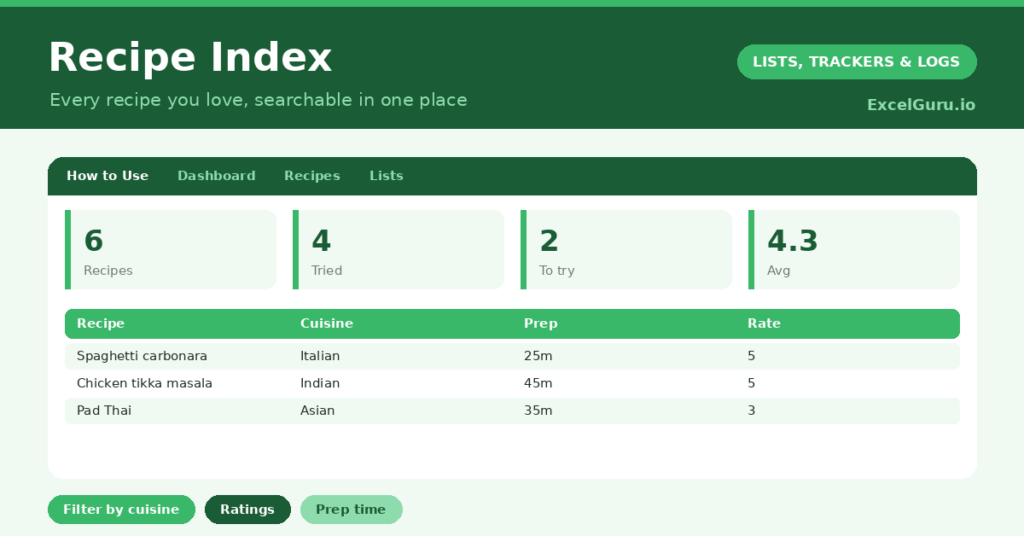
The template is one catalogue feeding a simple dashboard. Dropdowns keep cuisines and meal types tidy. In short, you get the following:
- A recipe list with the recipe, cuisine, meal type, prep time, servings, rating, source and a tried flag.
- Drop-down lists for cuisine, meal type and rating, so entries stay consistent and filterable.
- A source column, so you can always find the full recipe again.
- A tried flag, so you can separate proven favourites from recipes still on your to-try list.
- A dashboard showing total recipes, those tried, those to try, your average rating, average prep time and the range of cuisines.
Which formulas power the recipe index?
The index keeps the cleverness in the dashboard rather than the rows, so adding a recipe stays effortless. A COUNTIF counts how many recipes you have actually tried, and another counts those still on your to-try list.
An AVERAGEIF gives your average rating across the recipes you have scored, ignoring the blanks, and another finds your average prep time. A SUMPRODUCT then counts your distinct cuisines, even when a cuisine appears many times. So the dashboard turns a long list into a quick read on your cooking. The real magic, though, is Excel’s own filter and sort.
Why use a recipe index?
The first benefit is ending decision fatigue. Instead of staring blankly into the fridge, you filter by what you fancy and pick in seconds. So weeknight cooking gets noticeably easier.
The second benefit is rediscovery. We all forget brilliant recipes we made once and loved, and an index brings them back into view. The rating column steers you toward your genuine favourites, while the to-try list keeps your cooking from going stale. Furthermore, the prep-time column lets you match a recipe to the time you actually have. In short, the index makes you a more organised and adventurous cook.
How do you choose dinner with it?
This is where the index earns its keep. Suppose it is a busy Tuesday, so you filter by a prep time under thirty minutes and a high rating, and a shortlist of quick favourites appears. The decision makes itself.
On a relaxed weekend, you might filter by a cuisine you fancy, or sort the to-try list to tackle something new. Because every recipe carries its source, the full method is always one click or one page away. So the index does not store the recipes themselves; instead, it points you straight to them. In short, it turns a sprawling collection into a menu you can browse.
What does the dashboard reveal?
The dashboard offers a fun snapshot of how you cook. The tried and to-try counts show how adventurous you have been, and a long to-try list is a gentle nudge to branch out. So it quietly encourages variety.
The average-rating figure reflects the overall quality of your collection, and the distinct-cuisines count shows your range. The average prep time hints at whether your repertoire leans quick or involved. Because it all updates as you add recipes, the picture grows with your cooking. So the dashboard adds a little insight to the practical core of the index.
How do you customise it?
Edit the cuisines and meal types on the Lists tab to match how you cook. Additionally, you can add columns for the key ingredients, a difficulty rating, or dietary tags such as vegetarian or gluten-free. A column for who in the family liked it is surprisingly useful. The template grows happily from a handful of favourites to a collection of hundreds.
What mistakes should you avoid?
The first mistake is trying to type out full recipes in the spreadsheet, which it is not built for. So record the source instead, and let the index point you to the method. The second mistake is leaving the rating and tried columns blank.
Those fields are exactly what make filtering powerful, so fill them in. Finally, do not let the to-try list gather dust. Its purpose is to keep your cooking fresh, so dip into it regularly. An index you actually browse is what keeps mealtimes interesting.
Frequently asked questions
Does the recipe index store the full recipes?
No, and that keeps it fast to use. It records each recipe’s source, such as a cookbook page or a website, so you can find the full method instantly while the index stays easy to scan and filter.
How do I pick a recipe quickly?
Filter or sort by what suits the evening, such as a short prep time and a high rating on a busy night. A shortlist of matching favourites appears, so the decision takes seconds.
Can it handle a large collection?
Easily. The template works just as well with hundreds of recipes as with a dozen, and the dropdowns and dashboard keep even a big collection tidy and searchable.
Catalogue your recipes with their cuisine, rating and source, then filter to pick dinner in seconds. The dashboard adds a snapshot of how you cook. A recipe index will not chop an onion for you, yet it ends the nightly what-shall-we-eat stalemate and brings your forgotten favourites back to the table.