
A pantry inventory quietly saves money by making sure food gets eaten rather than binned. We buy with good intentions, push items to the back of the cupboard, and rediscover them months past their date. So a clear record of what you have, and when it expires, turns forgotten food into meals.
This free template tracks each item with its location, quantity and expiry date. So it counts down to expiry and flags what you should use soon. As a result, you waste less, shop more deliberately, and always know what is lurking at the back of the shelf.
What does the pantry inventory include?
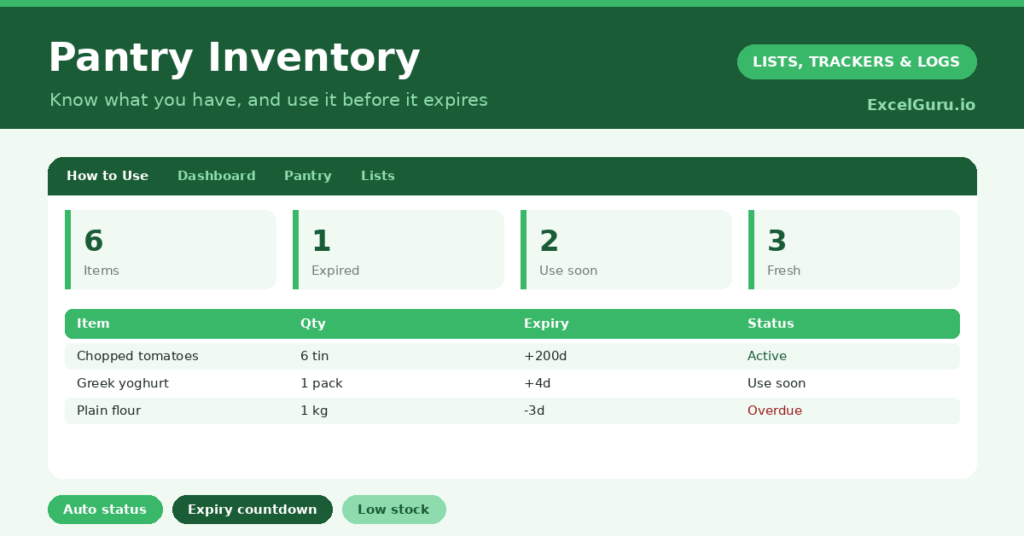
The template is one item list feeding a clear dashboard. Dropdowns keep categories and locations tidy. In short, you get the following:
- A pantry list with the item, category, location, quantity, unit, expiry date, days to expiry and status.
- An automatic Days to Expiry countdown and a Fresh, Use Soon or Expired status for every item.
- Drop-down lists for category, location and unit, so entries stay consistent.
- Color-coded statuses, so expired and use-soon items stand out.
- A dashboard showing total items, expired and use-soon counts, fresh items, low-stock items and your soonest expiry.
Which formulas power the pantry inventory?
Two formulas keep the inventory live. The Days to Expiry column is simply =Expiry Date – TODAY(), so every item counts down on its own. A nested IF then labels each item: Expired if the count is below zero, Use Soon within fourteen days, otherwise Fresh.
On the dashboard, COUNTIF tallies each status, and a SUMPRODUCT counts your low-stock items. A small helper column feeding a MIN then surfaces the single soonest expiry across the whole pantry. So the next thing about to turn is always one glance away. Because it updates daily, the picture never goes stale.
Why keep a pantry inventory?
The financial case is the clearest. Households throw away a startling amount of food, and most of it was simply forgotten. So an inventory that surfaces use-soon items turns waste straight back into savings.
It also makes shopping smarter. With a clear view of your stock, you stop buying duplicates of things you already have three of. The use-soon list practically writes your meal plan for you, since it tells you what to cook first. Furthermore, the low-stock figure helps you build a tidy shopping list. In short, the inventory saves money at both the bin and the till.
What does the dashboard reveal?
The dashboard turns your shelves into an action list. The use-soon count is the one to act on, since those items are your next few meals. So it nudges you to cook before food is wasted.
The expired count is an honest, if slightly uncomfortable, measure of waste, and watching it fall is satisfying. The low-stock figure feeds your shopping list, while the soonest-expiry date names the very next item to use. Because it all updates daily, the inventory stays a living tool rather than a stale list. So the dashboard keeps your kitchen organised and your waste down.
How do you set it up?
You do not need to log every grain of rice. Focus on the items that actually go to waste, such as tins, jars, dairy and anything with a clear date. So the effort stays manageable. Enter each item with its location, quantity and expiry date, and the status fills itself.
Then update it as you shop and cook, adding new items and removing what you use. Check the use-soon list before you plan meals or head to the shops. Because the inventory reflects your real stock, it quickly becomes the first place you look. In short, a few minutes of upkeep turns into real savings over a month.
How do you customize it?
Edit the categories, locations and units on the Lists tab to match your kitchen, adding a *Spice rack* location if you like. Additionally, you can add columns for the cost of each item, a minimum stock level, or the shop you bought it from. A column flagging staples you always want in stock is handy. The template suits a single cupboard or a fully stocked pantry, fridge and freezer.
What mistakes should you avoid?
The first mistake is trying to log absolutely everything, which makes the inventory a chore you abandon. So track the items that genuinely get wasted, and let the rest go. The second mistake is setting it up once and never updating it.
An inventory that does not match your shelves is worse than useless, so keep it current as you cook and shop. Finally, do not ignore the use-soon list. Its whole purpose is to guide your next few meals, so let it shape what you cook. A glance before dinner is what saves the food at the back.
Frequently asked questions
How does the pantry inventory flag items to use?
A Days to Expiry countdown drives a status that reads Use Soon within fourteen days of expiry and Expired once the date passes. The dashboard counts these, so your next meals are obvious.
Do I need to log every single item?
No, and you should not try. Focus on items that actually get wasted, such as tins, dairy and anything dated. Logging everything turns the inventory into a chore you will abandon.
How does it find my soonest expiry?
A helper column lists the days left for each item, and a MIN formula returns the smallest. So the dashboard always names how many days you have until the very next item turns.
Track the items that tend to get wasted, keep the dates current, and cook from your use-soon list. The dashboard then turns your shelves into savings. A pantry inventory is a small habit that quietly cuts your food waste and your grocery bill at the same time.