
A decision matrix is how you make a tough choice with your head rather than your gut. When several options each have pros and cons, it is genuinely hard to weigh them fairly in your mind. So you end up swayed by the most recent conversation or the loudest opinion, rather than what matters most.
This free template scores each option against the criteria you care about, with weights that reflect their importance. So it calculates an objective weighted score and ranks the options. As a result, your decision is transparent, defensible, and based on what you actually value.
What does the decision matrix include?
The template is one scoring grid feeding a clear dashboard. Dropdowns keep the scores tidy. In short, you get the following:
- A scoring matrix with each option, a score from one to five on each criterion, an auto-calculated weighted score and a rank.
- An automatic weighted score and rank for every option.
- Editable weights on the Lists tab, so you decide how much each criterion matters.
- Drop-down lists for scores, so entries stay consistent.
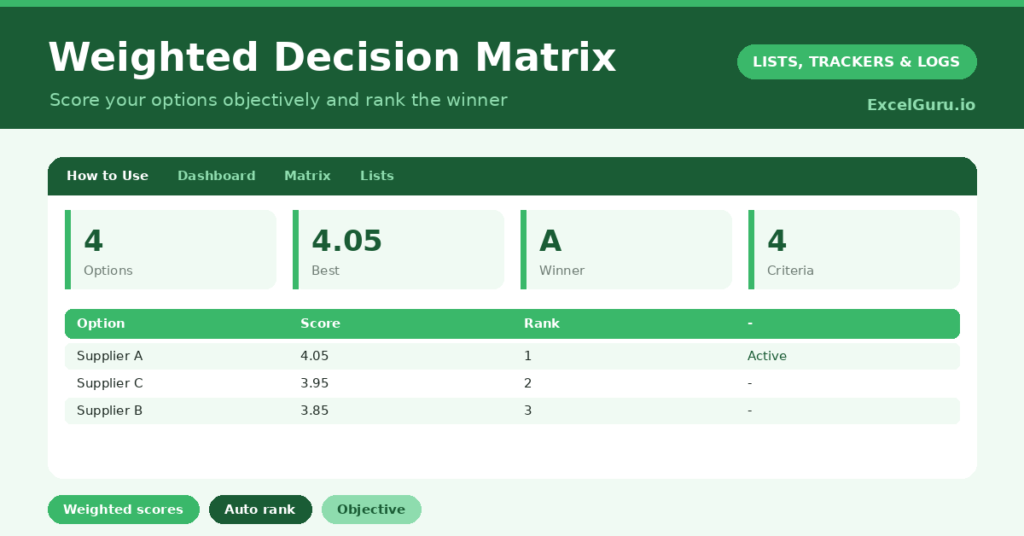
- A dashboard showing the number of options, the best score, the winning option, the lowest score, the criteria count and the total weight.
Which formulas power the decision matrix?
The calculation is the whole point, and it is simpler than it looks. The weighted score multiplies each criterion’s score by its weight and adds them up: =Cost*weight1 + Quality*weight2 + Speed*weight3 + Risk*weight4, reading the weights from the Lists tab.
So an option that scores well on a heavily weighted criterion rightly comes out ahead. The rank then uses =RANK(Score, all scores) to order the options automatically. On the dashboard, INDEX and MATCH name the winner, while a SUM confirms your weights add up to one. So the matrix produces a clear, weighted verdict.
Why use a decision matrix?
The first benefit is objectivity. By scoring against fixed criteria, you strip out the bias and emotion that cloud big decisions. So you compare options on their actual merits, not on a hunch.
The second benefit is clarity about what matters. Setting the weights forces you to decide, up front, which criteria are most important. That conversation alone often resolves a decision. The matrix also makes your reasoning easy to explain and defend to others. Furthermore, it handles complex trade-offs that the mind struggles to balance. In short, it turns an agonizing choice into a structured, confident one.
What does the dashboard reveal?
The dashboard delivers the verdict. The winning option is named for you, so the result of all that scoring is impossible to miss. The best and lowest scores then show how clear-cut the decision really is.
A narrow gap between the top scores tells you the options are closely matched, which is useful to know. The total-weight figure is a quick check that your weights sum to one, so the scores are valid. Because it all updates as you score, you can test different weights and watch the ranking respond. So the dashboard makes the decision both clear and explorable.
How do you use this template?
Start by setting your weights on the Lists tab, deciding how much each criterion matters and making sure they add up to one. So the matrix reflects your real priorities. Then list the options you are choosing between.
Score each option from one to five on every criterion, being as honest and consistent as you can. The weighted scores and ranks appear instantly. Because you can adjust the weights and watch the result change, you can test how sensitive the decision is. In short, a few minutes of scoring replaces hours of going round in circles.
How do you customize it?
The criteria are yours to define. Edit them, and their weights, on the Lists tab to suit any decision, from choosing a supplier to picking a holiday. Additionally, you can add more criteria columns, or a notes column explaining each score. Changing a one-to-five scale to one-to-ten is simple too. The template adapts to almost any choice between competing options.
What mistakes should you avoid?
The first mistake is letting your weights drift away from one, which distorts the scores. So check that they add up, using the total-weight figure as your guide. The second mistake is scoring inconsistently, where a four means one thing for one option and another for the next.
Keep your scoring honest and comparable across the board. Finally, do not treat the result as the final word. The matrix is a tool to inform your judgement, not replace it, so use it to clarify the decision rather than to hand it over entirely. A close result still deserves a human gut-check.
Frequently asked questions
How does the decision matrix calculate the score?
It multiplies each option’s score on every criterion by that criterion’s weight, then adds them up. So criteria you weight more heavily have a bigger effect on the final, ranked score.
Can I choose my own criteria and weights?
Yes, that is the whole idea. Edit the criteria and their weights on the Lists tab to match your decision, just making sure the weights add up to one for valid scores.
Should the matrix make the decision for me?
Think of it as a tool to inform your judgement, not replace it. It clarifies the trade-offs and ranks the options objectively, but a close result still deserves your own final gut-check.
Set your weights, list your options, and score each one honestly. The dashboard then names the winner and shows how clear-cut it is. A decision matrix turns an overwhelming, emotional choice into a transparent, weighted comparison, so you can decide with genuine confidence and explain exactly why.