
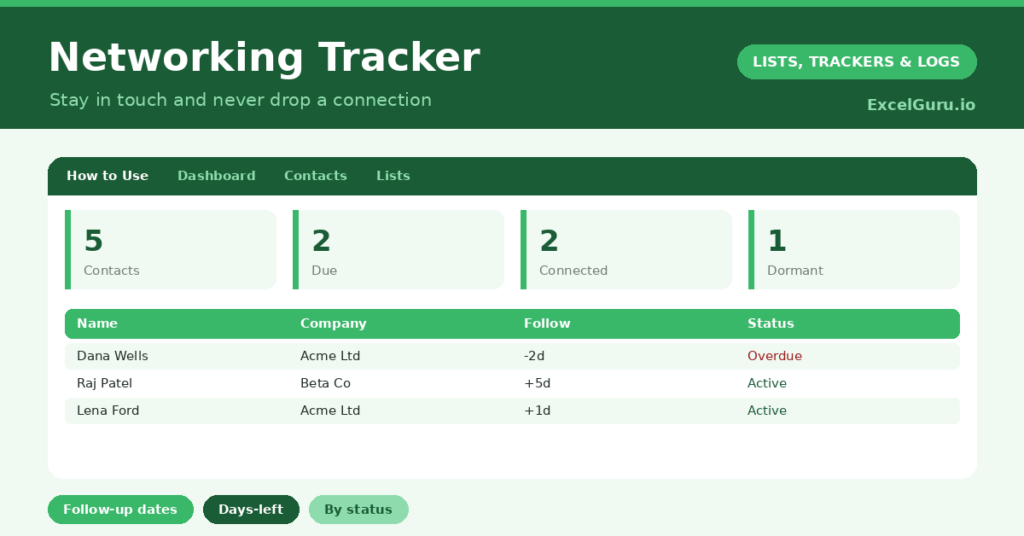
A networking tracker solves the quiet problem that undermines most networking: the follow-up that never happens. You meet someone promising at an event, mean to stay in touch, and then life intervenes. So a valuable connection goes cold simply because nobody remembered to reach out.
This free template keeps your professional contacts in one place, each with a follow-up date. So it counts down to every follow-up and shows who needs contacting this week. As a result, your connections stay warm, and networking becomes a steady habit rather than a flurry of forgotten intentions.
What does the networking tracker include?
The template is one contact list feeding a clear dashboard. A dropdown keeps the statuses tidy. In short, you get the following:
- A contact list with the name, company, role, where you met, last contact, follow-up date, days to follow-up and status.
- An automatic Days to Follow-up countdown for every contact.
- A dropdown for status, so each relationship’s stage is clear.
- Color-coded statuses, so connected, following-up and dormant contacts stand out.
- A dashboard showing total contacts, follow-ups due, those due within seven days, connected contacts, dormant ones and distinct companies.

Which formula powers the networking tracker?
The reminder engine is one simple formula. The Days to Follow-up column is =Follow-up Date – TODAY(), so each contact counts down to the day you planned to reach out. A negative number means a follow-up is overdue.
On the dashboard, a SUMPRODUCT counts the follow-ups that are due or overdue, and another counts those coming up within seven days. A few COUNTIF formulas then tally your connected and dormant contacts. So the dashboard tells you exactly who to contact, without you scanning the whole list.
Why use a networking tracker?
Networking is about relationships, and relationships need maintenance. A tracker turns vague good intentions into scheduled action. So the follow-up actually happens, and your network stays alive.
It also helps you network deliberately rather than randomly. By recording where you met someone and your last contact, you can pick up conversations naturally. The status column shows which relationships are thriving and which are fading. Furthermore, the dormant flag prompts you to revive connections before they disappear entirely. In short, the tracker makes you the kind of person who actually stays in touch.
What does the dashboard reveal?
The dashboard is your weekly networking to-do list. The follow-ups-due figure is the one to act on, since those are the people waiting to hear from you. The due-within-seven-days count then shows what is coming up.
The connected count is a satisfying measure of your active network, while the dormant count is a gentle nudge to reconnect. The distinct-companies figure hints at the breadth of your network. Because it all updates daily, you always know exactly who to reach out to. So the dashboard turns networking from a vague aspiration into a clear, manageable habit.
How do you use it to keep track of your networking journey?
After meeting someone worth knowing, add them straight away, with where you met and a follow-up date. So the connection is captured while it is fresh. A short, prompt follow-up is far more effective than a long, late one.
Then check the dashboard each week, and reach out to everyone whose follow-up is due. Update the last-contact date and set the next follow-up each time. Because the tracker keeps the dates in view, no relationship drifts into silence. In short, a few minutes a week keeps your whole network warm.
How do you customize it for efficient usage?
Edit the statuses on the Lists tab to match how you think about relationships. Additionally, you can add columns for the contact’s email, their interests, or how you might help each other. A priority flag for your most important contacts is useful. The template suits a job seeker, a freelancer building clients, or anyone growing a professional network.
What mistakes should you avoid while tracking your networking journey?
The first mistake is collecting contacts but never setting follow-up dates, which leaves the tracker as a static address book. So always set a next date. The second mistake is letting follow-ups pile up unactioned until the dashboard is all red.
A quick weekly review keeps it manageable. Finally, do not treat every contact identically. Some relationships deserve frequent contact and others an occasional check-in, so set follow-up dates that fit. Thoughtful, well-timed follow-ups beat a flood of generic ones every time.
Frequently asked questions
How does the networking tracker remind me to follow up?
Each contact has a follow-up date, and a Days to Follow-up countdown turns negative once it passes. The dashboard counts the follow-ups due, so you always know who is waiting to hear from you.
Can it help me revive old contacts?
Yes. Mark fading relationships as dormant, and the dashboard counts them, prompting you to reconnect. Setting a fresh follow-up date then brings them back into your regular routine, before the connection fades for good.
Is it useful for job hunting?
Very. It keeps every contact, where you met them and when to follow up in one place, so you can nurture the relationships that often lead to opportunities rather than letting them go cold.
Add each contact with a follow-up date, check the dashboard weekly, and reach out to whoever is due. A networking tracker turns the good intention of “I really should stay in touch” into a simple, reliable habit, so the connections you work to make actually last.