
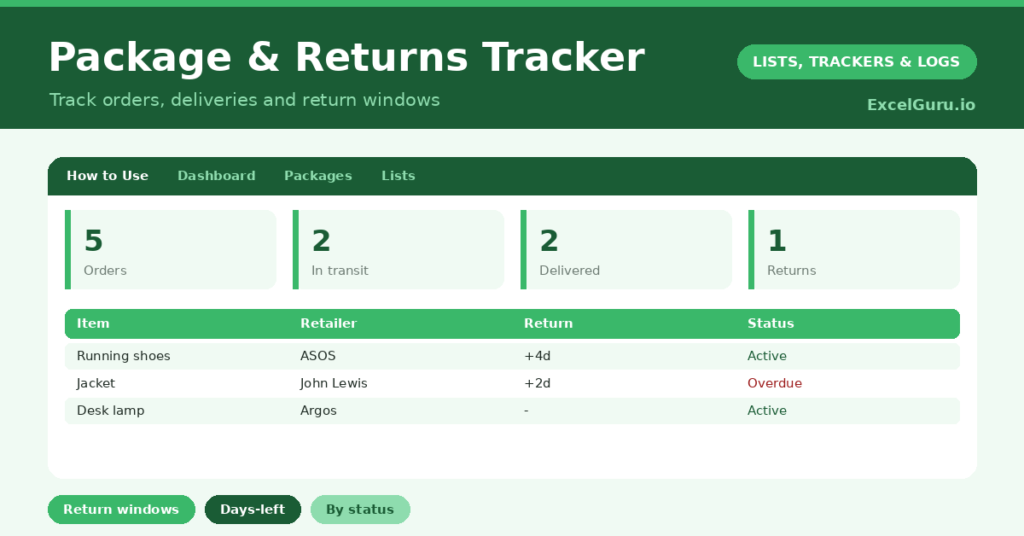
A package tracker brings order to the modern reality of shopping online: parcels arriving from everywhere, half of them needing returns. It is genuinely hard to remember what you ordered, what has arrived, and which items you meant to send back. So a single list of every order and its return window saves both money and confusion. Furthermore, whenever there are multiple shipment from warehouse or stores, it becomes difficult to track the shipments if you are tracking everything via Manual Tracker.
This free template follows each order from placed to delivered, and counts down every return window. So nothing gets lost and no refund deadline slips by. As a result, you always know what is on its way and what needs returning before the window closes.
What does the package tracker include?
The template is one order list feeding a clear dashboard. A dropdown keeps the statuses tidy. In short, you get the following:
- An order list with the item, retailer, order date, status, tracking number, return-by date, days to return and action.
- An automatic Days to Return countdown for anything you might send back.
- A dropdown for status, from Ordered through to Refunded.
- Colour-coded statuses, so deliveries and pending returns stand out.
- A dashboard showing total orders, items in transit, delivered items, returns pending, refunds and returns due within seven days.

Image – Packages and Returns Tracker Excel FormatNote – You can change Return By Date by using “CTRL+SHIFT+3”.
Which formula powers the package tracker?
The return countdown is the key. The Days to Return column is =IF(OR(Return By=””, Status=”Returned”, Status=”Refunded”), “”, Return By – TODAY()), so it counts down only for items still within an open return window.
On the dashboard, COUNTIF formulas tally the statuses, grouping ordered and shipped items as in transit. A SUMPRODUCT then counts the returns due within seven days, which is the figure that protects your refunds. So the dashboard tells you what is arriving and what needs sending back, without any hunting.
Why use a package tracker?
The first benefit is never missing a return deadline. Return windows are easy to forget, and a missed one means money lost. The countdown makes sure you act in time. So you keep the refunds you are owed.
The second benefit is order clarity. With every purchase in one place, you can see what is on its way and chase anything that has not arrived. The tracking numbers live alongside each order for quick reference. Furthermore, the log curbs impulse spending, since seeing all your orders at once is quietly sobering. In short, the tracker keeps online shopping organised and your money protected.
What does the dashboard reveal?
The dashboard gives you a clear read on your online shopping. The returns-due figure is the one to act on, since those items must go back this week to secure a refund. So it is the number that saves you money.
The in-transit count shows what is still on its way, useful for spotting a parcel that has not arrived. The returns-pending count tracks items mid-return, and the delivered count shows what has landed. Because the countdown updates daily, no window closes unnoticed. So the dashboard keeps your orders and returns firmly under control.
How do you use it?
Log each order as you place it, with the retailer and order date, and set the status to Ordered. So nothing is forgotten from the start. As parcels move, update the status to Shipped and then Delivered.
For anything you might return, add the return-by date, and the countdown begins. Check the dashboard regularly, acting on returns due soon. Move items through Return Requested to Refunded as they go. Because every order and window is captured, you never lose track or miss a deadline. In short, a quick update as orders progress keeps everything tidy.
How do you customize it?
Edit the statuses and sample retailers on the Lists tab to match how you shop. Additionally, you can add columns for the order value, the payment method, or a link to the order confirmation. A column for the reason you are returning an item is useful. The template suits an occasional shopper or someone juggling many orders at once.
What mistakes should you avoid?
The first mistake is logging the order but not the return-by date, which defeats the countdown’s whole purpose. Return window is to be traced appropriately. So add the return window for anything you might send back. The second mistake is checking the tracker too rarely and missing a return deadline.
A quick glance every few days is enough to catch anything in time. Finally, do not forget to update statuses as orders arrive. A tracker that does not reflect reality cannot help you, so a moment’s update as parcels land keeps it accurate and genuinely useful.
Frequently asked questions
How does the package tracker protect my refunds?
Each item can have a return-by date, and a Days to Return countdown flags it as the window closes. The dashboard counts returns due within seven days, so you act before any refund deadline passes.
Can it track an order that has not arrived?
Yes. Items marked Ordered or Shipped count as in transit on the dashboard, and the tracking number sits alongside each one, so you can chase a parcel that is taking too long.
Does it handle the whole return process?
It does. Move an item from Return Requested to Returned and then Refunded, and the dashboard tracks each stage, so you can see exactly where every return stands.
Log each order, set return windows, and update statuses as parcels move. The dashboard then flags returns due and items in transit. A package tracker turns the chaos of online shopping into a tidy, controlled list, so parcels never go missing and you never lose a refund to a forgotten deadline.