
An expense tracker answers the question that quietly undermines most budgets: where did all my money go? Spending happens in dozens of small moments, a coffee here, a subscription there, and none of it feels significant. So the total at the end of the month comes as a genuine surprise.
This free template lets you log every expense by category as you spend. So it totals your weekly and monthly outgoings automatically. As a result, your spending becomes visible, and you can finally see exactly where your money goes, which is the first step to taking control of it.
What does the expense tracker include?
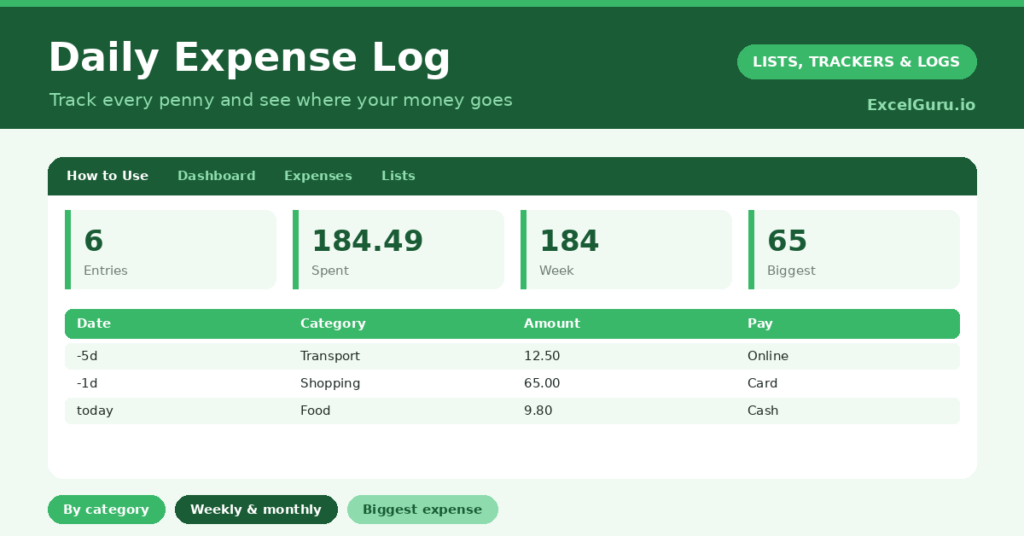
The template is one expense log feeding a clear dashboard. Dropdowns keep categories and payment methods tidy. In short, you get the following:
- An expense log with the date, category, description, amount, payment method and notes.
- Drop-down lists for category and payment method, so entries stay consistent and groupable.
- A description column, so you remember what each expense actually was.
- A notes column for context, such as whether a cost was shared or one-off.
- A dashboard showing total entries, total spent, this week, this month, your biggest single expense and your number of categories.

Which formulas power the expense tracker?
The dashboard does the adding up for you. A SUM of the amount column gives your total spend, while a clever SUMPRODUCT totals only this week’s and this month’s expenses by checking the date against today.
So you can see your spending over any period without filtering by hand. A MAX finds your single biggest expense, which is often the eye-opener, and a SUMPRODUCT counts your distinct categories. Because every figure updates as you log, your spending picture is always current. So the tracker turns scattered purchases into a clear total.
Why use an expense tracker?
Awareness is the whole point. You cannot manage what you do not measure, and most overspending comes from costs we simply do not notice. A tracker makes them impossible to ignore. So spending becomes a series of conscious choices.
It also reveals patterns. Categorising your spending shows where the money really goes, and it is rarely where people expect. That insight is what makes a budget realistic rather than wishful. The biggest-expense figure often prompts a useful rethink. Furthermore, simply logging a purchase can make you pause before the next one. In short, the tracker turns vague money worry into clear, actionable information.
What does the dashboard reveal?
The dashboard gives you an honest read on your finances. The this-month figure is the headline, and for many people it is a genuine wake-up call. So it is the number most likely to change a habit.
This week’s total shows your recent pace of spending, which helps you stay on budget. The biggest-expense figure flags where large sums went, and the category count hints at how varied your spending is. Because it all updates as you log, you can course-correct mid-month rather than discovering the damage too late. So the dashboard keeps your spending under control.
How do you use it?
The habit that makes it work is logging expenses as they happen, or at least daily. So nothing is forgotten. Enter the amount, pick a category, and add a short description, which takes only seconds on a phone.
Use the dropdown categories consistently, since that is what makes the totals meaningful. Then review the dashboard regularly, weekly at least, to see how you are tracking. Because the picture builds over time, you start to see clear patterns within a month. In short, a few seconds per purchase gives you complete control over where your money goes.
How do you customise this expense tracking template?
Edit the categories and payment methods on the Lists tab to match your life, adding categories like Childcare or Pets as needed. Additionally, you can add columns for a monthly budget per category, whether an expense was essential, or who it was for. A column flagging recurring costs is useful. The template suits a personal budget, a household, or a small side business.
What mistakes should you avoid?
The first mistake is logging the big purchases but ignoring the small daily ones. It is the little, frequent spends that quietly add up, so capture them all. The second mistake is inventing a new category for every expense, which makes the totals meaningless.
Stick to a tidy set of categories. Finally, do not just record your spending without ever reviewing it. The insight comes from looking at the dashboard and acting on it, so make the weekly review a habit. A tracker you never review is just a list of regrets.
Frequently asked questions
How does the expense tracker total my spending?
A SUM gives your overall total, and SUMPRODUCT formulas total just this week’s and this month’s spending by comparing each date with today. So you can see your outgoings over any period instantly.
Can I see where most of my money goes?
Yes. By logging each expense with a category, you can sort or filter to see your spending by area. The dashboard also flags your single biggest expense, which is often revealing.
Is it good for budgeting?
Very. Tracking is the foundation of any budget, because you cannot control spending you cannot see. Once you know where your money goes, setting a realistic budget per category becomes straightforward.
Log every expense, categorise it consistently, and review the dashboard each week. Seeing your real weekly and monthly spend is often the nudge that changes a habit. An expense tracker will not spend your money for you, yet it makes sure you always know exactly where it went, which is where good budgeting begins.