
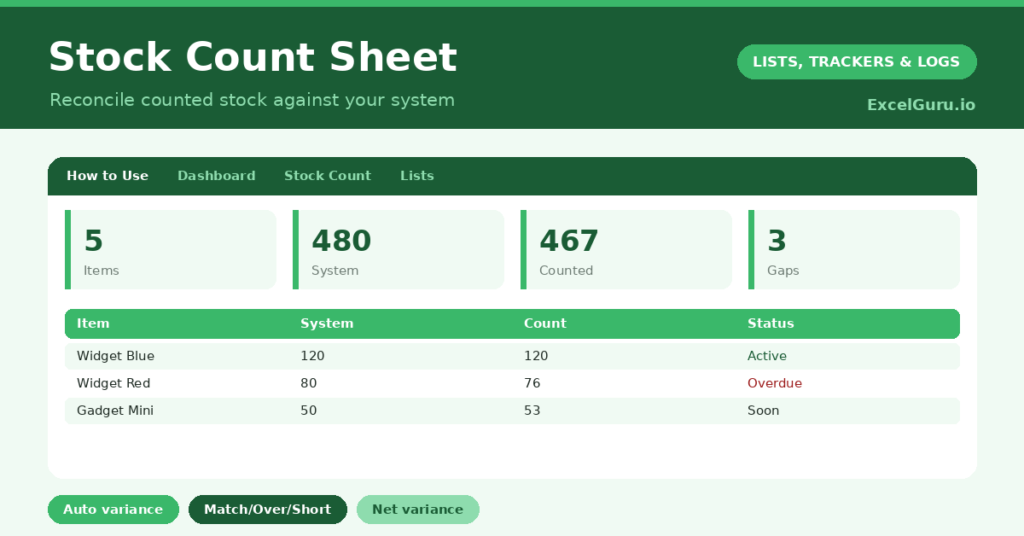
A stock count sheet is how a business turns the chore of a stocktake into reliable, actionable data. Counting physical stock is only half the job; the value comes from comparing it against what your system says should be there. So a sheet that calculates the variance for you is what reveals shrinkage, errors and discrepancies.
This free template lets you enter your system quantity and your counted quantity side by side. So it works out the variance and flags every discrepancy automatically. As a result, you can reconcile your inventory quickly and see exactly where the gaps are.
What does the stock count sheet include?
The template is one count sheet feeding a clear dashboard. A dropdown keeps locations tidy. In short, you get the following:
- A count sheet with the SKU, item, location, system quantity, counted quantity, an auto-calculated variance and status.
- An automatic variance and a Match, Over or Short status for every line.
- A dropdown for location, so you can count area by area.
- Colour-coded statuses, so shortages stand out in red.
- A dashboard showing items counted, total system, total counted, discrepancies, matches and your net variance.

Which formulas power the stock count sheet?
Two formulas do the reconciling. The variance is =Counted – System, so counting 76 against a system figure of 80 shows minus 4. A nested IF then labels each line: zero is a Match, a positive figure is Over, and a negative one is Short.
On the dashboard, a SUMPRODUCT counts the lines where the variance is not zero, which is your discrepancy total. A COUNTIF counts the perfect matches, and a SUM of the variance column gives your net position. So the sheet turns a count into an instant reconciliation against your records.
Why use a stock count sheet?
The first benefit is accurate inventory records. Over time, real stock drifts away from system figures through theft, breakage and miscounts. A regular count corrects that drift. So your records stay trustworthy, which everything else depends on.
The second benefit is spotting problems. Persistent shortages on certain items may point to theft or supplier issues, while overs suggest data-entry errors. The variance flags exactly where to investigate. The net-variance figure gives a quick sense of overall accuracy. Furthermore, regular counts are essential for valuing stock and for accounts. In short, the sheet makes a stocktake genuinely useful rather than just laborious.
What does the dashboard reveal?
The dashboard gives you an instant reconciliation. The discrepancies figure is the one that matters, since it tells you how many lines disagree with your system. So it is your investigation list.
The matches count is reassuring, showing how much of your stock is spot on. The total system and total counted figures give the headline comparison, and the net variance shows whether you are broadly over or short overall. Because it all updates as you enter counts, the reconciliation happens live. So the dashboard turns counting into immediate insight.
How do you use it?
Before counting, enter each item with its SKU, location and the quantity your system shows. So you have a baseline to count against. Then, working area by area, enter the counted quantity for each line.
The variance and status appear instantly, so you can spot a major discrepancy on the spot and recount if needed. Afterwards, review the dashboard and investigate every line that disagrees. Because the sheet does the comparison, you spend your time fixing problems rather than doing arithmetic. In short, count carefully and let the sheet handle the reconciliation.
How do you customise it?
Edit the locations on the Lists tab to match your premises. Additionally, you can add columns for the unit cost, a calculated variance value in money, or the counter’s initials. A column for the date last counted helps with rolling counts. The template suits a small shop, a warehouse, or a hospitality stockroom.
What mistakes should you avoid?
The first mistake is entering the system quantity carelessly, since the whole reconciliation depends on an accurate baseline. So pull those figures correctly before you start. The second mistake is ignoring small, recurring discrepancies.
A persistent small shortage on one line often signals a real problem worth investigating. Finally, do not count erratically. A reliable stocktake needs a consistent method and a complete count, so work methodically through each location. Careful, complete counting is what makes the variance trustworthy.
Frequently asked questions
How does the stock count sheet calculate variance?
It subtracts your system quantity from your counted quantity for each line. A status then labels it Match, Over or Short, and the dashboard counts the discrepancies and your net variance.
Can I count by location?
Yes. Each line has a location, so you can work through one area at a time and filter by it. That makes a methodical, complete count far easier in a larger space.
Does it value the discrepancies in money?
Not by default, but you can add a unit-cost column and a formula multiplying it by the variance. That turns each discrepancy into a monetary figure for your accounts.
Enter your system figures, count area by area, and let the sheet flag every discrepancy. The dashboard then reconciles your stock at a glance. A stock count sheet turns the laborious chore of a stocktake into clear, actionable data, so your inventory records stay accurate and any problems surface quickly.