
A monthly budget planner is the single most useful tool in personal finance, because it turns vague money worry into a clear plan. Most overspending happens not through extravagance but through simply not having a plan for the month. So setting out your income and expenses, then tracking what really happens, is what puts you back in control.
This free template lets you plan every income and expense line, then compare your actual spending against your budget. So it shows your monthly surplus or deficit at a glance. As a result, you can see exactly where your money is going and adjust before the month gets away from you.
What does the monthly budget planner include?
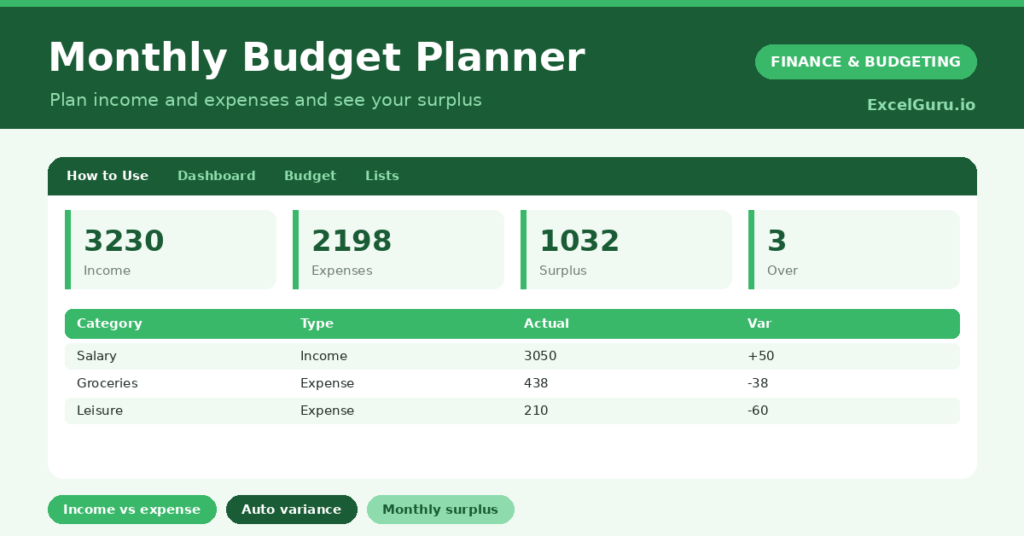
The template is one budget table feeding a clear dashboard. A dropdown keeps income and expense lines tidy. In short, you get the following:
- A budget table with the category, type, budgeted amount, actual amount, an auto-calculated variance and percent used.
- A dropdown to mark each line as Income or Expense, so the surplus calculates correctly.
- An automatic variance and percent used for every line.
- Colour-coding that flags any expense where you have gone over budget.
- A dashboard showing total income, total expenses, your surplus or deficit, your budgeted surplus, over-budget lines and your number of items.

Which formulas power the monthly budget planner?
The clever part is how income and expenses separate. A SUMIF totals everything marked Income, and another totals everything marked Expense. Your surplus is then simply the income total minus the expense total.
Each line’s variance is =Budgeted – Actual, and the percent used is =Actual / Budgeted, so you see exactly where the pressure is. A SUMPRODUCT counts the expense lines that have gone over budget. So the planner turns a list of figures into a clear verdict on your month.
Why use a monthly budget planner?
The first benefit is control. A budget gives every pound a purpose before the month begins, so spending becomes a series of conscious choices. So you reach month-end on plan rather than wondering where it all went.
The second benefit is early warning. Tracking actual against budget shows a category drifting over while there is still time to act. The surplus figure tells you, in one number, whether you are living within your means. Grouping income and expenses makes the whole picture clear. Furthermore, a budget that is reviewed each month gets steadily more realistic. In short, the planner turns money stress into money management.
What does the dashboard reveal?
The dashboard gives you an honest read on your month. The surplus or deficit figure is the headline, and it is the number that tells you whether the month worked. So it is the first thing to check.
The income and expense totals show the two sides of the equation, and the over-budget count points at exactly which categories need attention. The budgeted surplus shows what you had planned for, so you can compare plan against reality. Because it all updates as you enter figures, you can course-correct mid-month. So the dashboard keeps you firmly in control.

How do you use it?
At the start of the month, list your income and your expense categories, setting a realistic budget for each. So you begin with a clear plan. Mark each line as Income or Expense, which is what lets the surplus calculate.
Then, as the month unfolds, enter your actual figures. The variance and surplus update instantly, so you can see any category heading over. Review the dashboard regularly and adjust where needed. At month-end, refine next month’s budget from what you learned. Because the plan improves each time, your budgeting gets more accurate. In short, plan, track and review.
How do you customize it?
Edit the expense ideas on the Lists tab to match your life, adding categories like *Childcare* or *Pets*. Additionally, you can add columns for a sub-category, the previous month’s actual, or a notes field. Many people add several income lines for a varied wage. The template suits a personal budget, a household, or a simple side-business cash plan.
What mistakes should you avoid?
The first mistake is setting an aspirational budget that ignores what you actually spend. So base your first budget on real figures, then refine it. The second mistake is setting the budget but never entering your actuals.
The control comes from comparing the two, so keep your spending updated. Finally, remember this is a planning tool, not financial advice; for big decisions, a qualified adviser can help. A budget you refine each month beats a perfect one you abandon, so treat every month as useful information.
Frequently asked questions
How does the monthly budget planner calculate my surplus?
It totals everything marked Income and subtracts everything marked Expense, using SUMIF formulas. The result is your monthly surplus or deficit, shown on the dashboard and updated as you enter figures.
Can I track several income sources?
Yes. Add as many Income lines as you need, such as salary, side income or benefits. They all roll into your total income, so a varied or irregular wage is easy to plan around.
Should I budget from past spending?
Yes, especially at first. Basing your budget on what you actually tend to spend makes it realistic. You can then refine it each month as you learn where your money really goes.
List your income and expenses, set realistic budgets, track your actuals, and review at month-end. The dashboard then shows your surplus and flags any overspending. A monthly budget planner turns the worry of “did I overspend?” into a clear, controllable plan that gets a little more accurate, and a lot less stressful, every month.