
A membership tracker stops the small, recurring drain of memberships you forget you have. Gyms, clubs, professional bodies and software subscriptions all renew quietly, often on auto-renew, and it is easy to keep paying for something you no longer use. So a single record of every membership and its renewal date saves real money.
This free template logs each membership with its cost and renewal date. So it counts down to every renewal and flags which ones renew automatically. As a result, no renewal catches you out, and you can decide to keep or cancel each one with time to spare.
What does the membership tracker include?
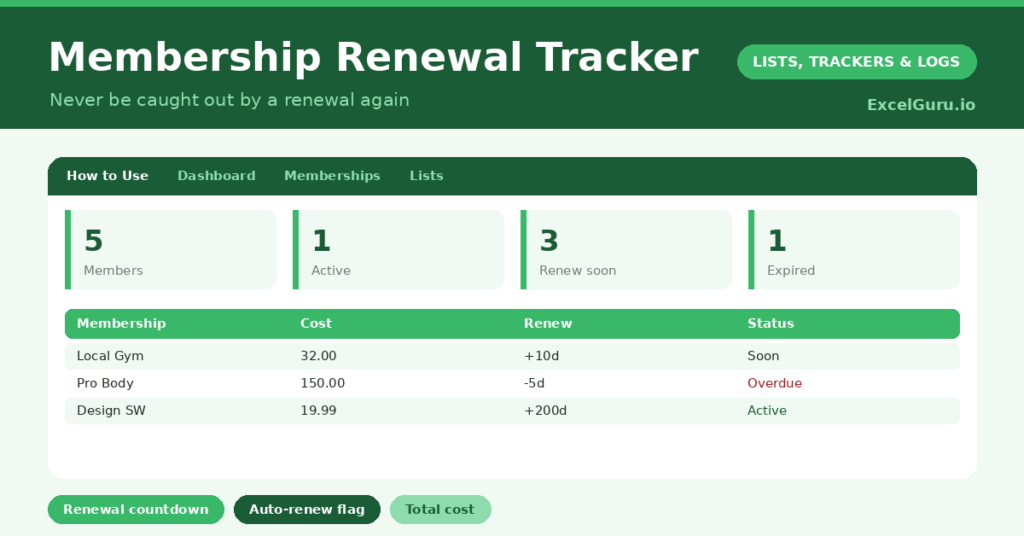
The template is one membership list feeding a clear dashboard. Dropdowns keep types and auto-renew flags tidy. In short, you get the following:
- A membership list with the membership, type, cost, renewal date, days to renewal, an auto-renew flag and status.
- An automatic days-to-renewal countdown and a colour-coded status for every membership.
- Drop-down lists for type and the auto-renew flag, so entries stay consistent.
- A cost column, so you can see what each membership is worth to you.
- A dashboard showing total memberships, active ones, those renewing soon, expired ones, your total cost and how many auto-renew.

Which formulas power the membership tracker?
Two formulas keep your renewals in view. The days to renewal is =Renewal Date – TODAY(), so each membership counts down on its own. A nested IF then labels each one Active, Renew Soon (within 30 days) or Expired, colour-coded for an instant read.
On the dashboard, COUNTIF totals each status, so you can see your renewal workload at a glance. A SUM adds up your total membership cost, and another COUNTIF counts how many renew automatically. So the tracker surfaces both what is due and what will quietly bill you.
Why use a membership tracker?
The first benefit is catching auto-renewals in time. Many memberships renew automatically, and the moment to cancel passes unnoticed. The countdown and auto-renew flag give you that moment back. So you only pay for what you actually want.
The second benefit is seeing the true cost. Memberships feel small individually, but together they add up, and the total is often surprising. That figure prompts the obvious question of what is still worth keeping. The tracker also keeps renewal dates handy for budgeting. In short, it turns silent, automatic payments into deliberate choices.
What does the dashboard reveal?
The dashboard keeps your memberships under control. The renewing-soon count is the one to act on, since those are the decisions facing you this month. So it tells you what needs attention now.
The auto-renew count is a quiet warning of what will bill you without asking, which is exactly where forgotten money goes. The total-cost figure is the wake-up call, gathering every membership into one number. The active and expired counts round out the picture. Because it all updates daily, nothing creeps up on you. So the dashboard keeps your memberships deliberate.
How do you use it?
List every membership you hold, with its cost and renewal date. So nothing hides. The status and countdown then take care of themselves, flagging each one as its renewal nears.
Mark which memberships renew automatically, since those are the ones to watch most closely. Check the dashboard every month, and act on anything renewing soon, deciding whether to keep or cancel. Because the total cost is always visible, you are nudged to review what you no longer use. In short, a quick monthly glance keeps your memberships worth their money.
How do you customise it?
Edit the types on the Lists tab to match your memberships, from gyms to professional bodies. Additionally, you can add columns for the renewal website, the payment card, or a note on whether a membership is worth keeping. A reminder-days column lets you set your own warning window. The template suits a single gym membership or a whole portfolio of subscriptions.
What mistakes should you avoid?
The first mistake is logging the membership but not flagging whether it auto-renews. The auto-renewals are exactly the ones that bill you silently, so always note them. The second mistake is checking the tracker too rarely and missing a cancellation window.
A quick monthly glance is enough to stay ahead. Finally, do not just track the memberships without ever reviewing their value. The real saving comes from cancelling what you no longer use, so let the total cost prompt an honest review. A membership you never use is money quietly leaving each month.
Frequently asked questions
How does the membership tracker warn me before a renewal?
A days-to-renewal countdown flags any membership within 30 days as Renew Soon, and the dashboard counts them. So you can decide to keep or cancel well before the renewal date.
Does it flag auto-renewals?
Yes. An auto-renew flag marks the memberships that bill you automatically, and the dashboard counts them. Those are the ones most worth watching, since the cancellation window passes easily.
Can it show my total membership cost?
Yes. A SUM totals the cost of all your memberships on the dashboard. Seeing that single figure is often the prompt to review which ones are genuinely worth keeping.
List every membership, flag the auto-renewals, and check the dashboard each month. The countdown then makes sure no renewal slips by unnoticed. A membership tracker is a small habit that protects you from paying, month after month, for things you meant to cancel but simply forgot.