
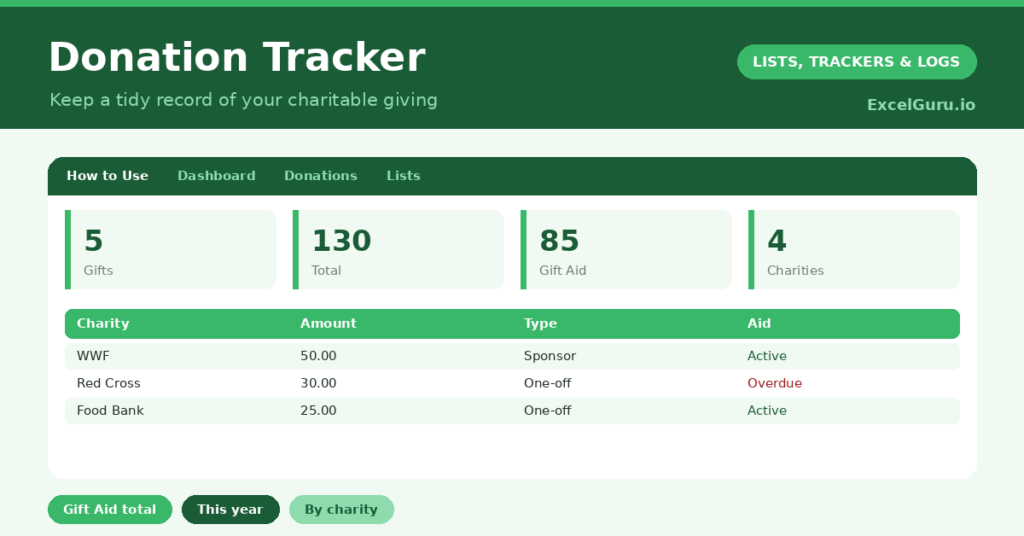
A donation tracker brings welcome order to your charitable giving, which is otherwise surprisingly hard to recall. Gifts go out across the year, to different charities, in different ways, and by the time you need a total, for tax, budgeting or your own interest, it is scattered and forgotten. So a single record of every donation is genuinely useful.
This free template logs each gift with its amount and whether it was Gift Aided. So it totals your giving overall and for the current year. As a result, you have a tidy record ready whenever you need it, and a clear picture of your generosity.
What does the donation tracker include?
The template is one donation log feeding a clear dashboard. Dropdowns keep types and Gift Aid tidy. In short, you get the following:
- A donation log with the date, charity, amount, type, a Gift Aid flag, a reference and notes.
- Drop-down lists for type and the Gift Aid flag, so entries stay consistent.
- A reference column, so you can keep receipt or confirmation numbers.
- Colour-coding on the Gift Aid flag, so eligible gifts stand out.
- A dashboard showing total donations, total donated, this year’s giving, your Gift-Aided total, distinct charities and your largest gift.

Which formulas power the donation tracker?
The dashboard does the totalling for you. A SUM of the amount column gives your overall giving, and a SUMPRODUCT totals only this year’s donations by checking each date against the start of the year.
A SUMIF adds up only the Gift-Aided donations, which is exactly the figure that matters for tax in many countries. A SUMPRODUCT counts your distinct charities, and a MAX finds your largest single gift. So the tracker turns a year of scattered giving into the totals you actually need.
Why keep a donation tracker?
The first reason is tax and record-keeping. In many places, charitable giving has tax implications, and a clear, dated record makes any claim straightforward. So you keep what you are entitled to, with no scrambling for receipts.
The second reason is intentional giving. Seeing your total and your giving by charity helps you give deliberately, in line with what matters to you, rather than ad hoc. The Gift Aid flag ensures you capture the extra value the scheme adds. Furthermore, a record of your generosity over a year can be quietly heartening. In short, the tracker makes giving both organised and meaningful.
What does the dashboard reveal?
The dashboard gives you a clear view of your giving. The this-year figure is the one most people want, ready for any tax return or annual review. So it is the headline number.
The Gift-Aided total matters for claims, kept neatly separate from non-eligible gifts. The distinct-charities count shows how widely you give, and the largest-gift figure marks your most significant donation. The overall total reflects your generosity across the whole record. Because it all updates as you log, the picture stays current. So the dashboard makes your giving easy to review and report.
How do you use it?
Log each donation when you make it, with the charity, amount and type. So nothing is forgotten by year-end. Flag whether the gift was Gift Aided, and note any reference or receipt number for your records.
Then, whenever you need a total, the dashboard has it ready, whether for a tax return or a personal review. Because every gift is captured as it happens, your records are always complete and accurate. So a moment’s logging per donation saves a great deal of effort later, and ensures you never miss a claim. In short, log as you give, and the totals look after themselves.
How do you customise it?
Edit the types and sample charities on the Lists tab to match your giving. Additionally, you can add columns for the campaign, whether a gift was anonymous, or a goal you are giving toward. A column for the tax year is useful where it differs from the calendar year. The template suits occasional giving or regular, planned philanthropy.
What mistakes should you avoid?
The first mistake is forgetting to flag Gift Aid, since that is the figure tax claims rely on. So set it for every eligible gift. The second mistake is not keeping references or receipts, which you may need to support a claim.
Record them as you go. Finally, do not leave logging until the end of the year, when memory has faded and receipts are lost. A donation logged at the time is accurate; one reconstructed months later is a guess. Timely entries are what make your record reliable when it matters.
Frequently asked questions
How does the donation tracker total this year’s giving?
A SUMPRODUCT adds up only the donations dated within the current year, comparing each date with the start of the year. So your annual total is always ready for a tax return or review.
Does it track Gift Aid?
Yes. Flag each eligible gift, and a SUMIF totals just your Gift-Aided donations. That gives you the figure that matters for tax claims, kept separate from non-eligible giving.
Should I keep references?
Yes, where you can. A reference or receipt number supports any tax claim and is easy to note at the time. Reconstructing them later is far harder, so record them as you give.
Log each donation, flag Gift Aid, and keep your references. The dashboard then totals your giving and this year’s contributions. A donation tracker keeps your charitable record tidy and ready for tax time, while giving you a clear, heartening picture of the generosity you have shown across the year.