
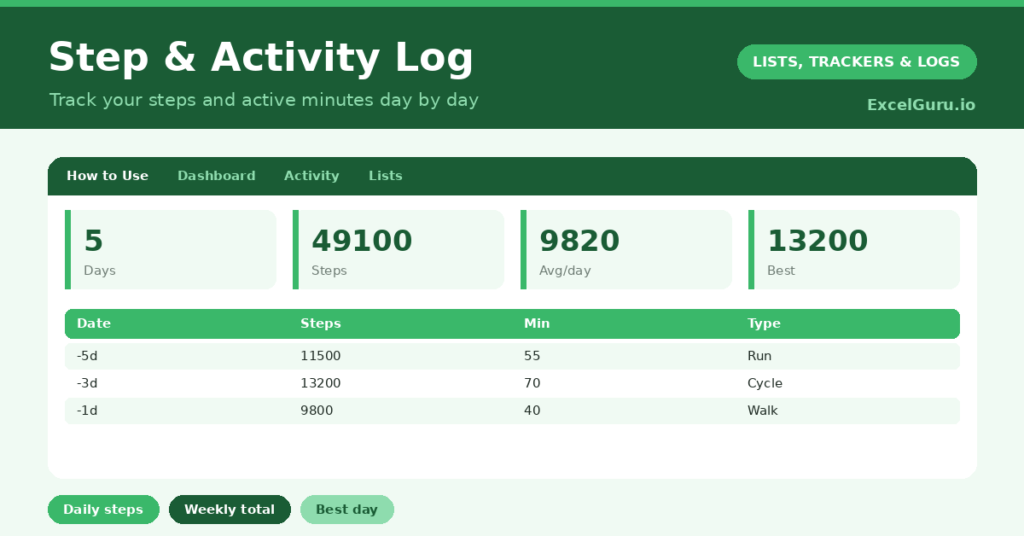
A step tracker is a simple, motivating way to keep your daily activity in view. Most of us have a rough sense of being active, but a vague feeling is easy to fool. So writing down your steps and active minutes each day turns that feeling into a clear, encouraging record you can actually act on.
This free template logs your daily steps, active minutes and activity type. So it totals your week and shows your average and best day. As a result, your movement becomes visible, which is exactly what helps you keep it up over time.
What does the step tracker include?
The template is one activity log feeding a motivating dashboard. A dropdown keeps activity types tidy. In short, you get the following:
- An activity log with the date, steps, active minutes, activity type, distance and notes.
- A dropdown for activity type, so walks, runs and rides are easy to compare.
- A distance column, for any activity where you tracked it.
- A notes column for how a session felt or anything worth remembering.
- A dashboard showing days logged, total steps, your average steps per day, this week’s steps, your best day and total active minutes.
Which formulas power the step tracker?
The dashboard does the totalling for you. A SUM of the steps column gives your overall total, and an AVERAGEIF works out your average steps per day, ignoring blank rows so the figure stays fair.
A SUMPRODUCT totals just this week’s steps, which is the truest measure of recent activity, and a MAX finds your best day. A SUM of the active-minutes column tracks your overall movement time. So the log turns a string of days into the encouraging totals that keep you going.
Why use a step tracker?
Motivation is the biggest benefit. Seeing your steps add up, and a streak of active days build, is genuinely encouraging. So the tracker helps you keep moving, especially on the days you might not bother.
It also gives you an honest baseline. Many people overestimate how active they are, and a clear average is a useful reality check. The weekly total helps you set a gentle, realistic goal to build on. The best-day figure is a personal record to enjoy beating. In short, the tracker makes everyday activity visible and rewarding, without any pressure.
What does the dashboard reveal?
The dashboard sums up your activity at a glance. The average-steps figure is the honest headline, showing your typical day rather than your best one. So it is a fair measure to build from.
This week’s steps shows your recent momentum, which is what keeps activity going. The best-day figure is a cheerful personal record, and the total active minutes capture movement that steps alone miss, like cycling. Because it all updates as you log, the trend stays current and encouraging. So the dashboard keeps you moving without turning it into a chore.
How do you use it?
Log your day with your step count and active minutes, ideally each evening while it is fresh. So nothing is missed. Note the activity type and distance if you tracked them, which adds useful context.
Check the dashboard weekly, using your average and weekly total to set a gentle goal to build on. There is no need to chase huge numbers; steady, consistent activity is the aim. Because the record grows day by day, your progress stays visible and motivating. In short, a quick daily entry keeps your activity on track.
How do you customise it?
Edit the activity types on the Lists tab to match how you move. Additionally, you can add columns for how you felt, the weather, or a simple energy rating. A weekly step goal is a gentle motivator if you want one. The template suits a casual walker building a habit or someone training more seriously, with no calorie or weight figures to worry about.
What mistakes should you avoid?
The first mistake is setting an unrealistic daily target and feeling defeated when you miss it. So build gradually from your real average, rather than chasing a number from day one. The second mistake is only logging your most active days.
The quieter days matter too, for an honest picture, so record them all. Finally, do not treat a single low day as a failure. Activity naturally varies, so watch the weekly trend rather than judging any one day. Consistency over time, not any single day, is what builds a lasting habit.
Frequently asked questions
How does the step tracker work out my average?
An AVERAGEIF takes the mean of your daily step counts, ignoring any blank rows. So the figure reflects the days you actually logged, giving you an honest sense of a typical day.
Can I log activities other than walking?
Yes. The activity-type dropdown covers walks, runs, cycling, the gym and sport, and the active-minutes column captures movement that steps alone miss, like cycling or a workout.
Does it count calories?
No, and that is deliberate. It focuses on steps, active minutes and consistency rather than calories or weight, so it stays a simple, positive way to keep your everyday activity in view.
Log your steps and active minutes each day, and let the dashboard total your week. A step tracker keeps your everyday movement visible and your progress encouraging, so building a gentle, consistent activity habit feels rewarding rather than like one more thing to get right.