
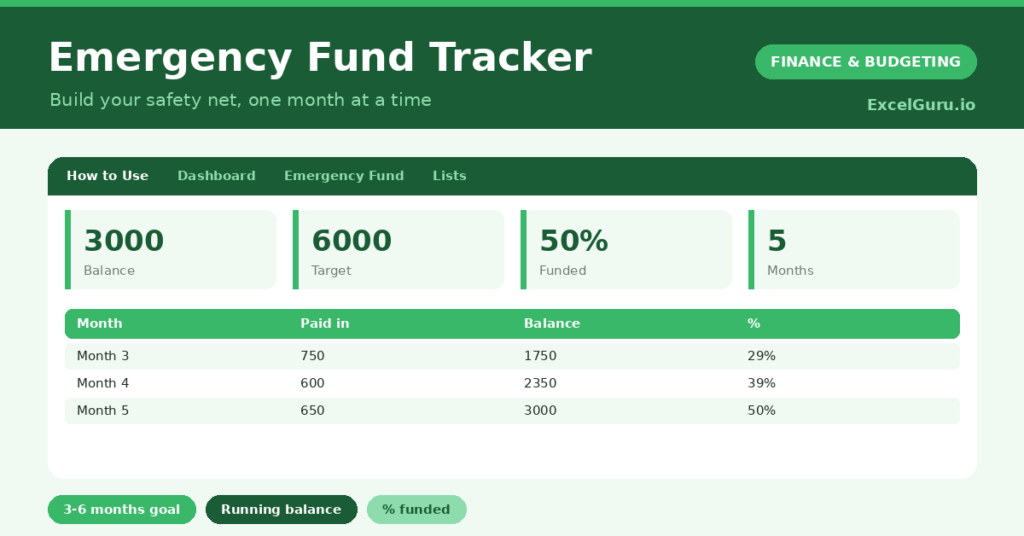
An emergency fund tracker helps you build the one thing that turns a financial crisis into a mere inconvenience: a cash safety net. A surprise car repair or a gap between jobs is far less frightening when you have savings set aside for exactly that. So a clear goal, and a record of your progress toward it, is what makes building that buffer feel achievable.
This free template lets you set a target, often a few months of essential expenses, then log each monthly contribution as your balance grows. So it shows your percent funded and what remains. As a result, your safety net builds steadily, and you can see it taking shape month by month.
What does the emergency fund tracker include?
The template is one contributions log feeding a clear dashboard. In short, you get the following:
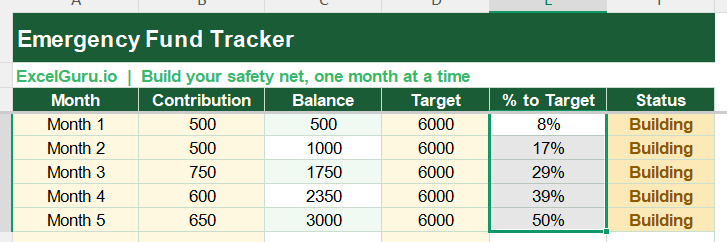
- A contributions log with the month, contribution, an auto-calculated running balance, target, percent to target and status.
- An automatic running balance that builds as you add each contribution.
- An automatic percent to target and a Funded or Building status.
- A target column, so you can set your own goal in months of expenses.
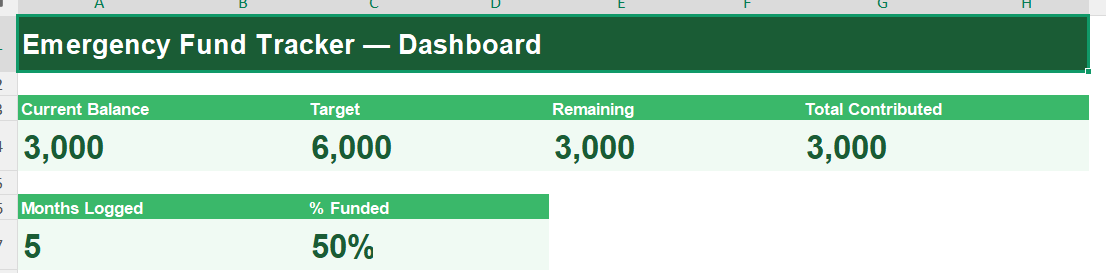
- A dashboard showing your current balance, target, remaining, total contributed, months logged and percent funded.
Which formulas power the emergency fund tracker?
The running balance does the work for you. Each month’s balance is =Previous Balance + Contribution, so your savings accumulate automatically as you log each deposit. The percent to target is =MEDIAN(0, Balance / Target, 1), capped neatly at 100%.
The status reads Funded once your balance meets the target, and Building until then. On the dashboard, a SUM gives your total contributed, and your percent funded divides that by your target. So the tracker turns a series of deposits into a clear, encouraging measure of your safety net.
Why build an emergency fund?
The first reason is peace of mind. Knowing you could handle an unexpected bill without panic, or borrowing, genuinely reduces financial stress. So an emergency fund buys calm as much as security.
The second reason is avoiding debt. Without savings, a surprise expense often goes on a credit card, starting a costly debt spiral. A buffer breaks that cycle. The fund also gives you breathing room in a job loss, so you can make calm decisions rather than desperate ones. Furthermore, watching the balance grow is motivating in itself. In short, an emergency fund is the foundation everything else in your finances rests on.
What does the dashboard reveal?
The dashboard keeps your safety net in view. The percent-funded figure is the motivating headline, climbing steadily toward 100% as you save. So it is the number that keeps you contributing.
The current balance shows the cushion you have already built, and the remaining figure shows how much is still to go. The months-logged count quietly shows the habit taking root. Seeing these together helps you decide whether to step up your contributions. Because it all updates as you log deposits, your progress stays live. So the dashboard keeps the goal feeling reachable.
How do you use it?
Start by setting your target. A common guideline is three to six months of essential expenses, though any buffer is better than none. So enter that figure as your target. Then, each month, log what you contribute.
The running balance builds automatically, and the percent funded climbs. Treat your contribution like any other bill, paying yourself first rather than saving only what is left. When the status reaches Funded, your safety net is complete. Because the progress is visible, the goal stays motivating. In short, set a target and feed the fund every month until it is funded.
How do you customise it?
Set your target to whatever number of months suits your situation. Additionally, you can add columns for the date, the account the fund sits in, or a note on any withdrawals. A withdrawals column is useful if you dip in and need to rebuild. The template suits a first small buffer or a full several-month fund, and scales to whatever goal you set.
What mistakes should you avoid?
The first mistake is keeping the fund too accessible, so it gets spent on non-emergencies. So hold it somewhere separate but reachable. The second mistake is aiming for the full target at once and feeling discouraged.
Start with a small first milestone and build from there. Finally, remember this is a savings tool, not financial advice; a qualified adviser can help with your wider plan. An emergency fund grows through steady habit, so contribute what you can each month and let the balance build toward security.
Frequently asked questions
How much should my emergency fund be?
A common guideline is three to six months of essential expenses, but the right figure depends on your situation. Any buffer helps, so set a target that feels achievable and build from there.
How does the tracker show my progress?
It builds a running balance from your contributions and divides it by your target to show your percent funded. The status flips to Funded once your balance reaches the goal.
Where should I keep my emergency fund?
Somewhere separate from your everyday account but still reachable within a day or two, like an easy-access savings account. That keeps it safe from casual spending while available in a genuine emergency.
Set a target of a few months’ expenses, log each contribution, and watch your balance and percent funded climb. The dashboard then shows your safety net taking shape. An emergency fund tracker turns building a buffer into a clear, motivating habit, so a future surprise becomes an inconvenience rather than a crisis.