
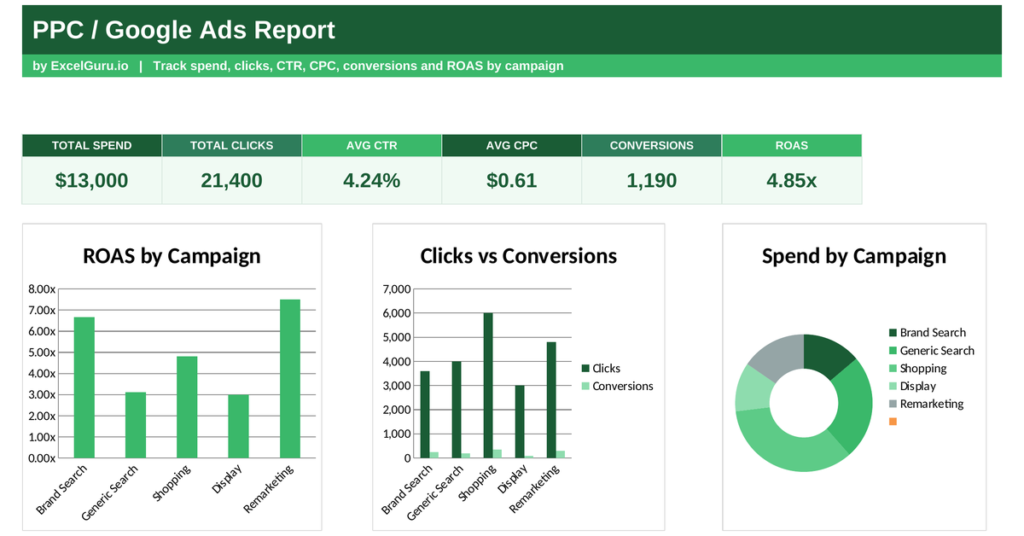
Paid advertising can grow a business fast or drain its budget quietly, and the difference comes down to the numbers. PPC stands for “Pay-Per-Click” in digital marketing. A PPC dashboard keeps those numbers in front of you, measuring the cost and return of every campaign. This free Excel template tracks clicks, spend and revenue across your paid ads, and works out whether they truly pay. Below you will learn the core PPC metrics, the formulas behind them, and how the template calculates each one.
What is a PPC dashboard?
A PPC dashboard is a single view of your pay-per-click advertising performance. It turns raw campaign data into the metrics that reveal whether your ads work.
It tracks impressions, clicks and spend, along with conversions and the revenue they earn. From these it derives the ratios that matter, such as click-through rate and return on ad spend. Because paid ads bill you for every click, watching these numbers closely protects your budget. So a PPC dashboard turns ad activity into a clear measure of value.
Why one should measure paid ads closely?
Every click on a paid ad costs money, so waste adds up fast if there is no monitoring. Without close measurement, budget leaks into campaigns that never pay back.
Measuring the return shows which campaigns earn their keep and which burn cash. It lets you shift budget toward the winners and pause the losers, so every pound works harder. Because paid advertising is a direct, ongoing cost, this discipline is essential. So the dashboard is really a tool for spending your ad budget wisely.
The PPC metrics formula
Three ratios define paid-ads performance: click-through rate, cost per click and return on ad spend. Each compares two of your raw figures.
CTR = Clicks ÷ Impressions
CPC = Spend ÷ Clicks
ROAS = Revenue ÷ Spend
- So click-through rate divides clicks by impressions, showing how compelling your ad is.
- Cost per click divides spend by clicks, showing what each visit costs.
- Return on ad spend divides revenue by spend, the single most important figure, showing how much you earn for every pound spent.
Because these ratios turn raw counts into efficiency, they reveal the true health of a campaign. So a few divisions expose whether your ads are working.
How the PPC dashboard calculates the metrics
The template needs each campaign’s impressions, clicks, spend, conversions and revenue. From there it derives every ratio for you.
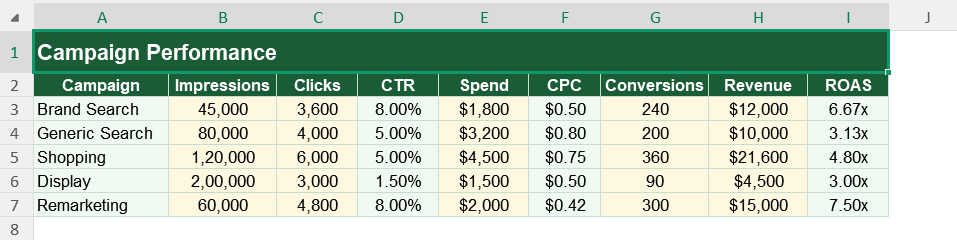
Click-through rate (CTR) appears as =C3/B3, the clicks over the impressions. Cost per click (CPC) uses =E3/C3, the spend over the clicks. Return on ad spend (ROAS) uses =H3/E3, the revenue over the spend.
The dashboard then totals spend, clicks and conversions with SUM, and works out overall CTR, CPC and ROAS from those totals. So every figure updates the moment you enter new campaign data.
A worked PPC example
Take one campaign and the maths is clear. Suppose a campaign earns 3,600 clicks from 45,000 impressions, costs 1,800, and returns 12,000 in revenue.
Its click-through rate is 3,600 divided by 45,000, or 8%. Its cost per click is 1,800 divided by 3,600, or 50 pence. Its return on ad spend is 12,000 divided by 1,800, which is about 6.7. So every pound spent on that campaign returned nearly seven, a clear winner worth more budget.
Reading the charts in the dashboard
The first chart compares spend with revenue for each campaign, so profitable campaigns stand out at once. The second chart ranks campaigns by return on ad spend, showing which earn the most per pound.
A campaign with high spend but low return is an obvious candidate to pause. The third chart is a doughnut splitting conversions by campaign, showing where your results come from. Because you see cost, return and results together, budget decisions get easier. So together the charts reveal which campaigns to scale and which to cut.
Judge campaigns on return on ad spend, not clicks. A campaign with cheap clicks is still a loss if those clicks never convert into revenue.
Who uses a PPC dashboard
PPC specialists use it to manage campaigns and prove their impact. It shows them what performs.
Small business owners use it to check their ad spend pays off. Agencies use it to report results to clients. Marketers use it to allocate budget across campaigns. Because anyone running paid ads must measure them, the dashboard suits many settings.
The template is a starting point, not a fixed form. You can add campaigns as you run them. You can adapt it to any paid channel, not just search.
The dashboard bends to your needs, so you can add a conversion-rate column alongside the cost metrics. A quick edit does it. You might also track cost per conversion for each campaign. The structure welcomes that kind of extension without complaint.
Paid advertising rewards the disciplined and punishes the careless. A PPC dashboard measures the cost and return of every campaign, so you can scale the winners and cut the waste. So download the template, enter your campaigns, and turn ad spend into a clear decision about what works. A single metric rarely tells the full story of a campaign. The numbers work best read together.
A high click-through rate means little if those clicks never convert, and cheap clicks can still lose money. So the strongest read looks across the funnel, from impression to click to conversion to revenue. Because each stage can hide a different problem, watching them together shows exactly where a campaign leaks. So the dashboard rewards a habit of reading the metrics as a set, not one at a time.