
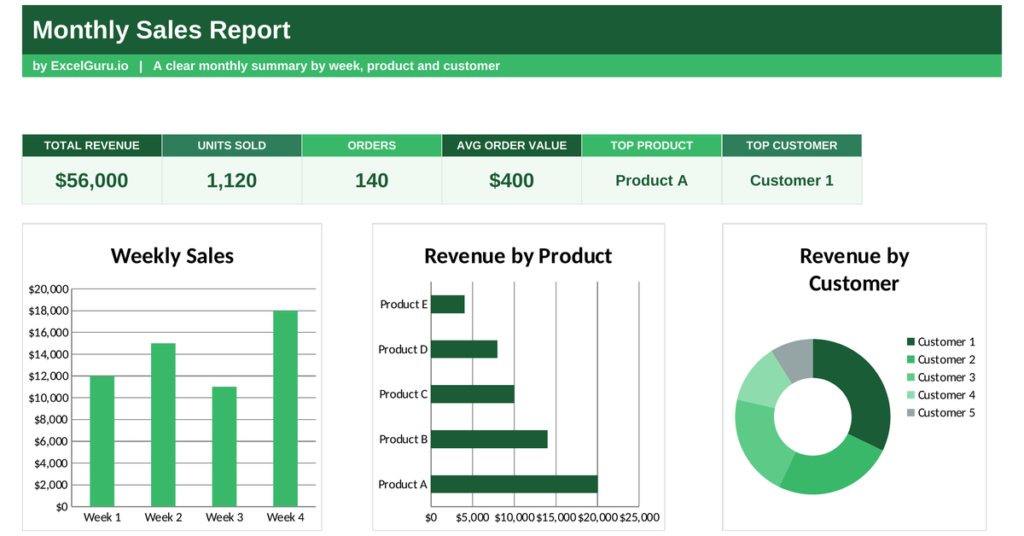
It is a repeated query at the end of every month: how much did we sell, what sold best, and who bought the most?
A monthly sales report answers them in one place, turning a month of transactions into a clear summary.
This free Excel template totals your revenue, tracks units and orders, and highlights your top products and customers. Below you will learn what the report shows, the formulas behind it, and how the template calculates each figure.
What is a monthly sales report dashboard?
A monthly sales report is a summary of a single month’s sales performance. It rolls up every transaction into the figures that matter.
It shows total revenue, units sold and orders taken, along with the average order value and your best products and customers. Because a month is the natural rhythm of most businesses, this report is a regular health check. So a monthly sales report turns a pile of transactions into a clear read on how the month went.
Why to report the sales figures on monthly cycle?
A month is long enough to show a trend but short enough to act on. Reporting at that rhythm keeps you close to the business.
Comparing months reveals whether sales are growing, which products are rising, and which customers are worth nurturing. Because patterns only emerge over time, a regular report is how you spot them early. So the monthly report is both a record of what happened and an early warning of what is coming.
Alternatively, retail cycle also follows 4-5-4 reporting cycle.
The average order value formula
One metric ties the whole report together: average order value, or AOV. It links revenue to the number of orders behind it.
Average order value = Total revenue ÷ Number of orders
So AOV divides your total revenue by the number of orders, showing how much the typical customer spends per purchase.
A rising AOV means customers are buying more each time, which lifts revenue without needing more orders. Because it is often easier to grow AOV than to win new customers, this metric guides real decisions. So a single division reveals a powerful lever for growth.
Alternatively, you can also take Gross Merchandise Value (GMV) per order as well.
How the monthly sales report calculates the metrics
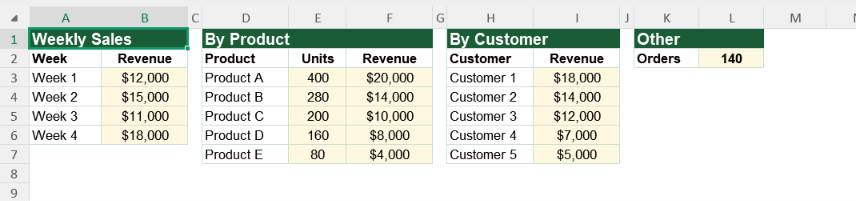
The template needs your weekly revenue, your sales by product, and your sales by customer, plus the order count. From there it summarises everything for you. To get these figures, you will either summarize your sales report in PIVOT format or use a separate tracker for sales.
Total revenue sums the weekly figures, and total units sum the product quantities.
Average order value uses =SUM(revenue)/orders, the revenue over the order count. To highlight your best sellers, the report uses INDEX and MATCH to find the product and customer with the highest revenue. So every figure updates the moment you enter the month’s data.
A worked sales example
Put numbers in and the maths is clear. Suppose a month brings in 56,000 in revenue across 140 orders.
The average order value is 56,000 divided by 140, which is 400. So the typical order was worth 400. If next month the AOV climbs to 450 on the same number of orders, revenue rises without a single extra customer. So the report shows not just how much you sold, but how you might sell more.
Reading the charts
The first chart shows revenue by week, so you can see how the month built up. A strong final week often points to end-of-month pushes paying off.
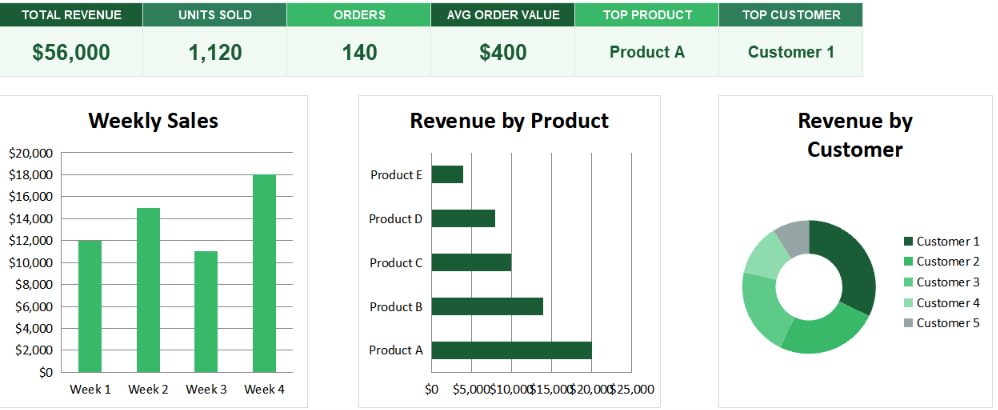
The second chart ranks sales by product, revealing your best sellers. The third chart is a doughnut splitting revenue by customer, showing who matters most. Because you see the timing, the products and the customers together, the full month comes into focus. So together the charts turn a sales total into a story you can learn from.
Grow average order value before chasing new customers. Bundles, upsells and minimum-order offers often lift AOV faster and cheaper than winning fresh buyers.
Who uses a monthly sales report
Sales managers use it to review the month and plan the next. It shows them what sold and what slipped. This can also work as Monthly Management reporting (MIS) for Finance professionals.
Business owners use it to track revenue and spot trends. Marketers use it to see which products to promote. Account managers use it to find their best customers. Because every business selling anything needs this view, the report suits many settings.
The template is a starting point, not a fixed form. You can add products and customers as your range grows. You can extend the weeks to match your month.
The dashboard bends to your needs, so you can add a comparison against last month’s revenue. A quick edit does it. You might also track units alongside revenue for each product. The structure welcomes that kind of extension without complaint.
A month of sales only teaches you something when you summarise it. A monthly sales report shows your revenue, your best sellers and your top customers in one place. So download the template, enter your month’s data, and turn a pile of transactions into a clear plan for the month ahead.
A single month’s total means little without something to compare it against. The value lives in the trend.
Set this month beside the last few and a story appears: a product gaining pace, a customer drifting away, a seasonal dip arriving on schedule. So the report is most powerful when read as a sequence, not a snapshot. Because patterns only show over time, keeping each month builds the context that makes the numbers useful.