
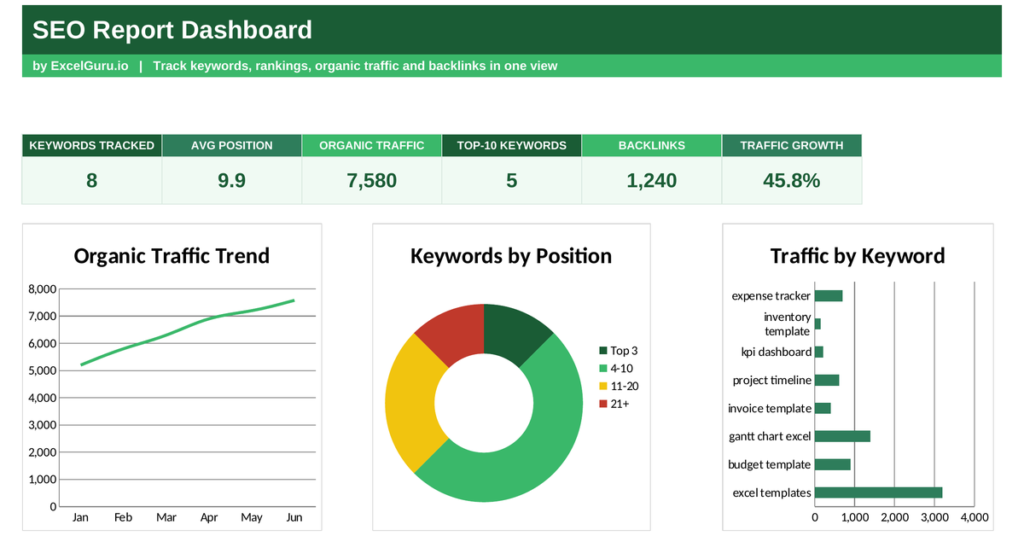
Search engine optimisation is a slow game, and without measurement it is easy to keep working with no idea whether it pays off. An SEO report makes the progress visible, tracking where your keywords rank and how much traffic they earn. This free Excel template monitors your rankings, sorts keywords by position, and shows your traffic trend. Below you will learn what an SEO report tracks, the formulas behind it, and how the template calculates each figure.
What is an SEO report?
An SEO report is a summary of how your site performs in organic search. It tracks the keywords you rank for, the positions you hold, and the traffic they bring.
Search position matters enormously, because the top few results capture most of the clicks. A keyword sitting in the top three earns far more traffic than one on page two. Because rankings shift constantly, a report lets you see whether your work is moving them up. So an SEO report turns the slow, invisible work of optimisation into visible progress.
Why track rankings and traffic together
Rankings and traffic tell two halves of the same story. Neither is complete on its own.
A high ranking on a keyword nobody searches brings little traffic, while a modest ranking on a popular term can drive plenty. Watching both reveals which keywords are truly worth the effort. Because the goal is visitors, not vanity positions, the report ties rankings to the traffic they actually produce. So you can focus on the keywords that move the needle.
On-page versus off-page SEO
Rankings come from two broad kinds of work, and a good report reflects both. Knowing the difference helps you read the numbers.
On-page SEO covers what you control directly, such as your content, titles and site speed. Whereas, Off-page SEO covers signals from elsewhere, chiefly the links other sites point at you. When a ranking moves, asking whether an on-page change or an off-page one caused it tells you what to repeat. So the report becomes a feedback loop, not just a scoreboard.
The SEO report formula
The report groups keywords by how high they rank, using simple position buckets. It also measures how your traffic changes over time.
Position bucket: Top 3, 4-10, 11-20, or 21+ by ranking
Traffic growth = (Current traffic − Previous traffic) ÷ Previous traffic
So each keyword falls into a bucket based on its position, from the coveted top three down to twenty-first and beyond. This shows at a glance how many keywords sit on the valuable first page. Traffic growth compares your current traffic with an earlier period, expressed as a percentage. So the report captures both where you rank and whether your visibility is rising.
How the SEO report calculates the buckets
The template needs your keywords with their positions, search volumes and traffic. From there it groups and totals everything for you.
The position bucket appears as =IF(B3<=3,”Top 3″,IF(B3<=10,”4-10″,IF(B3<=20,”11-20″,”21+”))), reading each keyword’s position. The dashboard then counts keywords in each bucket with COUNTIF, averages the positions with AVERAGE, and sums the traffic with SUM. Traffic growth divides the change in traffic by the earlier figure. So every metric updates the moment you enter fresh rankings.
A template with pre-built example
Take one keyword and the logic is clear. Suppose the term excel templates sits at position 4 and brings 3,200 visits.
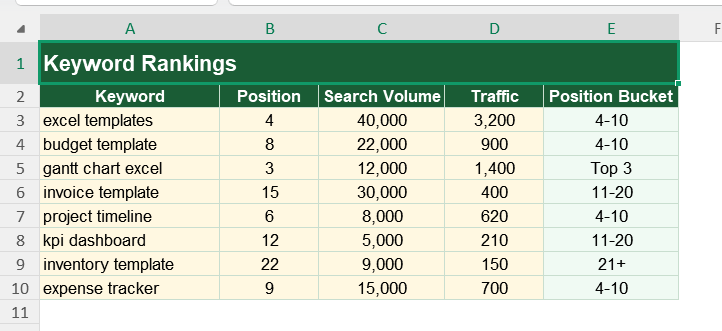
Because position 4 falls between 4 and 10, the keyword lands in the 4-10 bucket, just outside the top three. It counts toward your first-page total and adds its traffic to the overall figure. Nudge it up to position 3, and it would jump into the top-three bucket, where clicks rise sharply. So the buckets make the value of a small ranking gain obvious.
Reading the charts in dashboard
The first chart plots your organic traffic over time, so you can see whether your SEO work is paying off. A rising line is the clearest sign of progress.
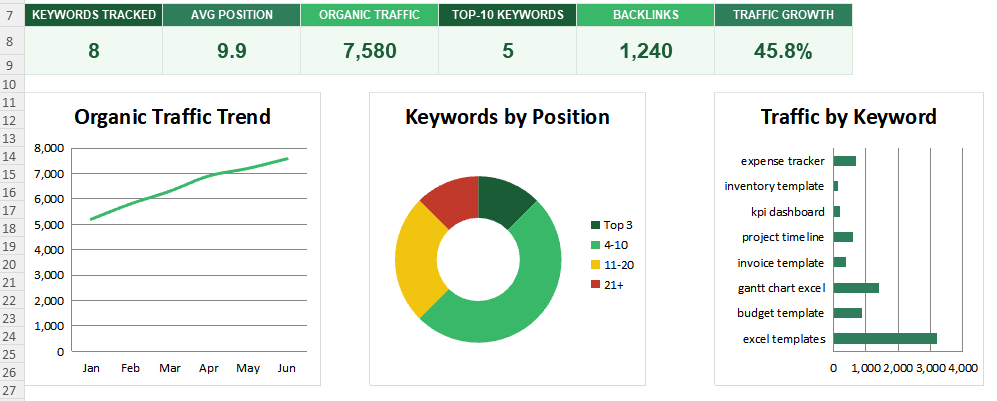
The second chart is a doughnut splitting keywords by position bucket, showing how many reach the first page. The third chart ranks traffic by keyword, revealing your biggest earners. Because you see the trend, the rankings and the top terms together, priorities become clear. So together the charts show both your progress and where it comes from.
Focus on keywords ranking just below the top. Moving a keyword from position 4 to the top three often brings a big jump in clicks for relatively little effort.
Who uses an SEO report, Ultimate users
SEO specialists use it to track rankings and prove their impact. It shows them what is working. SEO Specialists in today world are part of marketing function or department. SEO is a very small branch within digital marketing operations.
Small business owners use it to see whether their content earns traffic. Agencies use it to report results to clients. Content teams use it to guide what to write next. Because anyone chasing organic traffic needs to measure it, the report suits many settings.
The template provided here is a starting point, not a fixed form. You can add keywords as you target them. You can extend the traffic trend across a full year.
The dashboard bends to your needs, so you can add a column for ranking changes since last month. A quick edit does it. You might also add click-through rate alongside traffic. The structure welcomes that kind of extension without complaint.
SEO rewards patience, but only if you can see the progress. An SEO report tracks your rankings and traffic, so the slow climb up the results becomes visible. So download the template, enter your keywords, and turn invisible optimisation work into a clear record of results.