
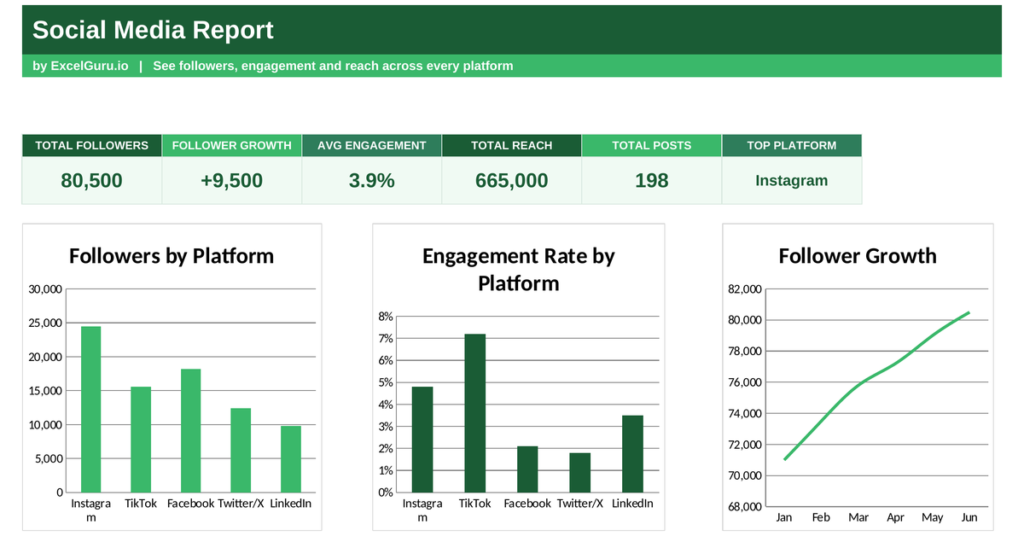
Posting to social media without tracking results is like shouting into a crowd and never checking who turned around. A social media dashboard tells you what actually landed, pulling every platform’s numbers into one clear view. This free Excel template tracks followers, engagement and reach across your channels, and shows how your audience grows over time. Below you will learn the core social metrics, the formulas behind them, and how the template calculates each one.
What is a social media dashboard?
A social media dashboard is a single view of your performance across every platform. It turns scattered numbers from each network into one comparable picture.
It tracks how many followers you have, how much they engage, how far your posts reach, and how the audience grows. Because each platform hides its stats in a different place, pulling them together is the only way to compare them fairly. So a social media dashboard turns a jumble of separate reports into one clear scorecard.
Why social metrics matter
Social media eats time and budget, so it has to earn its place. Follower counts alone rarely tell you whether it does.
Engagement shows whether people actually care about your posts, while reach shows how far your message travels. Tracking growth reveals whether your audience is building or stalling. Because a big but silent following is worth less than a smaller, active one, these deeper metrics matter more than a headline number. So the dashboard measures impact, not just size.
The key social media metrics
A few metrics define social performance, and each answers a different question. Together they show the full health of your presence.
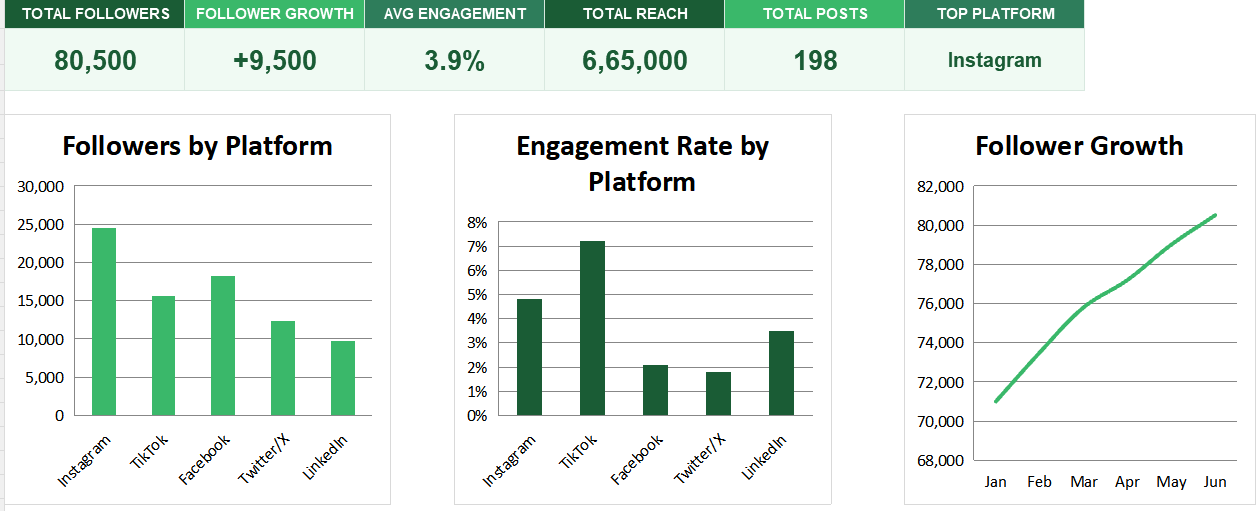
Below is the list of key metrics that stands as key visualization ideas;
- Total followers = sum of followers across platforms
- Average engagement = average of each platform’s engagement rate
- Follower growth = followers at end − followers at start
So total followers add up your audience across every channel. Average engagement blends each platform’s engagement rate into one figure, showing how active your audience is overall. Follower growth compares your audience now with where it started, revealing momentum. To highlight your strongest channel, the dashboard names the platform with the most followers. So a handful of metrics capture both size and health.
How the social media dashboard calculates the metrics
The template needs each platform’s followers, posts, engagement and reach, plus a monthly follower trend. From there it does the maths for you.
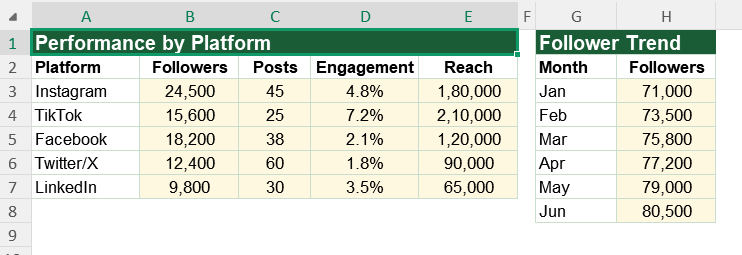
Total followers use =SUM(‘Social Data’!B3:B7) across the platforms. Follower growth uses the trend column, subtracting the first month’s total from the last. Average engagement uses =AVERAGE(‘Social Data’!D3:D7), and total reach and posts use SUM. To name your top platform, the dashboard uses INDEX and MATCH on the highest follower count. So every figure updates the moment you enter new numbers.
A worked engagement example
Take engagement and the maths is clear. Suppose five platforms post engagement rates of 4.8%, 7.2%, 2.1%, 1.8% and 3.5%.
The average engagement is the sum of those rates divided by five, which works out to about 3.9%. A platform like TikTok at 7.2% is pulling well above that average, while one at 1.8% drags below it. So the blended figure shows overall health, while the per-platform numbers reveal where the real energy is.
Reading the charts
The first chart shows followers by platform, so you can see where your audience is biggest. The second chart shows engagement by platform, which often tells a very different story.
A platform with fewer followers but high engagement can be your most valuable channel. The third chart plots follower growth month by month, revealing momentum. Because you see size, engagement and growth together, the strongest channels become clear. So together the charts show not just how big your audience is, but how alive it is.
Chase engagement, not just followers. A smaller, active audience that comments and shares is worth far more than a large one that scrolls straight past.
Who uses a social media dashboard
Social media managers use it to report performance and plan content. It shows them what resonates.
Small business owners use it to check their social effort pays off. Agencies use it to report results to clients. Creators use it to track their growth. Because anyone building an audience needs to measure it, the dashboard suits many settings.
The template is a starting point, not a fixed form. You can add platforms as you join them. You can extend the trend across a full year.
The dashboard bends to your needs, so you can add metrics such as clicks or conversions from social. A quick edit does it. You might also track follower growth as a percentage. The structure welcomes that kind of extension without complaint.
Social media is only worth the effort when you can see what works. A social media dashboard brings followers, engagement and reach into one view, so you can double down on what resonates. So download the template, enter your numbers, and turn scattered stats into a clear plan for growth.
Some numbers look impressive but change nothing. Others quietly drive the business, even when they seem small.
A huge follower count is a vanity metric if none of those people engage or buy. Engagement, saves and clicks are the metrics that hint at real intent. So the trick is to watch the numbers that lead somewhere, not just the ones that flatter. Because a smaller, active audience often converts better than a vast silent one, chasing pure follower growth can mislead you.