
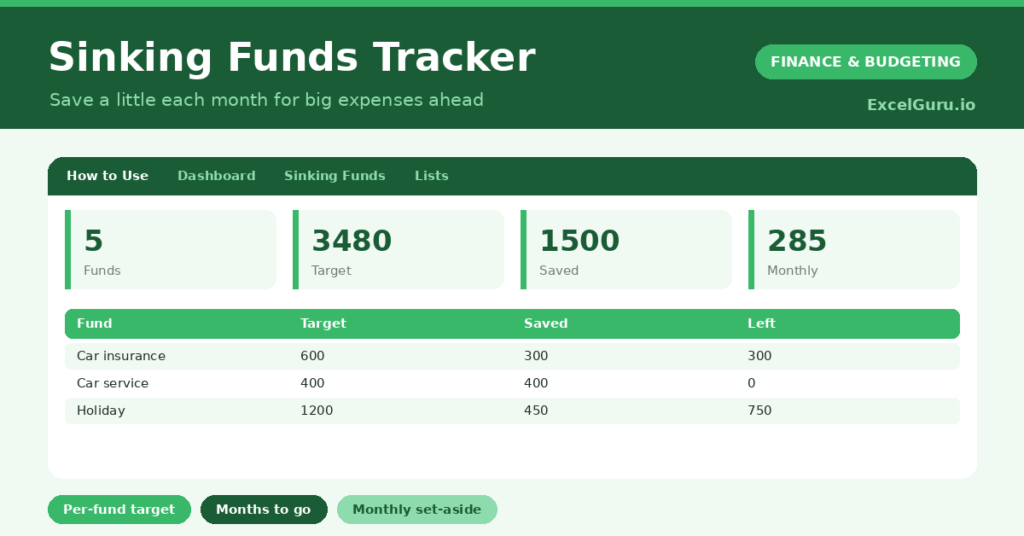
A sinking funds tracker is the quiet secret to a budget that never gets blown by a big, predictable bill. Annual insurance, car servicing, Christmas; these are not emergencies, yet they wreck budgets because we forget to save for them. So setting aside a little each month, in a named fund for each, is what turns a daunting bill into a non-event.
This free template lets you create a fund for each big expense, set a target and a monthly amount, and track each balance as it grows. So it shows how much is left and how many months remain. As a result, the big bills are already paid for by the time they arrive.
What does the sinking funds tracker include?
The template is one fund list feeding a clear dashboard. In short, you get the following:
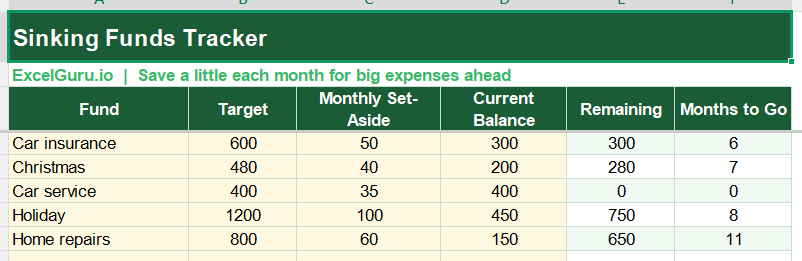
- A fund list with the fund, target, monthly set-aside, current balance, an auto-calculated remaining amount and months to go.
- An automatic remaining figure and months to go for every fund.
- A monthly set-aside column, so you know your total commitment.
- A clear view of which funds are close to their target.
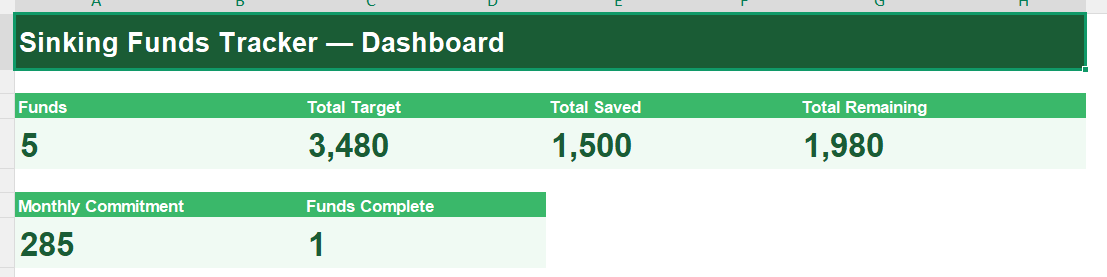
- A dashboard showing your number of funds, total target, total saved, total remaining, your monthly commitment and funds complete.
Which formulas power the sinking funds tracker?
Two formulas keep each fund on track. The remaining amount is =MAX(0, Target – Balance), so it never shows a negative once a fund is full. The months to go is =ROUNDUP(Remaining / Monthly Set-Aside, 0), rounding up to whole months.
On the dashboard, SUM formulas total your targets, savings, remaining amounts and monthly commitment, the last being especially useful for your budget. A SUMPRODUCT counts the funds that have reached their target. So the tracker turns a set of savings pots into a clear plan for every big bill ahead.
Why use a sinking funds tracker?
The first benefit is no more nasty surprises. A large annual bill stops being a shock when you have been quietly saving for it all year. So your budget stays smooth instead of lurching from one big expense to the next.
The second benefit is calmer finances. Spreading a big cost over many small monthly amounts is far easier than finding a lump sum, and it removes the temptation to reach for credit. Seeing the total monthly commitment helps you fit your funds into your budget. Furthermore, watching each fund near its target is reassuring. In short, the tracker turns predictable big bills into manageable monthly habits.
What does the dashboard reveal?
The dashboard gives you a clear view of your saving. The monthly-commitment figure is the practical one, since that is what your budget must accommodate each month. So it is the number to check against your income.
The total-remaining figure shows how much saving is still ahead across all your funds, and the funds-complete count is a satisfying tally of bills already covered. The total saved shows the cushion you have built. Because each fund’s months-to-go updates as you save, you can always see which bill is nearly handled. So the dashboard keeps every big expense under quiet control.
How do you use it?
List the irregular expenses you know are coming, such as insurance renewals, car servicing or Christmas. So nothing predictable catches you out. For each, set the total you will need and a sensible monthly amount.
Each month, set aside the monthly amounts and update each fund’s balance. The remaining and months-to-go figures adjust, so you can see each fund approaching its target. When a bill arrives, the money is already there. Because the totals show your monthly commitment, you can fit it neatly into your budget. In short, save a little each month and let the big bills take care of themselves.
How do you customise it?
Edit the fund ideas on the Lists tab to match your known expenses. Additionally, you can add columns for the due date of each bill, the account the fund is held in, or a priority. A column for the date a fund was last topped up is useful. The template suits a handful of funds or a full set covering every irregular cost in your year.
What mistakes should you avoid?
The first mistake is forgetting to actually transfer the monthly amounts, so the balances exist only on paper. So move the money as well as logging it. The second mistake is setting targets too low and being caught short when the bill arrives.
Estimate each one generously. Finally, remember this is a budgeting tool, not financial advice. A sinking funds tracker works by turning big, lumpy costs into small, steady habits, so save a little each month and let the predictable bills arrive already paid for.
Frequently asked questions
What is a sinking fund?
It is money you set aside gradually for a specific, known future expense, like car insurance or Christmas. Rather than finding a lump sum when the bill lands, you save a little each month so it is ready.
How does the tracker work out months to go?
It divides each fund’s remaining amount by your monthly set-aside and rounds up. So you can see exactly how many more months of saving each fund needs to reach its target.
How is this different from an emergency fund?
An emergency fund is for the unexpected; sinking funds are for the expected but irregular. You know Christmas and insurance are coming, so a sinking fund saves for them on purpose, in advance.
Create a fund for each big bill, set a target and a monthly amount, and update the balances as you save. The dashboard then shows your commitment and what remains. A sinking funds tracker turns the predictable expenses that wreck budgets into small, painless monthly habits, so every big bill arrives already paid for.