
An emergency contact sheet is the file you hope to never open. When you do need it, though, missing details are the last thing you want.
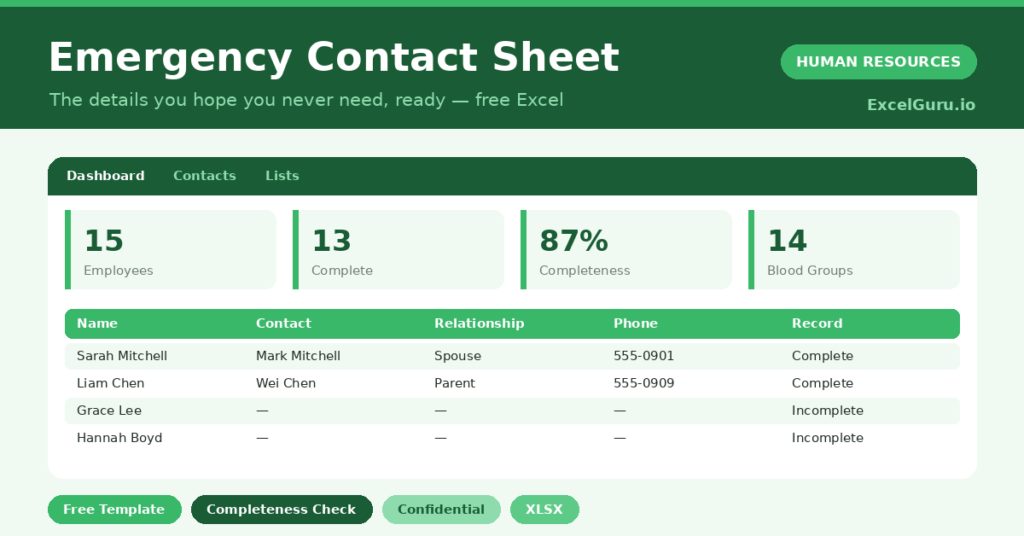
This free emergency contact sheet keeps those details ready and complete. You log each contact, and the sheet flags any record that is missing information. You will also find realistic sample data already inside the file. Therefore, you can explore every formula, dropdown and chart first, and then replace the samples with your own records in minutes.
Below, we explain the structure, the formulas, and how to adapt the sheet to your own team.
What Is an Emergency Contact Sheet?
An emergency contact sheet stores the person to call, and key details, for each employee. It keeps that critical information in one place.
It also checks whether each record is complete. As a result, the details are ready and reliable the moment you need them. A simple flag shows at a glance which records still need chasing, so gaps do not go unnoticed.
Why Does an Emergency Contact Sheet Matter?
In a real emergency, minutes matter and so does accuracy. A missing or outdated contact can turn a hard moment into a worse one.
A maintained sheet removes that risk. Therefore, the right person can be reached quickly when it counts most. Keeping it current is a simple duty of care that every employer owes its staff.
Why Use This Template?
A complete sheet brings real peace of mind. In particular, this one helps you:
- Store an emergency contact for every employee.
- Record relationship and phone numbers.
- Capture key details like blood group.
- Flag any record that is incomplete.
- See your completeness rate at a glance.
What’s Inside the Template?
The workbook has four tabs:
- How to Use — a built-in guide.
- Dashboard — completeness and coverage KPIs.
- Contacts — one row per employee.
- Lists — department and relationship dropdowns.
What Formulas Does the Template Use?
The sheet uses dependable Excel formulas:
| Formula | What it does |
| =IF(AND(Contact<>””,Phone<>””),”Complete”,”Incomplete”) | Checks if a record is complete. |
| =COUNTIF(Record,”Complete”) | Counts complete records. |
| =Complete / Employees | Calculates the completeness rate. |
| =COUNTIF(Alt Phone,”?*”) | Counts records with an alternate contact. |
| =COUNTIF(Department, d) | Counts records per department. |
How Do You Use the Template?
Setup is quick. Just follow these steps:
- Open the Contacts tab and list your employees.
- Enter each person’s emergency contact.
- Add the relationship and phone numbers.
- Record any key details such as blood group.
- Let the completeness check update.
- Review the completeness rate on the Dashboard.
What Are the Best Use Cases?
The sheet fits many teams, such as:
- Small businesses meeting duty-of-care needs.
- Managers keeping team details ready.
- HR teams maintaining staff records.
- Sites with safety or field work.
- Anyone who wants details ready in a crisis.
How Can You Modify the Template?
You can tailor it freely. To add detail, insert columns for medical notes or a second emergency contact.
You can also change the completeness rule to require more fields.
Moreover, the sheet covers 40 employees by default, and you can copy the formula row downward for more.
What Mistakes Should You Avoid?
A few habits weaken the sheet. Therefore, avoid these common mistakes:
- Letting contact details go out of date.
- Storing the file without access controls.
- Leaving records incomplete and unchased.
- Collecting medical details without consent.
Tips to Get the Most From It
- Treat the file as strictly confidential.
- Refresh details at least once a year.
- Chase incomplete records until they are filled.
- Collect only the details you genuinely need.
Frequently Asked Questions
How does the completeness check work?
A record is marked Complete when it has both a named contact and a phone number. Anything missing those is flagged Incomplete to chase.
Is it safe to store this data?
Treat the file as strictly confidential and limit who can open it. Personal and medical details deserve careful access control.
Should I store medical information?
Only with the employee’s consent, and only what is genuinely needed. Details like blood group can help, but privacy comes first.
How often should I update it?
At least once a year, and whenever someone moves home or changes their contact. Out-of-date details defeat the purpose.
Does it work in Google Sheets?
It does, with minor adjustments to formatting after importing.
Download the Template and Get Started
Being ready for an emergency is a simple act of care. This sheet keeps the details you need close and complete.
Download the Emergency Contact Sheet Template and prepare your team today.