
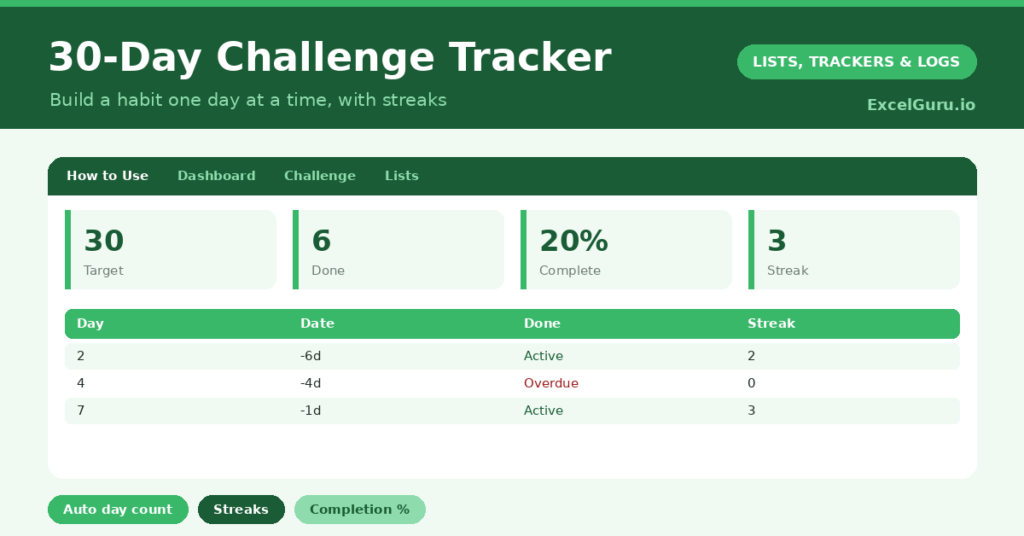
A 30-day challenge tracker is built around a simple truth: a habit is far easier to start when you only have to commit to thirty days. A vague resolution to “exercise more” fizzles out, but “walk every day for thirty days” feels achievable. So a clear, day-by-day tracker is exactly what keeps you going.
This free template lets you mark each day done and builds a visible streak automatically. So it counts your completion percentage as you go. As a result, you have the motivation of a growing streak and the satisfaction of watching a new habit take hold.

What does the 30-day challenge tracker include?
The template is one 30-day grid feeding a clear dashboard. A dropdown keeps the entries tidy. In short, you get the following:
- A 30-day grid with an auto-numbered day, the date, a done flag, an automatic streak and notes.
- An automatic day number from 1 to 30, so you never count rows.
- An automatic streak that counts your consecutive days done.
- A dropdown for the done flag, with colour-coding so missed days stand out.
- A dashboard showing target days, days done, days missed, your completion percentage, your best streak and your current streak.
Which formulas power the 30-day challenge tracker?
The clever part is the streak. The streak column uses =IF(Done=”Yes”, N(streak above)+1, 0), so it adds one for each consecutive day done and resets to zero when you miss a day. The N function neatly treats the header as zero, so the first day works too.
On the dashboard, a MAX over the streak column finds your best run, and a LOOKUP returns your current streak from the last day you logged. The completion percentage is =COUNTIF(Done, “Yes”) / 30. So the dashboard turns daily ticks into the streaks and progress that keep you motivated.
Why use a 30-day challenge tracker?
Motivation is the whole point. A visible streak is surprisingly powerful, because once you have a run going, you do not want to break it. So the tracker uses that instinct to keep you consistent.
The fixed thirty-day frame helps too, since a short commitment feels far less daunting than “forever”. The completion percentage gives you a clear sense of progress, and the day-by-day grid makes the habit concrete. Furthermore, by the end of thirty days, the behaviour often feels like a genuine routine. In short, the tracker turns a good intention into a habit that lasts.
What does the dashboard reveal?
The dashboard keeps your challenge motivating at a glance. The current-streak figure is the one you will watch most, since protecting a run is a strong daily nudge. So it keeps you showing up.
The completion percentage shows how far through the challenge you are, climbing steadily toward 100%. The best-streak figure is a personal record to beat, and the days-missed count is an honest, gentle reality check. Because it all updates as you tick off days, the momentum stays visible. So the dashboard makes a 30-day challenge genuinely sticky.
How do you use it?
Pick one specific, daily habit, since the challenge works best with a single clear behaviour. So decide exactly what “done” means before you start. Each day, set the date and mark whether you did it.
Watch your streak grow, and try not to break it, though a missed day is not the end. Just carry on the next day and build a fresh streak. Check the dashboard for your completion percentage and your best run. Because the goal is only thirty days, the finish line always feels within reach. In short, one tick a day is all it takes.
How do you customize it?
The challenge ideas on the Lists tab are just suggestions, so replace them with your own goal. Additionally, you can add columns for a daily rating, the time you did the habit, or a target you are building toward. Extending the grid to sixty or ninety days is simple if you want a longer challenge. The template suits fitness, learning, mindfulness or any daily habit.
What mistakes should you avoid?
The first mistake is choosing a vague or over-ambitious habit you cannot do daily. So pick something small and specific enough to manage every day. The second mistake is giving up entirely after one missed day.
A broken streak is not a failed challenge; just start a new streak and keep going. Finally, do not pick five habits at once. The power of the challenge is its focus, so commit to one behaviour for the thirty days. One habit, done consistently, beats five attempted and abandoned.
Frequently asked questions
How does the 30-day challenge tracker count my streak?
Each day you mark done adds one to the streak, and a missed day resets it to zero. The dashboard shows both your best streak and your current one, so your run is always visible.
What happens if I miss a day?
Your current streak resets, but that is not a failure. Simply carry on the next day and build a new streak. The completion percentage still counts every day you complete across the thirty.
Can I make it longer than 30 days?
Yes. Thirty days is a manageable default, but you can extend the grid to sixty or ninety days. The day numbers, streaks and dashboard formulas all adapt automatically.
Pick one daily habit, mark each day done, and watch your streak and completion climb. A 30-day challenge tracker turns the daunting idea of changing a habit into a short, achievable game, where a single tick a day quietly builds the routine you were after.