
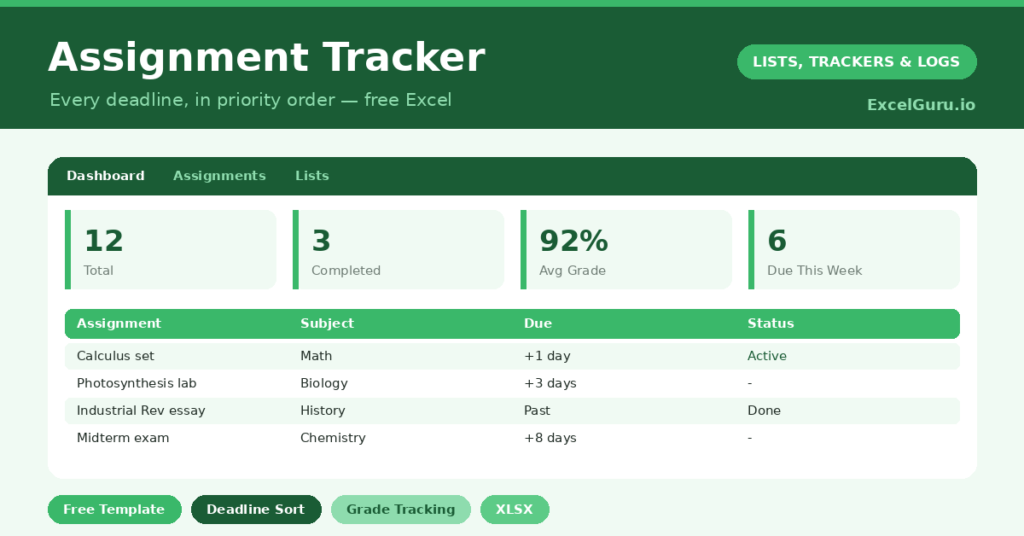
An assignment tracker is the single most useful tool a student can keep, because the hardest part of studying is rarely the work itself. It is keeping track of what is due, when, and how much it counts. Deadlines scattered across emails, portals and memory are how good students still end up pulling all-nighters.
This free template gathers every assignment into one place, each with a subject, a due date and a priority. So it counts down to deadlines and tracks your grades. As a result, nothing is forgotten until the night before, and you can plan your effort where it matters most.
What does the assignment tracker include?
The template is one assignment list feeding a clear dashboard. Dropdowns keep subjects, types and statuses tidy. In short, you get the following:
- An assignment table with the assignment, subject, type, due date, priority, status, grade and days left.
- An automatic Days Left countdown that blanks out once an assignment is submitted or graded.
- Drop-down lists for subject, type, priority and status, so entries stay consistent.
- Color-coded priorities and statuses, so urgent and overdue work stands out.
- A dashboard showing total assignments, those done, those pending, overdue work, your average grade and assignments due within seven days.
Which formulas power the assignment tracker?
The dashboard turns your list into a study plan. The Days Left column is =IF(OR(Due=””, Status=”Graded”, Status=”Submitted”), “”, Due – TODAY()), so it counts down to each deadline and clears once the work is handed in.
A SUMPRODUCT then flags overdue assignments, and another counts those due within seven days, which is your near-term focus. An AVERAGEIF works out your average grade across the assignments that have been marked, ignoring the rest. So you see both what is pressing and how you are performing, all at a glance.
Why use an assignment tracker?
The benefit is reduced stress and better grades, in that order. When every deadline lives in one place, the constant low-level worry of forgetting something simply disappears. So you can focus on the work instead of the logistics.
The priority and days-left columns then help you plan. You can see which assignment to tackle first, balancing what is due soonest against what counts most. The grade column adds a useful feedback loop, showing where you are strong and where you need to push. In short, the tracker turns a chaotic workload into a manageable, prioritised plan.
What does the dashboard reveal?
The dashboard answers a student’s most urgent questions. The overdue count is the first thing to check, since nothing should be sitting there. The due-within-seven-days count is your immediate to-do list.
The pending count shows the total work still ahead, which helps you pace yourself. The average-grade figure is a quiet performance check, revealing trends across subjects. Because it all updates automatically, a single glance tells you whether you are on top of your studies or sliding behind. So the dashboard keeps you ahead of the workload.
How do you use it through a term?
At the start of term, enter every assignment from your syllabuses, with its due date and weighting. So the whole term is visible from day one. Set a priority for each, based on how much it counts and when it is due.
Then update the status as you move from *Not Started* to *In Progress* to *Submitted*. Check the dashboard at the start of each week to plan your effort. As grades come back, log them, and the average builds a picture of your progress. Because the term is mapped out, deadlines stop ambushing you.
How do you customize it?
Edit the subjects, types and statuses on the Lists tab to match your courses. Additionally, you can add columns for the weighting of each assignment, an estimated time to complete, or a link to the brief. A column for the marker’s feedback is useful for tracking how to improve. The template works equally well for school, college or university.
What mistakes should you avoid?
The first mistake is only logging the big assignments and ignoring smaller tasks, which then sneak up on you. So capture everything with a deadline. The second mistake is setting up the tracker and forgetting to update statuses, which makes the dashboard misleading.
A quick weekly update keeps it honest. Finally, do not rely only on the due date while ignoring priority. A small task due tomorrow may matter less than a major project due next week. The tracker shows both, so use both to decide what to work on now.
Frequently asked questions
How does the assignment tracker show what is urgent?
A Days Left countdown turns negative when an assignment is overdue, and the dashboard counts overdue work and assignments due within seven days. So your most urgent tasks are always front and centre.
Does it track my grades?
Yes. Log each grade as it comes back, and an AVERAGEIF on the dashboard calculates your average across marked assignments, ignoring the ones still outstanding. It is a simple way to spot trends across subjects.
Is it suitable for university?
Absolutely. It works for school, college and university alike. Just edit the subjects and statuses to match your courses, and add a weighting column if your modules count assignments differently.
Enter every assignment at the start of term, set priorities, and update your progress each week. The dashboard then keeps deadlines and grades in clear view. An assignment tracker will not write your essays, yet it makes sure you never lose marks to a deadline you simply forgot.