
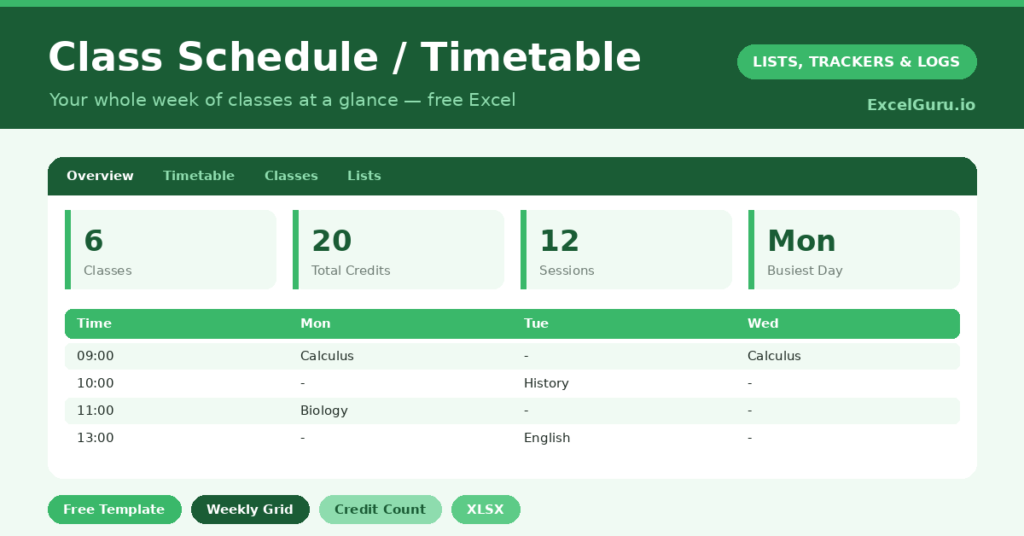
A class schedule is the backbone of an organised term, the one page that tells you where to be and when. Juggling lectures, seminars, labs and study blocks across a week is genuinely hard to hold in your head. So a clear timetable removes the daily uncertainty and the missed classes that come with it.
This free template lays your whole week on a grid, with a separate sheet for the class details. So you can see your timetable at a glance and track credits, locations and tutors. As a result, you always know your next class, and you can spot your free time for study and rest.
What does the class schedule include?
The template pairs a weekly timetable grid with a class-details sheet. In short, you get the following:
- A weekly timetable with the times down the side and the days across the top.
- A classes sheet listing each class with its subject, credits, location and tutor.
- Drop-down lists to keep the class details consistent and easy to read.
- A dashboard showing total classes, total credits, scheduled slots, your busiest day, free slots and your number of distinct subjects.
Which formulas power the class schedule?
The dashboard quietly analyses your week. A COUNTA counts your scheduled slots across the grid, and =5*9 – that count reveals how many slots are still free. So you can see your spare time without counting cells by hand.
An INDEX and MATCH pair names your busiest day by finding the column with the most classes. A clever SUMPRODUCT then counts your distinct subjects, even if a subject appears several times. Meanwhile, a SUM totals your credits. So the timetable becomes more than a grid; it becomes a quick read on how your week is balanced.
Why use a class schedule?
The first benefit is simply never missing a class or turning up to the wrong room. With the timetable and locations in one place, your week runs smoothly. So the small daily stresses of student life ease off.
The second benefit is planning. Seeing your free slots laid out lets you schedule study, work shifts and rest deliberately, rather than leaving them to chance. The busiest-day figure warns you which day needs the most energy. Furthermore, a printable timetable is easy to pin up or share. In short, the schedule turns a scattered week into a structure you can plan around.
What does the dashboard reveal?
The dashboard shows the shape of your week. The total-credits figure confirms you are carrying the right course load, which matters for progression. The scheduled-slots and free-slots counts then show how full your week really is.
The busiest-day figure is genuinely useful for planning, since it tells you where to expect the heaviest going. The free-slots count is the one students love, because it reveals the time available for study and life. Because it updates as you fill the grid, you can balance your week before term gets underway. So the dashboard supports good planning, not just attendance.
How do you set it up?
Start with the classes sheet, listing each class with its credits, location and tutor. So the details live in one tidy place. Then place each class into the right slot on the weekly grid, matching the day and time.
Once the grid is filled, the dashboard works out your busiest day, your free time and your totals automatically. Print the timetable or keep it on your phone for quick reference. At the start of each new term, simply clear the grid and build the new week. A few minutes of setup saves a term of confusion.
How do you customise it?
Adjust the time rows to match your institution’s day, whether classes start at eight or nine. Additionally, you can colour-code the grid by subject for an even faster read, or add a column to the classes sheet for the tutor’s email. Some students add their work shifts and study blocks to the grid too, so the timetable shows their whole week, not just classes.
What mistakes should you avoid?
The first mistake is filling the grid so densely that there is no room to breathe. So leave deliberate gaps for travel, meals and rest between classes. The second mistake is recording classes on the grid but leaving the details sheet empty.
The locations and tutors are exactly what you need when something goes wrong, so fill them in. Finally, remember to rebuild the timetable each term, since an out-of-date schedule is worse than none. A current, well-spaced timetable is what keeps a busy term under control.
Frequently asked questions
How does the class schedule find my busiest day?
An INDEX and MATCH formula scans the days for the one with the most scheduled classes and names it on the dashboard, so you know in advance which day will be the most demanding.
Can I see how much free time I have?
Yes. The dashboard counts your scheduled slots and subtracts them from the total, showing how many slots are free. That makes it easy to plan study, work and rest around your classes.
Can I reuse it each term?
Absolutely. Clear the timetable grid and update the classes sheet, and you have a fresh schedule for the new term. Keeping old terms as separate tabs builds a handy record of your studies.
List your classes, lay them on the grid, and let the dashboard reveal your busiest day and free time. A class schedule is more than a list of where to be; instead, it is the planning tool that helps you balance study, work and rest across a demanding term.