
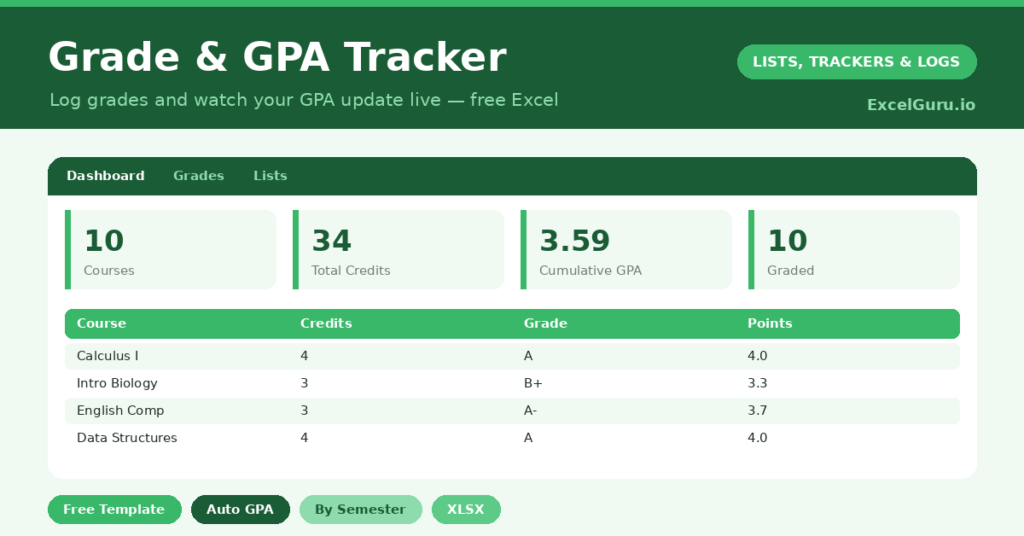
A GPA tracker takes the anxiety out of one of the most stressful numbers in student life: your grade point average. Working it out by hand is fiddly, because grades must be weighted by credits, not simply averaged. So most students only discover their GPA when the transcript arrives, far too late to do anything about it.
This free template fixes that. So you enter each course, its credits and your grade, and it calculates your weighted GPA automatically. As a result, you always know where you stand, and you can see exactly what a tough module is doing to your average.
What does the GPA tracker include?
The template is one grade sheet feeding a clear dashboard. Dropdowns keep grades and statuses consistent. In short, you get the following:
- A grades table with the course, semester, credits, grade, grade points, quality points and status.
- Automatic grade points and quality points for every course you enter.
- Drop-down lists for the grade and status, so entries stay consistent.
- A dashboard showing total courses, total credits, your weighted GPA, completed credits, courses graded and courses in progress.
Which formulas power the GPA tracker?
The calculation mirrors how a real GPA works. First, a VLOOKUP converts each letter grade into grade points using a scale on the Lists tab, so an A might be 4.0 and a B 3.0. That step turns letters into numbers.
Next, quality points multiply each course’s credits by its grade points, written =Credits * Grade Points. The GPA itself then divides the total quality points by the total graded credits, which is exactly the weighted formula universities use. So a five-credit course rightly counts more than a one-credit one. Because it updates live, your GPA is always current.
Why use a GPA tracker?
The biggest benefit is no surprises. Instead of waiting for an official transcript, you watch your GPA evolve in real time. So a disappointing result prompts action while there is still time to recover.
It is also a powerful planning tool. Because the GPA updates as you enter grades, you can model scenarios: what happens if you get a B in this module, or push for an A in that one? That lets you focus your effort where it will move your average most. Furthermore, it keeps long-term goals, like a scholarship threshold, firmly in view. In short, the tracker puts you in control of your own academic record.
What does the dashboard reveal?
The dashboard centres on the number that matters: your weighted GPA. Because it is calculated correctly, by credits, it reflects your true standing rather than a rough average. So you can trust it for decisions.
The completed-credits figure shows your progress toward your degree, while the courses-graded and in-progress counts show what is settled and what is still open. Seeing these side by side helps you judge whether a strong finish can lift a shaky start. Because it all updates automatically, you always know both where you are and where you are heading. So the dashboard supports real planning.
How do you use it through a degree?
Enter each course as you take it, with its credit value and your grade once it is awarded. So your record builds semester by semester. Mark courses still underway as in progress, and the GPA simply reflects what is graded so far.
Check the dashboard after each result, and use it to plan the courses ahead. If your GPA dips, you can see exactly which grades would bring it back up. Keeping every semester in the file builds a complete academic history. Because the maths is automatic, that history is always accurate and always ready when you need it.
How do you customise it?
The most important customisation is the grade scale on the Lists tab, which you should set to match your institution’s exact points system. Additionally, you can add columns for the semester’s GPA separately, a target grade, or the professor. Some students track a cumulative versus a semester GPA side by side. The template adapts to almost any grading system with a quick edit to the scale.
What mistakes should you avoid?
The first and most important mistake is using the wrong grade scale, since every institution differs slightly. So check the points on the Lists tab carefully before you trust the result. The second mistake is forgetting to enter credits, because without them the weighting cannot work.
Every course needs its credit value. Finally, do not panic over a single low grade. The weighted GPA shows how much a strong run can offset one weak result, which is often reassuring. Use that perspective to plan calmly rather than worry.
Frequently asked questions
How does the GPA tracker calculate my GPA?
It converts each grade to grade points, multiplies those by the course credits to get quality points, then divides the total quality points by your total graded credits. That is the standard weighted GPA formula.
Can I match my university’s grading scale?
Yes, and you should. Edit the grade scale on the Lists tab to match your institution’s exact points system, so the calculated GPA reflects your real standing precisely.
Can I track courses still in progress?
Yes. Mark them as in progress, and they are excluded from the GPA until you enter a grade. The dashboard shows your in-progress courses separately, so you can see what is still open.
Set your grade scale, enter each course and grade, and let the template do the weighting. The dashboard then shows your true GPA in real time. A GPA tracker turns a stressful, mysterious number into something you can see, understand and actively plan around all the way through your degree.