
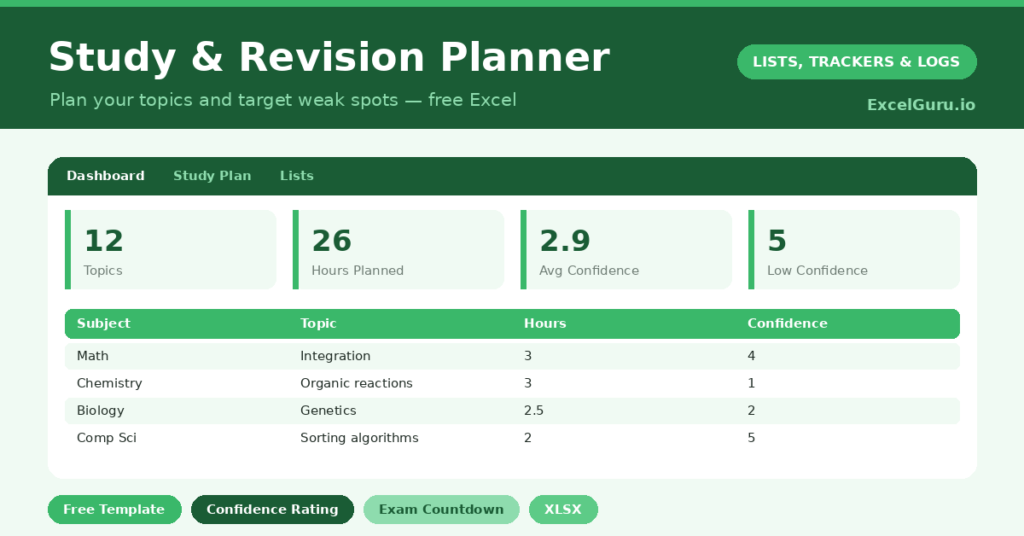
A study planner is what turns the vague, anxious feeling of “I should be revising” into a calm, concrete plan. Revision fails not from a lack of effort but from a lack of structure. Faced with a mountain of material, students freeze, cram the easy topics, and avoid the hard ones until it is too late.
This free template breaks each subject into topics, lets you plan study sessions, and tracks how confident you feel about each one. So it counts down to your exams and shows where to focus. As a result, your revision becomes targeted and steady, rather than panicked and patchy.
What does the study planner include?
The template is one study plan feeding a focused dashboard. Dropdowns keep priorities and statuses tidy. In short, you get the following:
- A study plan with the subject, topic, priority, planned date, estimated hours, status, a confidence rating and an exam date.
- An automatic Days to Exam countdown for every topic.
- Drop-down lists for priority and status, so entries stay consistent.
- A confidence rating from one to five, so you can see which topics still worry you.
- A dashboard showing total topics, those done, total planned hours, hours completed, your average confidence and the number of low-confidence topics.
Which formulas power the study planner?
The dashboard keeps your revision honest. The Days to Exam column is a simple =Exam Date – TODAY(), so every topic shows how long you have left. That countdown is a gentle, constant motivator.
A SUMIF totals the hours you have actually completed against your planned hours, so you can see your real progress. An AVERAGEIF gives your average confidence, and a COUNTIF counts the topics rated two or below. So the low-confidence count points you straight at the topics that need the most work. Because it updates live, your plan always reflects where you stand.
Why use a study planner?
The first benefit is beating procrastination. A blank revision schedule is paralysing, but a list of specific topics with planned dates is something you can simply start. So the planner replaces dread with a first step.
The second benefit is studying smart. The confidence rating is the clever part, because it stops you wasting time on topics you already know. Instead, you focus on the low-confidence topics that will actually raise your grade. The exam countdown keeps the urgency real without tipping into panic. In short, the planner makes your limited revision time count for as much as possible.
What does the dashboard reveal?
The dashboard shows whether your revision is on track. The hours-completed figure against your planned total is an honest measure of effort. So you can see if you are keeping pace or falling behind.
The low-confidence count is the most useful number of all, since it names how many topics still worry you. As you revise and your confidence rises, that count should fall, which is genuinely motivating. The average-confidence figure gives an overall sense of readiness. Because it all updates as you study, the dashboard tells you exactly where to spend your next session. So your effort always goes where it matters.
How do you plan revision with it?
Start by listing every topic for every subject, then add each exam date. So the full scope of your revision is visible from the outset. Rate your starting confidence honestly for each topic, even though the low scores are uncomfortable to see.
Next, schedule study sessions, prioritising the low-confidence topics and the nearest exams. After each session, update the status and re-rate your confidence, which shows your progress. Watching the low-confidence count fall is both proof of progress and a powerful motivator. Because the plan adapts as you go, it stays useful right up to the final exam.
How do you customise it?
Edit the priorities and statuses on the Lists tab to match how you work. Additionally, you can add columns for the resource you are using, the type of revision, or a self-test score. Some students add a second confidence rating taken closer to the exam, so they can see how much they improved. The planner suits a single exam or a whole season of them.
What mistakes should you avoid?
The first mistake is rating your confidence dishonestly to feel better, which simply hides the topics that need work. So be brutally honest, because the planner only helps if it knows the truth. The second mistake is planning revision but never updating it.
A quick update after each session keeps the dashboard meaningful. Finally, do not revise only the topics you enjoy. The whole point of the confidence rating is to pull your attention toward the difficult topics you would otherwise avoid. Trust it, and your grades will thank you.
Frequently asked questions
How does the study planner help me prioritise?
It tracks a confidence rating for every topic and counts how many are low, so you can focus your revision on the topics that worry you most rather than the ones you already know well.
Does it count down to my exams?
Yes. Enter each topic’s exam date, and a Days to Exam countdown shows how long you have left. It keeps the urgency real and helps you schedule the nearest exams first.
Can I track my study hours?
Yes. Record estimated and completed hours, and the dashboard sums the hours you have actually done against your plan. It is a simple, honest measure of how much revision you have really put in.
List your topics, rate your confidence honestly, and let the planner point you at the weak spots. The exam countdown keeps you moving. A study planner will not learn the material for you, yet it makes sure every hour of revision lands where it will do the most good.