
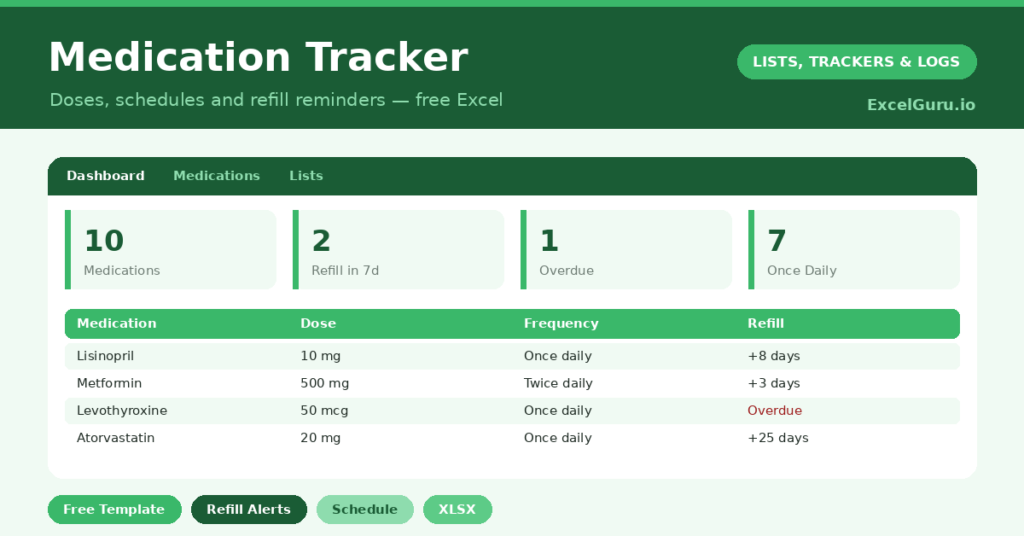
A medication tracker keeps the essential details of your medicines in one reliable place. Names, dosages, schedules and refill dates are easy to muddle, especially when several medications overlap. So writing them down protects against both missed doses and empty bottles.
This free template lists each medication with its dosage, frequency and prescriber. It then counts down to every refill date automatically. As a result, you can see at a glance what you take, when you take it, and when a refill is due.
Important: this is a personal organisation tool, not medical advice. It does not recommend medications, doses or schedules, and you should never change how you take a medicine based on a spreadsheet. For anything about your medication, always follow your doctor or pharmacist.
What does the medication tracker include?
The template is one clear list feeding a simple dashboard. Dropdowns keep the frequency and timing tidy. In short, you get the following:
- A medication listwith the name, dosage, frequency, time of day, prescriber and refill date.
- An automatic Days to Refillcountdown for every medication.
- Drop-down lists for frequency and time of day, so entries stay consistent.
- A notes column for instructions, such as taking a tablet with food.
- A dashboardshowing total medications, refills due soon, overdue refills, the once- and twice-daily counts, and the soonest refill of all.
Which formulas power the medication tracker?
The refill tracking does the remembering for you. The Days to Refill column is a simple =Refill Date – TODAY(), so each medication counts down on its own. That single column is the heart of the tool.
On the dashboard, a SUMPRODUCT counts the refills due within seven days, and another flags any that are already overdue. A helper column feeding a MIN then surfaces the single soonest refill across everything. So the next thing you need to order is always one glance away, never a nasty surprise at the pharmacy.
Why use a medication tracker?
Managing medicines is genuinely hard, especially for several at once or on behalf of a relative. A clear list reduces the risk of error. So you are far less likely to double a dose, miss one, or run out unexpectedly.
It is also invaluable at appointments. When a doctor or pharmacist asks what you take, you can show them an accurate, up-to-date list rather than trying to recall it. Furthermore, a carer can use it to manage a loved one’s medicines with confidence. In short, the tracker brings order and safety to something that really matters.
What does the dashboard show you?
The dashboard turns your list into a simple set of reminders. The refills-due-soon count is the one to watch each week, since it tells you what to reorder. The overdue count then flags anything you have already let slip.
The soonest-refill figure names the very next date you need to act on. Because it is calculated for you, you never have to scan the whole list to find it. The frequency counts give a quick sense of your daily routine. So the dashboard keeps a complex schedule feeling manageable.
How do you set it up?
Enter each medication exactly as it appears on the label, including the dosage and how often you take it. So the list matches what your prescriber intended. Add the refill date from the pharmacy, and the countdown begins.
Use the time-of-day column to map your daily routine, such as morning and evening doses. The notes field is the place for instructions like taking a tablet with food. Update a refill date each time you collect a prescription, and the tracker stays accurate. That small habit keeps the whole system trustworthy.
What mistakes should you avoid?
The first and most important point is simple: never use the tracker to make medical decisions. It organises information, but it does not advise. So any change to a medication belongs with your doctor or pharmacist, not a spreadsheet.
The practical mistakes are smaller. Do not forget to update refill dates, or the countdown drifts out of date. And keep the list complete, including any over-the-counter medicines and supplements, since a doctor needs the full picture. An incomplete list can be misleading at exactly the wrong moment.
Who finds a medication tracker most useful?
Anyone taking more than one or two medicines benefits, because the schedule quickly gets complicated. Older adults often juggle several prescriptions, so a clear list reduces confusion. People newly home from hospital, with fresh prescriptions, find it especially steadying.
Carers gain the most of all. When you manage a relative’s medicines, a shared, accurate list is invaluable at every appointment and handover. So it travels well between family members and professionals. In short, the more medicines involved, the more a simple tracker protects against error.
Frequently asked questions
Is the medication tracker a substitute for medical advice?
No. It is purely an organisation tool for keeping track of your medicines and refill dates. It does not recommend anything, and all medical decisions should be made with your doctor or pharmacist.
How does the refill countdown work?
Each medication’s Days to Refill is its refill date minus today. The dashboard then highlights refills due within seven days and flags any that are overdue, so you can reorder in good time.
Can I use it to manage someone else’s medication?
Yes, many carers do. It gives a clear, shareable list of what a loved one takes and when, which is especially helpful at appointments. Always coordinate any changes with their healthcare provider.
Keep an accurate list, update each refill date as you collect it, and check the dashboard weekly. The tracker brings calm and order to managing medicines. Just remember its one firm limit: it keeps the information tidy, while your doctor and pharmacist keep you safe.