
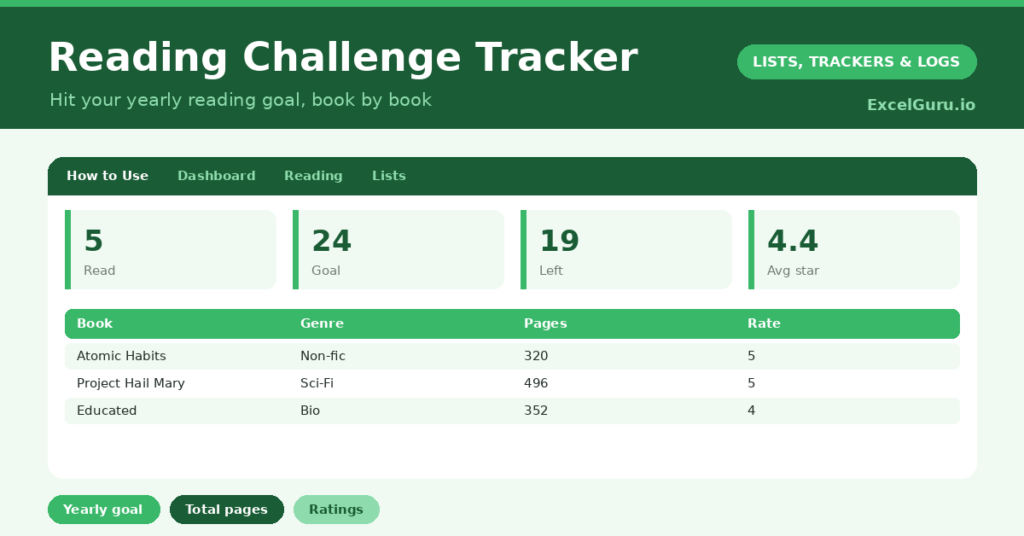
A reading challenge is a wonderful way to read more, because a clear goal turns a vague intention into a year of steady progress. “I should read more” rarely changes anything, but “24 books this year” gives you something concrete to aim at. So a tracker that logs each book and counts down to your goal is exactly what keeps the pages turning.
This free template lets you set a yearly target and log each book you finish. So it tracks your progress, pages and ratings. As a result, you can see how close you are to your goal, look back on what you have read, and keep the motivation going all year.
What does the reading challenge tracker include?
The template is one book list feeding a motivating dashboard. Dropdowns keep genres, ratings and formats tidy. In short, you get the following:
- A book list with the book, author, genre, pages, date finished, a rating and the format.
- Drop-down lists for genre, rating and format, so entries stay consistent.
- A pages column, so you can see the sheer volume you have read.
- Colour-coding by format, so paperbacks, eBooks and audiobooks are easy to compare.
- A dashboard showing books read, your goal, how many remain, total pages, your average rating and books read this year.

Which formulas power the reading challenge tracker?
The dashboard keeps your challenge in view. A COUNTA counts the books you have read, and the remaining figure is =MAX(0, Goal – Books Read), so it counts down to your target and never drops below zero.
A SUM of the pages column shows the impressive total you have worked through, and an AVERAGEIF gives your average rating, ignoring unrated books. A SUMPRODUCT counts the books finished this year. So the tracker turns a stack of finished books into clear, motivating progress toward your goal.
Why use a reading challenge tracker?
Motivation is the heart of it. A visible goal and a climbing count of books read are surprisingly powerful, nudging you to pick up a book instead of your phone. So the challenge helps you build a genuine reading habit.
It also creates a lovely record. Looking back over a year of books, with your ratings and notes, is a real pleasure and helps you remember what you read. The genre column gently encourages variety, and the pages total is its own quiet achievement. Furthermore, seeing the remaining count keeps the goal alive. In short, the tracker makes reading more both motivating and memorable.
What does the dashboard reveal?
The dashboard keeps your challenge motivating at a glance. The remaining figure is the one that drives you, counting down to your goal as the year goes on. So it is the gentle nudge to keep reading.
The books-read count is a satisfying tally of progress, and the total pages is a quietly impressive figure. The average rating reflects how much you have enjoyed your reading, and this year’s count keeps the challenge anchored to the calendar. Because it all updates as you log books, your progress stays live. So the dashboard keeps the goal in sight all year.
How do you use it?
Start by setting your goal, editing the dashboard formula to your target, whether that is twelve books or fifty. So you have something to aim at. Then, each time you finish a book, log it with its author, genre, pages and the date.
Give it a rating and note the format, which builds a richer record over time. Check the dashboard to see how many books remain and keep your pace on track. Because every book counts toward the goal, finishing one is its own small reward. In short, set your target and log each book as you go.
How do you customise it?
Edit the genres and formats on the Lists tab to match your reading, and change the goal in the dashboard formula to your target. Additionally, you can add columns for a short review, whether you would recommend it, or the author’s nationality for a diversity challenge. A column for the month read helps you see your pace. The template suits a casual reader or a committed bookworm.

What mistakes should you avoid?
The first mistake is setting a goal so ambitious it becomes discouraging. So pick a target that stretches you gently rather than one you will abandon by March. The second mistake is forgetting to log books soon after finishing them.
A book logged at the time keeps your record accurate and your motivation fresh. Finally, do not turn reading into a race for the number. The goal is to enjoy more reading, so let yourself savour a long book even if it slows the count. The pleasure of reading matters more than the tally.
Frequently asked questions
How do I set my own reading goal?
The goal defaults to 24 books a year. Edit the Goal and Remaining formulas on the dashboard to your own target, whether that is twelve books, fifty, or anything that stretches you gently.
Does it count books read this year?
Yes. A SUMPRODUCT counts the books finished since the start of the current year, so your annual challenge stays anchored to the calendar even if the list carries older books too.
Can I track audiobooks?
Yes. The format dropdown covers paperbacks, eBooks and audiobooks, all colour-coded. An audiobook you have finished counts toward your goal just like any other book.
Set your goal, log each book as you finish it, and watch the remaining count fall through the year. The dashboard keeps your progress and your total pages in view. A reading challenge tracker turns “I should read more” into a year of steady, motivating progress, and a lovely record of everything you read.