
A safety incident log is how a workplace turns near misses into lessons instead of repeating them as injuries. Every slip, hazard and close call carries information, yet without a record that information evaporates. So a structured log captures each event, tracks the response, and helps you spot the patterns that prevent the next one.
This free template records each incident with its type, severity and status. So it generates an ID automatically and tracks every case through to closure. As a result, nothing gets forgotten, serious incidents stay visible, and near misses become early warnings rather than missed chances.
What does the safety incident log include?
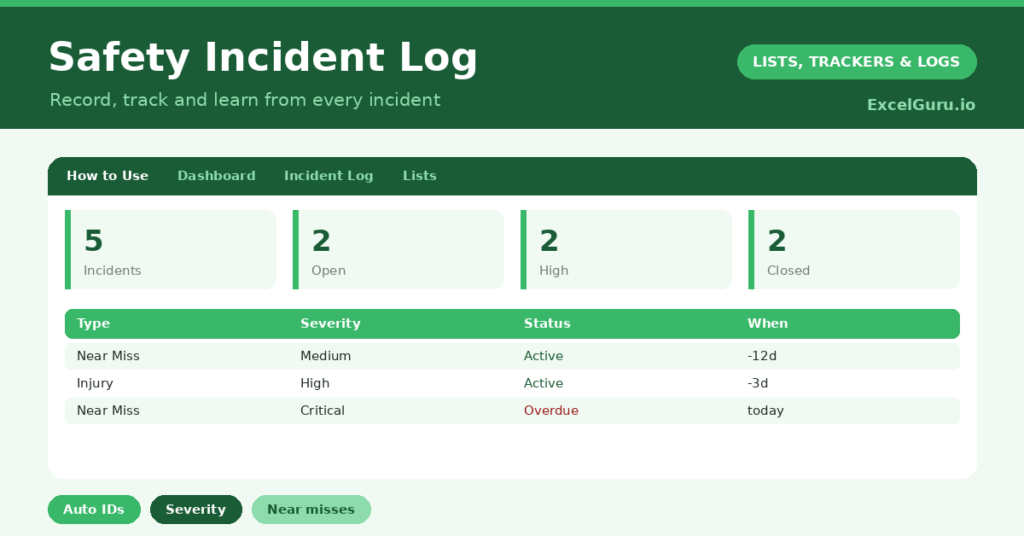
The template is one log feeding a clear dashboard. Dropdowns keep types, severities and statuses tidy. In short, you get the following:
- An incident log with an auto-generated ID, date, location, type, severity, description, reporter, status and action taken.
- Drop-down lists for type, severity and status, so entries stay consistent.
- Color-coded severity and status, so high-severity and open incidents stand out.
- An action-taken column, so the response to each incident is on record.
- A dashboard showing total incidents, open cases, high or critical incidents, closed cases, this month’s count and near misses.
Which formula powers the safety incident log?
The housekeeping is automatic. Each ID is generated with =IF(Date=””, “”, “INC-“&TEXT(ROW()-3, “000”)), so every incident gets a clean reference like INC-001 for follow-up and reporting.
On the dashboard, COUNTIF formulas tally open and investigating cases together, count high and critical incidents, and total your near misses. A SUMPRODUCT counts the incidents within the last month. So the dashboard surfaces both the severity of what has happened and how much is still unresolved.
Why keep a safety incident log?
The first reason is prevention. Near misses are warnings, and a log lets you spot a recurring hazard before it causes a real injury. So you can fix the cause rather than treat the symptom.
The second reason is accountability and compliance. Many workplaces are legally required to record incidents, and a clear log demonstrates that you take safety seriously. The action-taken column shows that each case led to a response. Furthermore, the data reveals trends, such as a particular location or task that keeps producing incidents. In short, the log helps you build a genuinely safer workplace.
What does the dashboard reveal?
The dashboard gives you an honest read on workplace safety. The open count shows how many incidents still need resolving, which is your live workload. The high-or-critical count flags the serious cases that demand attention.
The near-misses figure is quietly the most valuable, because near misses are your chance to prevent harm. A rising count is not bad news; it often means people are reporting more, which is healthy. The monthly figure helps you track whether incidents are trending up or down. So the dashboard turns scattered events into safety insight.
How do you run it?
Encourage everyone to report incidents, including near misses, and log each one promptly. So the record is complete and timely. Capture a clear description, set the severity honestly, and name who reported it.
Then track each incident from open to investigating to closed, recording the action you took. Review the dashboard regularly, focusing first on open and high-severity cases. Because near misses are logged too, you can act on warnings before they become injuries. In short, the log turns reporting into a cycle of continuous improvement.
How to customize this safety incident logging template?
Edit the types, severities and statuses on the Lists tab to match your workplace. Additionally, you can add columns for the corrective action’s due date, the person responsible for it, or a risk rating. A category for the body part injured is useful in some industries. The template adapts to an office, a warehouse or a workshop.
What mistakes should you avoid?
The first mistake is logging only injuries and ignoring near misses. Near misses are the warnings that prevent the next injury, so capture them all. The second mistake is recording an incident but never closing the loop with an action.
An incident without a response is a lesson wasted, so always note what you did. Finally, do not let fear of blame suppress reporting. The log works only in a culture where people feel safe to report, so treat each entry as a chance to improve, not to punish. Honest reporting is what keeps everyone safer.
Frequently asked questions
Below are some of the frequently asked questions by users of this template;
Should I log near misses as well as injuries?
Yes, absolutely. Near misses are warnings that let you prevent a future injury. The log counts them separately, and a healthy reporting culture treats them as valuable rather than trivial. Hence, you can log both using this template.
How does the safety incident log generate IDs?
Each incident gets an automatic reference like INC-001 from a formula based on its row, so you never assign IDs by hand and every incident is easy to track and report.
Can it help with compliance?
It provides a clear, dated record of incidents and the actions you took in response, which supports most workplace safety requirements. Always check the specific rules that apply in your region and industry.
Log every incident and near miss, set honest severities, and close each case with an action. The dashboard then keeps serious and open cases in view. A safety incident log is more than paperwork; instead, it is how a workplace learns from its close calls before they turn into real harm.