
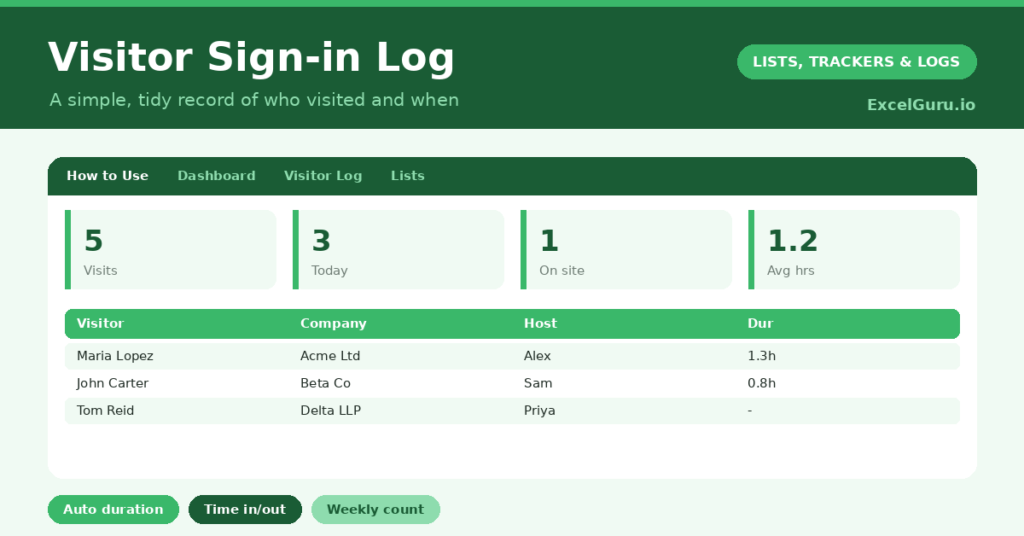
A visitor sign-in log gives a small office or site a tidy, professional record of who came through the door. A scrappy paper book is hard to search, easy to lose, and useless the moment you need to know who was on site last Tuesday. So a simple spreadsheet does the job far better.
This free template records each visitor with their company, their host and their times in and out. So it works out the visit duration and shows who is still signed in. As a result, you keep an orderly record for safety and reception, and you always know who is currently in the building.
What does the visitor sign-in log include?
The template is one log feeding a clear dashboard. Dropdowns keep hosts tidy. In short, you get the following:
- A visitor log with the date, visitor name, company, host, time in, time out, auto-calculated duration and purpose.
- An automatic duration in hours for every completed visit.
- A dropdown for the host, so names stay consistent.
- A purpose column, so the reason for each visit is on record.
- A dashboard showing total visits, today’s visits, visitors still signed in, average duration, distinct companies and the weekly count.
Which formula powers the visitor sign-in log?
Calculating a visit length across the clock is fiddly, yet one formula handles it. The duration column reads =MOD(Time Out – Time In, 1) * 24, so a visitor in at 9:15 and out at 10:30 correctly shows 1.25 hours.
The MOD function wraps the calculation cleanly, so the times never produce a negative result. On the dashboard, a SUMPRODUCT counts today’s visits, and another counts visitors with no time out yet as still signed in. An AVERAGEIF gives the typical visit length. So the dashboard reflects both the day and who remains in the building.
Why use a visitor sign-in log?
Safety is the headline reason. In an evacuation, you need to know exactly who is on site, and the still-signed-in count gives you that instantly. So a simple log becomes a genuine safety tool.
It also looks professional and keeps a useful record. You can see how many visitors you host, which companies visit most, and how long meetings tend to run. The purpose column adds helpful context for reception. Furthermore, a digital log is searchable, unlike a paper book. In short, the template upgrades a scruffy sign-in sheet into something orderly and genuinely useful.
What does the dashboard reveal?
The dashboard turns the log into live information. The still-signed-in count is the safety-critical figure, since it tells you who remains on site right now. So it is the number to check in any emergency.
Today’s visits and the weekly count show how busy reception has been. The distinct-companies figure reveals who visits most often, which can be useful commercially. The average-duration figure hints at how long meetings really run. Because it all updates as visitors sign in and out, the picture is always current. So the dashboard makes reception both safer and smarter.
How do you use Excel to track visitor sign-in logs?
Sign each visitor in on arrival, recording their name, company and host. So the record starts the moment they enter. Note the time in, and the time out when they leave, and the duration fills itself.
Keep the file open at reception, or on a tablet, so signing in and out is quick. Glance at the still-signed-in count through the day, especially before locking up. Because the log captures every visit, you build a searchable history for safety and reference. In short, a few seconds per visitor keeps your site secure and your records tidy.
How do you customize it?
Edit the host list to match your team, and tailor the purpose options to your site. Additionally, you can add columns for a badge number, a vehicle registration, or a signature confirmation. A pre-booked column is useful if you manage expected visitors in advance. The template adapts to a quiet office or a busy reception with steady footfall.
What mistakes should you avoid?
The first mistake is forgetting to record the time out, which leaves visitors showing as still on site long after they have left. So make signing out as routine as signing in. The second mistake is treating it as optional on quiet days.
The safety value only holds if the log is complete, so capture every visitor. Finally, remember any data-protection rules that apply to visitor records in your region, and store the file securely. A tidy, secure log is what makes it both useful and responsible.
Frequently asked questions
How does the visitor sign-in log calculate duration?
A MOD formula subtracts the time in from the time out and converts the result to hours, so a visit from 9:15 to 10:30 correctly shows 1.25 hours, even across the clock.
Can I see who is still on site?
Yes. Any visitor without a time out counts as still signed in, and the dashboard shows that total. It is exactly the figure you need in an evacuation or before locking up.
Is it suitable for safety records?
It is a practical, searchable record of who was on site and when. Just keep it complete and stored securely, and follow any data-protection rules that apply to visitor information where you are.
Sign visitors in and out, let the duration calculate itself, and watch the on-site count. The dashboard then keeps reception safe and informed. A visitor sign-in log is a small upgrade from a paper book, yet it makes your site more secure, more professional and far easier to search.