
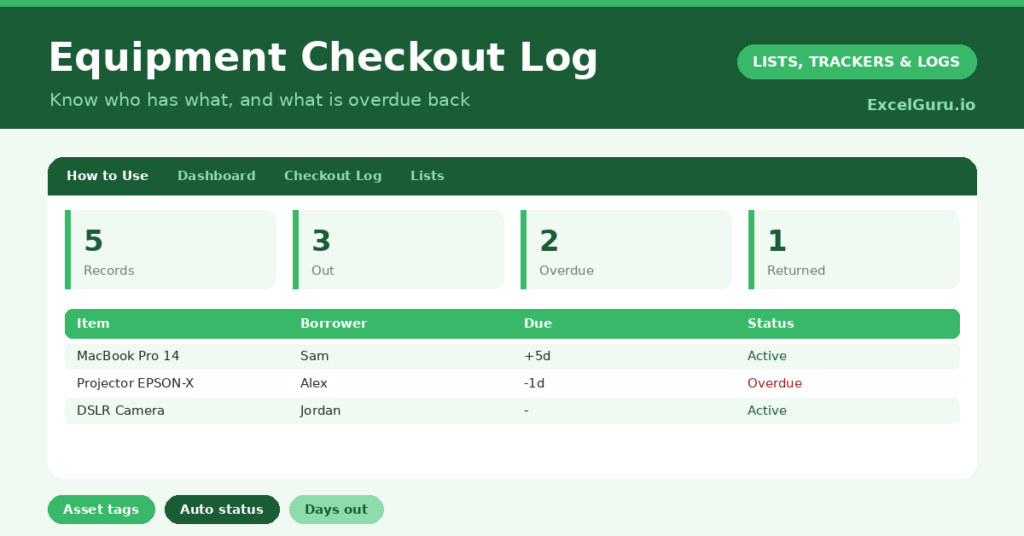
An equipment checkout log answers the question every shared store cupboard eventually faces: who on earth has the projector? Shared kit walks off, lingers on desks, and quietly disappears, simply because nobody tracked where it went. So a single log of who borrowed what, and when it is due back, saves a great deal of hunting.
This free template records each checkout with the borrower and a due-back date. So it works out an automatic status and counts how long each item has been out. As a result, you always know who holds your equipment and what has overstayed its welcome.
What does the equipment checkout log include?
The template is one checkout sheet feeding a clear dashboard. Dropdowns keep entries tidy. In short, you get the following:
- A checkout table with the item, asset tag, borrower, checkout date, due-back date, a returned flag, days out and status.
- An automatic status that reads Out, Overdue or Returned for every item.
- An automatic Days Out counters for items still on loan.
- Color-coded statuses, so overdue items leap out in red.
- A dashboard showing total records, items currently out, overdue items, returns, distinct borrowers and the longest loan.
Which formulas power the equipment checkout log?
Two formulas keep the log honest. The status uses a nested IF: if you have marked an item returned it reads Returned, if its due date has passed it reads Overdue, otherwise it reads Out. So the state of every item is obvious at a glance.
The Days Out column is =IF(OR(Checkout=””, Returned=”Yes”), “”, TODAY()-Checkout), so it counts only while an item is genuinely on loan. On the dashboard, COUNTIF tallies the statuses, a SUMPRODUCT counts distinct borrowers, and a MAX finds the longest current loan. So the dashboard surfaces exactly what needs chasing.
Why use an equipment checkout log?
Shared equipment represents real money, and untracked kit goes missing. A log protects that investment. So you can see who holds each item and follow up the moment it is overdue.
It also removes the friction of borrowing. People treat tracked equipment with more care, because they know their name is against it. The asset-tag column makes each item easy to identify, and the history shows usage patterns over time. Furthermore, the log settles the inevitable “I gave it back ages ago” disputes. In short, it keeps a shared resource organized and accountable.
What does the dashboard reveal?
The dashboard gives you an instant read on your equipment. The overdue count is the one to act on, since those items need chasing now. The currently-out count then shows how much kit is in circulation.
The distinct-borrowers figure hints at how widely your equipment travels, and the longest-loan figure flags the item that has been out worryingly long. Because the statuses update automatically, you never have to read the whole log to find a problem. So the dashboard turns a list of loans into a simple chase list. It keeps your store cupboard under control.
How do you use Excel Equipment Checkout Log efficiently?
The habit is simple: log every checkout at the point it happens. So nothing leaves untracked. Record the item, the borrower and the due-back date, and let the status take care of itself.
When kit comes back, set the returned flag to Yes, which stops the days-out counter and marks it returned. Check the dashboard regularly, and chase anything overdue while the trail is warm. Because the log captures every loan, you build a clear history of how your equipment gets used. In short, a few seconds at each checkout keeps the whole system tidy.
How do you customize it?
Edit the borrower list and add your own asset tags to match your inventory. Additionally, you can add columns for the item’s condition on return, a deposit amount, or the department a borrower belongs to. A location column helps if your equipment lives across several rooms or sites. The template suits a small office cupboard or a busy AV and IT store.
What mistakes should you avoid?
The first mistake is logging the checkout but forgetting to mark the return. The log then shows items as out long after they are back, which erodes trust in it. So close the loop every time. The second mistake is leaving the due-back date blank, since the overdue status depends on it.
Always set a return date, even a generous one. Finally, do not skip the quick chase of overdue items. The log’s whole value is the gentle nudge it gives you to recover your kit before it vanishes for good. A timely reminder is what keeps equipment coming back.
Frequently asked questions
How does the equipment checkout log know what is overdue?
A nested IF compares each item’s due-back date with today. If the date has passed and the item is not yet returned, the status reads Overdue, and the dashboard counts those items for you.
Does it track who has the most items out?
It counts distinct borrowers and shows the longest current loan. To see everything one person holds, simply filter the borrower column by their name.
Can I track equipment across several locations?
Yes. Add a location column and filter by it, or keep a separate sheet per site. The status, days-out and dashboard formulas all work the same way.
Log each checkout, mark returns, and chase overdue items from the dashboard. The status and days-out columns do the watching for you. An equipment checkout log is a tiny habit that stops shared kit from quietly walking out of the door and never coming back.