
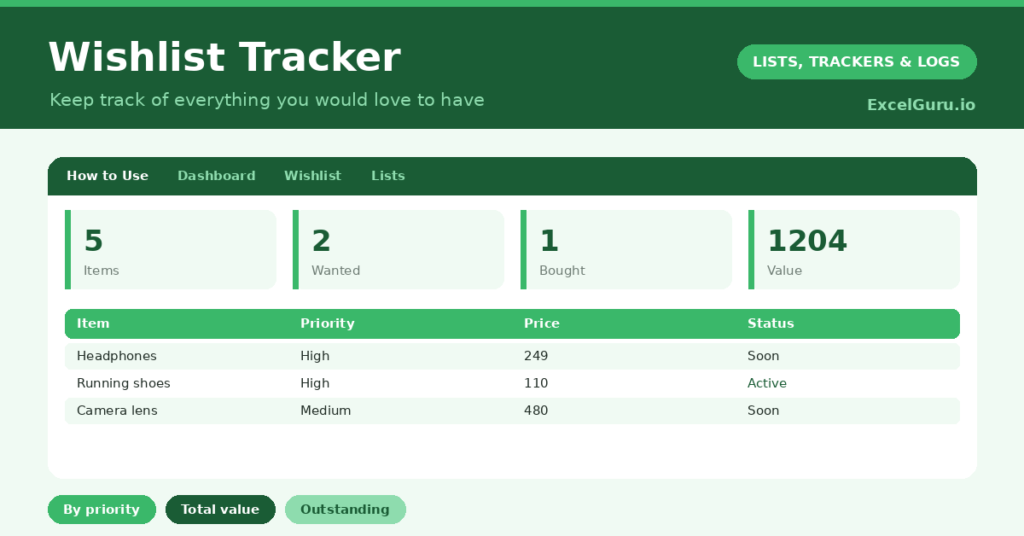
A Wishlist template is a surprisingly useful tool for spending money well rather than impulsively. We all keep a mental list of things we would like, scattered across browser tabs, screenshots and vague memory. So we either forget the things we genuinely wanted, or we buy on impulse and regret it. A single, considered list fixes both. This is a free printable Excel Template.
This free template lists everything you want, with its price and how much you want it. So it tracks what you are saving for and what you have bought. As a result, you can prioritise deliberately, see the true cost of your wishes, and buy the things that actually matter to you.
What does the wishlist template include?
The template is one wishlist feeding a clear dashboard. Dropdowns keep categories, priorities and statuses tidy. In short, you get the following:
- A Wishlist with the item, category, priority, price, store or link, status and notes.
- Drop-down lists for category, priority and status, so entries stay consistent.
- Colour-coded priorities and statuses, so your most-wanted items stand out.
- A store-or-link column, so you can find each item again easily.
- A dashboard showing total items, items wanted, items bought, high-priority items, your total Wishlist value and your outstanding value.

Which formulas power the wishlist template?
The dashboard does the totting up for you. A SUM of the price column gives your total wishlist value, which is often a revealing figure. A COUNTIF counts your high-priority items, so you know what to focus on first.
A pair of SUMIF formulas then totals the value of everything still wanted or being saved for, giving your outstanding value. So you can see exactly how much your remaining wishes would cost. Because it all updates as you add items and mark them bought, the picture stays current. So the template turns a vague list of wants into clear, costed priorities.
Why use a wishlist template?
The first benefit is deliberate spending. Writing an item down and giving it a priority creates a pause between wanting and buying. So impulse purchases give way to considered ones. That pause alone saves money.
The second benefit is organisation. The list keeps prices and links in one place, so when you do buy, it is quick and informed. The priority column helps you save for what matters most, rather than spreading yourself thin. Furthermore, the wishlist is handy to share when people ask what you would like as a gift. In short, the template makes your spending more intentional and less scattered.
What does the dashboard reveal?
The dashboard gives you a clear view of your wants. The total-value figure is often the eye-opener, showing what your full wishlist would cost. So it encourages you to prioritise rather than buy everything.
The outstanding-value figure shows what your remaining wishes would cost, useful for planning your saving. The high-priority count points at what to focus on first, and the bought count is a satisfying record of wishes fulfilled. Because it all updates as you go, the picture stays current. So the dashboard helps you spend deliberately and within your means.

How do you use it?
Whenever you find something you want, add it with its price, a priority and a link. So it joins the list instead of an impulse purchase. Setting a priority is the key step, since it forces you to decide how much you really want it.
Then, as you save toward an item, mark its status, and update it to Bought once you buy it. Check the dashboard to see your outstanding value and decide what to save for next. Because every want is captured and costed, you buy with intention rather than on a whim. In short, list it, prioritise it, and let the pause do its work.
How do you customize it?
Edit the categories, priorities and statuses on the Lists tab to match your wishes. Additionally, you can add columns for a target purchase date, the amount saved so far, or who might gift an item. A column for an alternative or a cheaper version is handy. The template suits a personal wishlist, gift ideas for others, or a family’s shared list.
What mistakes should you avoid?
The first mistake is adding everything at the same priority, which defeats the point. So be honest about what you truly want most. The second mistake is never updating the statuses, so the list drifts out of date.
A quick update keeps it useful. Finally, do not treat the wishlist as a shopping list to clear. Its real value is the pause it creates, helping you buy deliberately rather than impulsively. Many items, given time, turn out to be wishes you are happy to let go.
Frequently asked questions
How does the wishlist template show what I should save for?
It tracks a priority for each item and totals the value of everything still wanted. So you can focus your saving on your high-priority items rather than spreading it thinly across the whole list.
Can I use it for gift ideas?
Yes. Many people keep a wishlist to share when family ask what they would like, or to note gift ideas for others. The categories and notes make it easy to organise either way.
Does it help me spend less?
It can. Writing an item down with a priority creates a pause between wanting and buying, which curbs impulse purchases. Seeing the total value of your list also encourages you to prioritise.
List what you want, set honest priorities, and update each item as you save or buy. The dashboard then shows your total and outstanding value. A wishlist template turns scattered wants into considered priorities, so you spend on the things that genuinely matter to you and let the impulse buys quietly fall away.